Modifying Registry Entries for a Source-Built Unreal Engine
BAT Commands
Create a BAT file and enter the following commands
set str=%~dp0
set name=%~n0
REG ADD "HKCU\SOFTWARE\Epic Games\Unreal Engine\Builds" /v "%name%" /t REG_SZ  /f /d "%str:~0,-1%"
This script adds the Unreal Engine source in the current path to the registry, using the script’s filename as the name
The benefit is a consistent version identifier in the source engine’s .uproject files
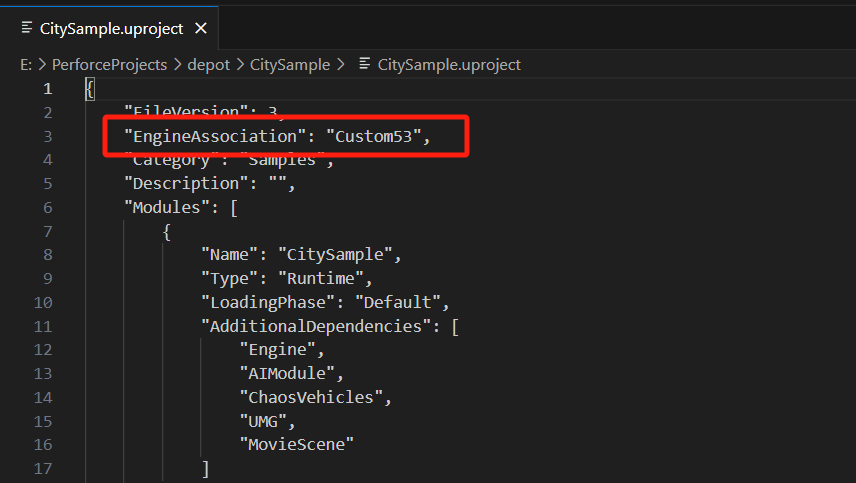 This prevents different registry names for the source engine on each computer from causing differences in the .uproject file and triggering recompilation
Updated BAT Commands
@echo off
setlocal

REM 设置当前批处理脚本的路径并去掉最后的反斜杠
set str=%~dp0
set str=%str:~0,-1%
set name=%~n0
set key=HKCU\SOFTWARE\Epic Games\Unreal Engine\Builds

REM 查找并删除所有数据值等于 %str% 的项
for /f "tokens=1" %%i in ('REG QUERY "%key%" /f "%str%"') do (
    echo %%i
    REG DELETE "%key%" /v "%%i" /f
)

REG ADD "%key%" /v "%name%" /t REG_SZ  /f /d "%str%"

endlocal
Added functionality to delete all entries whose values equal the current document; otherwise, adding the entry may fail