MCPBlueprint User Guide
Installation, connection, tools and limitations of MCPBlueprint
MCPBlueprint provides Blueprint discovery, graph editing, member and component tools, asset lifecycle operations, compilation feedback, and graph screenshots to AI clients over MCP. The tools/list response from the current editor session is always the authority for available tool names and parameters.
Requirements and installation
- Unreal Engine 5.2+ Editor on Windows, macOS, or Linux.
- An MCP client that supports a local HTTP server.
- A package matching the exact Unreal Engine minor version.
Install once per engine:
<UE_5.x>/Engine/Plugins/Marketplace/MCPBlueprint/MCPBlueprint is an optional editor tool installed with the engine. Its .uplugin uses Installed=true and EnabledByDefault=true. Do not copy it into every project or add MCPBlueprint to a project’s .uproject. Restart the editor for the corresponding engine version after replacing the plugin package.
Connect an AI client
MCPBlueprint enables itself and starts its local MCP server when the editor starts. You do not need to enable it manually in each project or add a plugin declaration to the project’s .uproject.
Follow your AI client’s MCP setup process and give it the endpoint shown in the plugin toolbar. The default endpoint is http://127.0.0.1:8766/mcp. If the configured port is occupied, MCPBlueprint tries up to nine subsequent ports. Client configuration formats differ, so this guide does not prescribe a client-specific JSON file or manual port-configuration procedure.
The MCP client normally handles initialize and tools/list automatically. ping is for troubleshooting and does not need to be run manually for every session.
The server binds only to the local machine. Browser-style Origin values are limited to localhost, 127.0.0.1, and [::1]; ordinary non-browser MCP clients can omit Origin.
Feature overview
The current version registers 69 tools:
Capability | Count | Tools |
|---|---|---|
| Discovery and reading | 7 | ListBlueprints, GetBlueprintOverview, GetBlueprintDetails, ListBlueprintMembers, GetGraphDetail, SearchGraphNodes, GetCompileErrors |
| User Defined Structs and Enums | 6 | CreateUserDefinedStruct, GetUserDefinedStruct, ModifyUserDefinedStruct, CreateUserDefinedEnum, GetUserDefinedEnum, ModifyUserDefinedEnum |
| Variables, functions, macros, events, and pins | 30 | AddVariable, ModifyVariable, RemoveVariable, CreateFunction, CreateMacro, ModifyMacroSignature, RenameMacro, RemoveMacro, ModifyMacroDetails, RenameFunction, ModifyFunctionSignature, ModifyFunctionDetails, RemoveFunction, CreateCustomEvent, ModifyCustomEvent, ModifySignalSignature, RenameSignal, RemoveCustomEvent, AddEventNode, AddBoundEvent, AddLocalVariable, ModifyLocalVariable, RemoveLocalVariable, AddNodePin, RemoveNodePin, AddInterface, RemoveInterface, ModifyClassSettings, AddEventDispatcher, RemoveEventDispatcher |
| Graph editing and layout | 4 | ApplyGraphPatch, SetPinDefaults, FormatGraph, AddCommentBox |
| Components and defaults | 11 | GetComponents, AddComponent, SetComponentProperties, RenameComponent, RemoveComponent, ReparentComponent, SetRootComponent, DuplicateComponent, GetComponentProperties, GetClassDefaults, SetClassDefaults |
| Asset lifecycle and screenshots | 11 | CreateBlueprint, ReparentBlueprint, CompileBlueprint, SaveAsset, OpenAsset, CloseAsset, ReloadBlueprintFromDisk, DeleteAsset, RenameAsset, DuplicateAsset, CaptureGraphScreenshot |
Capabilities include:
- Stable, bounded pagination for large asset, member, graph, and pin queries.
- Node IDs returned by the Action Registry, with no invented node types.
- Single-transaction graph patches for creation, connection, disconnection, removal, movement, defaults, and layout. Failures trigger an automatic rollback attempt; the response explicitly reports when recovery cannot be proven.
- Three deterministic layout styles:
Balanced,Straight, andCompact. - Protection of native Comment Box containment in local and whole-graph layouts.
- Dry-run impact analysis and explicit approval requirements for high-risk edits.
- Transaction rollback and single-step Undo within Unreal’s supported scope.
- Explicit persistence: ordinary edits only mark assets dirty.
SaveAssetwrites to disk;DeleteAssetexplicitly deletes disk assets after stricter checks. - Automatic discovery and loading from the engine directory without a project declaration.
Concepts: choose the right editing target
These objects often appear next to each other in Unreal Editor, but they represent different state. Choosing the wrong tool may produce a successful call whose effect appears somewhere other than you expected.
| Editing target | Meaning and tool | Distinct from |
|---|---|---|
| Variable default | The declaration default of a member variable declared by this Blueprint. Use ModifyVariable with DefaultValue. | Node-pin literals and overrides on existing level instances. |
| Function parameter / pin | Parameters on function Entry/Result nodes form the function signature; use ModifyFunctionSignature. Use SetPinDefaults for an input literal on an existing graph node. | Member-variable defaults. Connected input-pin defaults have no runtime effect. |
| Component-template property | A component template added to this Blueprint’s SCS, such as RelativeLocation or StaticMesh. Use SetComponentProperties. | Class Defaults and component overrides on Actor instances in a scene. |
| Class Defaults | CDO defaults of the Blueprint-generated class, including editable inherited properties. Use SetClassDefaults. | Variable-declaration metadata edited by ModifyVariable, and current values on placed or spawned instances. |
| Blueprint parent class | The class inherited by the Blueprint class. Use ReparentBlueprint. | Parent-component relationships in the component tree. |
| Component hierarchy | SceneComponent attachment hierarchy within one Actor Blueprint. Use ReparentComponent, or SetRootComponent for the local root. | Blueprint class inheritance. |
Complete tool reference (69 tools)
Ordinary editing tools only mark assets dirty; they do not silently save. Use SaveAsset to keep changes. The table describes each tool’s purpose and the limits that affect its use.
| Tool | What it does | Important notes |
|---|---|---|
ListBlueprints | Finds project Blueprint assets with pagination. | Use PathFilter and pagination to narrow large projects. |
GetBlueprintOverview | Shows the parent class, graphs, variables, components, and interfaces; member variables include VarGuid, declaration flags, and Details metadata. | Provide an exact BlueprintPath. Metadata IsSet distinguishes absent values from empty strings. |
GetBlueprintDetails | Reads implemented member-variable, CustomEvent, Function or ordinary local Macro declaration properties and editing capability. | Member variables use Target.Kind: "MemberVariable", Name, and optional VarGuid; CustomEvents use Target.Kind: "CustomEvent" and NodeGuid; Functions use Target.Kind: "Function", Name, and FunctionGraphGuid from ListBlueprintMembers. Macros use Target.Kind: "Macro", Name, and GraphGuid returned by GetGraphDetail. CoverageComplete: false marks the current scope. |
ListBlueprintMembers | Lists functions, events, dispatchers, and local variables by page. | Use pagination for large Blueprints. |
GetGraphDetail | Shows nodes, pins, links, and layout in the selected graph. | Use GraphName to select a graph. |
SearchGraphNodes | Finds creatable nodes by English action name. | Create nodes only with returned SpawnerId values. |
GetCompileErrors | Retrieves current Blueprint compilation diagnostics. | Use it to handle errors or warnings reported by the editor. |
CreateUserDefinedStruct | Creates a User Defined Struct under /Game. | Does not save automatically. |
GetUserDefinedStruct | Shows Struct field definitions. | Read large Structs with pagination. |
ModifyUserDefinedStruct | Adds, edits, or removes Struct fields. | Start with bDryRun; potential data loss requires explicit approval. |
CreateUserDefinedEnum | Creates a User Defined Enum under /Game. | Does not save automatically. |
GetUserDefinedEnum | Shows Enum entries, values, and display names. | Read large Enums with pagination. |
ModifyUserDefinedEnum | Adds, edits, or removes Enum entries. | Start with bDryRun; changing serialized meaning requires explicit approval. |
AddVariable | Adds a Blueprint member variable. | Requires a Blueprint path, variable name, and TypeName. |
ModifyVariable | Changes member-variable type, default, name, editability, category, tooltip, and Details metadata. | Unsupported references block type changes; supported constructor references require applicable approvals. Variables with RepNotify cannot be renamed through this tool. |
RemoveVariable | Removes a member variable. | References or an inability to recover safely block removal. |
CreateMacro | Creates a macro with explicit exec or concrete data pins. | Requires a successful current compile; omitted signatures create no pins; use returned graph/tunnel GUIDs. |
ModifyMacroSignature | Edits input/output parameters of an owned ordinary or library macro. | Preview by default; uses macro Name/GraphGuid and declaration PinId. Connected-pin removal/type changes and unknown or unloaded references are refused. |
RenameMacro | Renames natively while preserving GraphGuid and loaded instance identities. | Preview by default; apply requires reference approval. Library macros retain native old-name redirectors. |
RemoveMacro | Removes an unreferenced owned ordinary or library macro. | Any local/external instance refuses deletion and reports its location; remove instances explicitly first. No cascading external-node deletion. |
ModifyMacroDetails | Edits a local ordinary or native MacroLibrary macro’s category, tooltip, keywords and compact title. | Uses Target.Kind: "Macro", Name, and GraphGuid; preserves signatures and does not save automatically; library presentation edits preserve loaded authored-graph consumers. |
CreateFunction | Creates a Blueprint function and its parameters. | Requires a Blueprint path, function name, and parameter definitions. |
RenameFunction | Renames a user function and updates references that can be updated safely. | Start with dry-run; reference updates require explicit approval. |
ModifyFunctionSignature | Adds, renames, removes, reorders, or changes parameter types, flags, and input defaults. | Defaults to dry-run; parameter removal or type changes may lose data and require explicit approval. |
RemoveFunction | Removes a user function. | References or an inability to recover safely block removal. |
CreateCustomEvent | Creates a Custom Event in an Event Graph. | The target must be an actual Event Graph. |
ModifyCustomEvent | Changes editor-callable, deprecation, and RPC declaration properties of a CustomEvent. | Use Target.Kind: "CustomEvent" and NodeGuid. Supports local editable events; omitted fields keep their values. |
ModifySignalSignature | Adds, removes, renames, retypes, sets defaults, or reorders CustomEvent and EventDispatcher inputs. | Copy Target and current PinId from ListBlueprintMembers. Defaults to preview; applying requires reference-update approval. Dispatchers accept only native empty defaults. |
RenameSignal | Renames an owned signal and its exact loaded call/binding references. | Uses stable Target and NewName; retains handler selections. |
RemoveCustomEvent | Safely removes an editable local CustomEvent. | Explicitly remove real calls/bindings first; preview by default, with no cascading deletion. |
ModifyFunctionDetails | Changes local function presentation, editor and deprecation properties, plus Pure, Const, access and Exec declarations. | Use Target.Kind: "Function", Name, and FunctionGraphGuid; declaration fields default to preview and applying requires reference approval. Omitted fields keep their values. |
AddEventNode | Adds a supported event node. | Specify the Blueprint and event type. |
AddBoundEvent | Adds a bound event for a component or delegate. | The component and delegate must be resolvable. |
AddLocalVariable | Adds a local variable to a function graph. | Requires a function name, variable name, and type. |
ModifyLocalVariable | Edits one local declaration’s name, type, default, category or tooltip and its exact Get/Set references, including collapsed graphs. | Copy its Target from ListBlueprintMembers; preview is the default. Apply requires reference approval, and supplying TypeName also requires data-loss approval. |
RemoveLocalVariable | Removes a function-local variable. | References or an inability to recover safely block removal. |
AddNodePin | Adds a pin to a node that supports variable pin counts. | Obtain the target node identifier from graph details first. |
RemoveNodePin | Removes an editable user pin from a node. | Locate the exact target pin. |
AddInterface | Adds an interface to a Blueprint. | Use the interface class path. |
RemoveInterface | Removes a directly implemented interface while retaining function and event bodies. | Requires the full interface class path; inherited interfaces cannot be removed. |
ModifyClassSettings | Changes or clears an ordinary Blueprint’s display name, description and category. | Omitted fields keep their values; instance defaults are unaffected. |
AddEventDispatcher | Adds an Event Dispatcher. | Specify its name and signature. |
RemoveEventDispatcher | Removes an Event Dispatcher. | References or an inability to recover safely block removal. |
ApplyGraphPatch | Creates, connects, disconnects, removes, and moves nodes, sets defaults, and lays out the graph in one operation. | Search for nodes first. Supports dry-run and attempts rollback on failure. |
SetPinDefaults | Changes input-pin literals on existing nodes. | Connected input pins ignore their literals at runtime. |
FormatGraph | Organizes graph layout using Balanced, Straight, or Compact. | Select a graph or a layout scope. |
AddCommentBox | Adds a native Comment Box. | Specify text and bounds or target nodes. |
GetComponents | Shows an Actor Blueprint’s component tree, parents, and template information. | Applies only to Actor Blueprints. |
AddComponent | Adds a local SCS component. | Specify the component class, name, and optional parent component. |
SetComponentProperties | Sets local or identified inherited SCS template defaults; resets inherited values. | Optional Properties, ResetProperties, and bDryRun; actual edits require an editor transaction. |
RenameComponent | Renames a local SCS component and updates member references. | The new name must be unique. |
RemoveComponent | Removes a component. | References or an inability to recover safely block removal. |
ReparentComponent | Moves a local SceneComponent below another SceneComponent. | Cannot create cycles; use SetRootComponent for an actual local root. |
SetRootComponent | Makes a local SceneComponent the root. | The target must be a local SceneComponent. |
DuplicateComponent | Duplicates a local component and its template properties. | The actual local scene root cannot be duplicated. |
GetComponentProperties | Reads component-template properties and parent-default comparisons by page. | Returns bounded parent-value metadata and the state of the whole local override record. |
GetClassDefaults | Reads CDO defaults and parent-default comparisons by page. | Returns UE-text values and Reset availability. Page through large property sets. |
SetClassDefaults | Changes Blueprint CDO defaults or resets inherited properties. | Supports Properties, ResetProperties, and bDryRun. Property names are case-sensitive. |
CreateBlueprint | Creates a Blueprint asset in memory. | Provide an asset path and parent class; optional BlueprintKind is Normal (default) or MacroLibrary with a legal native parent; save explicitly. |
ReparentBlueprint | Changes a Blueprint’s parent class. | Start with bDryRun; hierarchy or interface conflicts may require bAllowPotentialDataLoss. |
CompileBlueprint | Compiles the selected Blueprint and returns diagnostics. | Use it to handle errors or warnings reported by the editor. |
SaveAsset | Explicitly saves the asset’s current changes to disk. | Ordinary edits do not save automatically. |
OpenAsset | Opens a Blueprint in the editor. | Required before capturing its graph. |
CloseAsset | Closes the asset editor. | Save changes you want to keep before closing. |
ReloadBlueprintFromDisk | Replaces the in-memory Blueprint with its disk version. | Defaults to dry-run; discarding unsaved changes requires explicit approval. |
DeleteAsset | Deletes an asset. | Deletion has stricter reference and recovery-safety checks. |
RenameAsset | Renames or moves an asset. | Specify source and destination paths. |
DuplicateAsset | Duplicates an asset. | Specify source and destination paths. |
CaptureGraphScreenshot | Captures an open Blueprint graph. | Call OpenAsset first; the graph widget must be initialized. |
Focused guides: defaults, signatures, components, and inheritance
1. ModifyVariable: declaration defaults and node values
- Call
GetBlueprintOverviewwithBlueprintPathto find a variable declared by this Blueprint and itsVarGuid. Then callGetBlueprintDetailswithTarget.Kind: "MemberVariable", itsName, and optionally thatVarGuid.CoverageComplete: falsemeans the tool currently returns implemented declaration properties for supported target kinds; it does not yet cover all Blueprint Details functionality. InspectPropertiesbefore editing:Currentis the value,IsSetdistinguishes an absent metadata key from an empty one, andEditable/ReasonorEnable/Disableexplain available changes. WithinEnable/Disable,Allowedmeans the action can run,NoChangemeans the requested state is already current, andReasonexplains a restriction.Properties.NewName.Editabledescribes the current declaration; a proposed new name still needs validation. Inherited variables can be read here, butModifyVariablechanges only declarations owned by the target Blueprint. - Call
ModifyVariablewithBlueprintPath, the existingVariableName, and only the fields you want to change.DefaultValuechanges the UE-text declaration default; useSetPinDefaultsfor graph pin literals andSetClassDefaultsfor direct class-default edits. It does not retroactively replace existing instance overrides. A dirty or newly added declaration can receive flags, defaults, and metadata; rename and type changes require a successfully compiled baseline. Compile when relevant, then useSaveAssetwithBlueprintPathonly if you want to keep the change on disk.
These are complete tool arguments; replace /Game/Blueprints/BP_Player and the sample variable names with your own Blueprint path and declarations:
{"BlueprintPath":"/Game/Blueprints/BP_Player"}Pass that object to GetBlueprintOverview, then use GetBlueprintDetails:
{"BlueprintPath":"/Game/Blueprints/BP_Player","Target":{"Kind":"MemberVariable","Name":"Health"}}For an int32 Health declaration, this ModifyVariable call sets a default, instance display, category, and SaveGame archive flag:
{"BlueprintPath":"/Game/Blueprints/BP_Player","VariableName":"Health","DefaultValue":"100","bInstanceEditable":true,"bSaveGame":true,"Category":"Stats","Tooltip":"Current health"}Field | Applicable value or type | Effect |
|---|---|---|
BlueprintPath, VariableName | Required strings; existing Blueprint and member name | Select the declaration. VariableName is the old name even when using NewName. |
TypeName, DefaultValue, NewName | Type syntax accepted by AddVariable; UE-text default; nonempty new name | Change type, declaration default, or name. Supported constructor references can migrate to a new type with the required reference-update and data-loss approvals; unsupported references block type changes. RepNotify variables cannot be renamed here. Rename/type also reject dependencies that cannot be safely updated. |
bInstanceEditable, Category, Tooltip | Boolean; category/tooltip strings | Control instance Details editing, category, and help text. Empty Category restores Unreal’s default category; empty Tooltip removes its metadata. |
bSaveGame, bTransient, bAdvancedDisplay | Booleans | Select properties for SaveGame archives, exclude them from persistent serialization, or move them to advanced Details. bSaveGame does not create a save system; bTransient is a serialization flag. |
bBlueprintReadOnly, bPrivate | Booleans on owned member declarations | Restrict Blueprint Set usage or Blueprint access from other Blueprints. These are independent of bInstanceEditable; see the access example below. |
UIMin, UIMax, ClampMin, ClampMax | Finite numeric strings on scalar int32, non-enum byte, float/double, or supported range structs | Set slider and clamp bounds. Lower bounds cannot exceed upper bounds, and slider/clamp intervals must overlap. |
ForceUnits | Recognized unit name or abbreviation on scalar numeric variables | Changes the displayed unit without converting the default. UE 5.4+ stores the editor’s full unit name; UE 5.2/5.3 store a recognized input. An old abbreviation may display as None after upgrading; set the unit again if needed. |
bMultiLine | Boolean for string/text, including array/set elements and Map values | Select a multiline text editor. |
bBitmask, BitmaskEnum | Boolean and explicit Enum object path; scalar int32 only | Display a bitmask, optionally using an allowable Blueprint Enum with Bitflags metadata. A nonempty BitmaskEnum requires bBitmask enabled in the final state. |
bDeprecated, DeprecationMessage | Boolean and string | Mark the declaration deprecated and show a message. A nonempty message requires bDeprecated enabled in the final state. |
bConfig | Types allowed by native Config rules | Set the configuration-property flag without reading or writing ini files. Hard Object and Interface are disallowed; Class, SoftClass, SoftObject, and containers are checked against the actual type. |
bExposeToCinematics | Properties animatable by the current Sequencer | Set Interp for Cinematics use; unavailable Sequencer capability returns a reason. |
bMakeEditWidget | Vector, Transform, and their arrays; Instance Editable required | Provide a property editing widget in the editor viewport. |
bFieldNotify | Members supported by the current Blueprint type and compiler | Set the FieldNotify declaration while preserving existing notification dependencies; disabling it can also remove other fields’ dependencies on this field. |
bExposeOnSpawn | Member types supported by native creation nodes | Provide a variable input on creation nodes; preview and approve consumer updates, with separate approval for default, split-field or connection losses. |
Replication | None, Replicated, or RepNotify | Set native replication flags on owned members; Set and Map cannot enable replication. None also clears the notification association and resets the condition to COND_None. |
ReplicationCondition | An enum name from the current engine, such as COND_OwnerOnly | Requires replication enabled in the final state; see AllowedValues in Details. Hidden values and COND_Max are rejected. |
RepNotifyFunction | An existing owned function with no parameters or return value | Explicitly associate it with RepNotify. Omission retains a valid association or creates OnRep_<variable name>. Disabling notification retains the function body. |
Replication changes compile the declaring Blueprint, required descendants, and affected loaded Setter consumers. Pass bApproveReferenceUpdates: true and keep automatic compilation enabled. Unloaded dependencies block the edit; inherited declarations are read-only. The three replication properties in GetBlueprintDetails expose declaration values as Current and compiled values as Compiled; check CompiledKnown before reading the latter. For example, enable owner-only notification for Health:
{"BlueprintPath":"/Game/Blueprints/BP_Player","VariableName":"Health","Replication":"RepNotify","ReplicationCondition":"COND_OwnerOnly","bApproveReferenceUpdates":true}This configures the variable declaration; network execution still requires Actor replication and the appropriate network setup. An associated notification function cannot be renamed, have its signature changed, or be deleted until you detach it with ModifyVariable. Use Replicated to retain replication without notification, or None to disable replication. Both retain the existing notification function body.
Input | Result |
|---|---|
| Omit an optional field | Leave its current value or metadata unchanged. |
Pass false to a Boolean flag | Clear that flag. bPrivate: false removes its metadata key even if the stored value is "false" or empty; check IsSet and Disable in Details. Clearing bBitmask or bDeprecated leaves the Enum or message until you clear it separately. |
Pass "" to Category, Tooltip, or a string metadata field | Restore the default category or remove the corresponding metadata key. NewName: "" does not rename; DefaultValue uses UE text and is not a metadata-clear command. |
For a numeric variable, a range edit is another complete ModifyVariable request:
{"BlueprintPath":"/Game/Blueprints/BP_Player","VariableName":"Health","UIMin":"0","UIMax":"100","ClampMin":"0","ClampMax":"100"}For a scalar int32 AbilityFlags, use {"BlueprintPath":"/Game/Blueprints/BP_Player","VariableName":"AbilityFlags","bBitmask":true}. If you add BitmaskEnum, supply the actual object path of your Blueprint-usable Bitflags Enum. Bitmask edits rebuild only supported local getter/setter nodes; external references, derived Blueprints, or unsupported local nodes can block the edit. Apply bitmask changes separately from rename or type changes.
For an access-restriction example, first inspect Properties.bBlueprintReadOnly.Enable and Properties.bPrivate.Enable in Details. If both are allowed, call ModifyVariable:
{"BlueprintPath":"/Game/Blueprints/BP_Player","VariableName":"Health","bBlueprintReadOnly":true,"bPrivate":true}ReadOnly keeps Blueprint reads but blocks variable Set nodes; it is not deep immutability. A mutable reference consumer can also block enabling it, while some engine-version container operations may still compile with warnings. Enabling ReadOnly removes MakeEditWidget metadata. Private restricts Blueprint reads and writes outside the declaring Blueprint; existing external references block it. Unresolved references or unloaded derived Blueprints can block either restriction. A missing inherited-variable action in SearchGraphNodes does not prove Private access is safe. To remove these restrictions, use {"BlueprintPath":"/Game/Blueprints/BP_Player","VariableName":"Health","bBlueprintReadOnly":false,"bPrivate":false}.
Move any default value you still need to a replacement variable before setting bDeprecated: true: Unreal does not serialize deprecated property values, so reopening the Blueprint may reset them. To retain an edit, call SaveAsset with {"BlueprintPath":"/Game/Blueprints/BP_Player"}.
The five editor flags accept JSON true/false only. Omission preserves the current state; same-state requests report no change without creating a transaction. Edits apply to owned member declarations; inherited and native members can be queried. Inspect direction availability with GetBlueprintDetails:
{"BlueprintPath":"/Game/Blueprints/BP_Player","Target":{"Kind":"MemberVariable","Name":"Health"}}Each flag in Properties contains Current (the declaration), IsSet (equal to the declaration for the first four flags; metadata-key presence for ExposeOnSpawn), Effective (the current compiled product, or null when unknown), EffectiveReason, Editable, and Enable/Disable with Allowed, NoChange, and Reason. GetBlueprintOverview also returns the five declaration booleans. A pending compilation or native Undo/Redo can leave Current different from Effective; Undo/Redo does not guarantee automatic recompilation.
For a Vector HandleOffset, enable instance editing and the viewport widget together:
{"BlueprintPath":"/Game/Blueprints/BP_Player","VariableName":"HandleOffset","bInstanceEditable":true,"bMakeEditWidget":true}Setting bInstanceEditable:false or bBlueprintReadOnly:true clears MakeEditWidget; the response lists this implicit edit. Check whether the final combination is allowed before applying it.
bExposeOnSpawn controls the variable input on creation nodes. Preview the change before approving consumer updates:
{"BlueprintPath":"/Game/Blueprints/BP_Player","VariableName":"Health","bExposeOnSpawn":true,"bInstanceEditable":true,"bDryRun":true}Inspect the nodes, pin changes and Losses in EditorPropertyImpact.Consumers. Remove bDryRun and pass bApproveReferenceUpdates:true to update consumers. Removing pins with defaults or connections, or changing to an incompatible type, also requires bAllowPotentialDataLoss:true. Compatible changes preserve pin identity, connections and explicit defaults. An approved incompatible-default loss uses the new type’s native automatic default. Changing a declaration default preserves loaded derived-class overrides. Actor/Object creation nodes usually also require Instance Editable; legacy AddComponent nodes follow their native rules.
Using NewName on an exposed variable lists EditorPropertyImpact.RenameImpact and creation-node changes. Candidate-name conflicts, unsupported references, unloaded derived classes or unknown rename handlers block the edit. Resolve the stated restriction and preview again.
Undo or redo the rename, then compile normally to preserve loaded derived-class overrides. Later edits to derived defaults are not overwritten by the rename. This behavior applies while the plugin remains loaded; reloading it does not preserve the guarantee for earlier undo history.
Preview FieldNotify edits that affect consumer Blueprints. For an existing Widget Health member:
{"BlueprintPath":"/Game/UI/WBP_Player","VariableName":"Health","bFieldNotify":true,"bDryRun":true}ModifyVariable defaults to bDryRun:false; preview neither writes nor compiles. Applying consumer updates requires bApproveReferenceUpdates:true; removing notification dependencies also requires bAllowPotentialDataLoss:true. With bAutoCompileAfterModify enabled, the tool compiles affected Blueprints. With it disabled, the declaration can differ from the current Effective value and requires explicit compilation. The tool does not save automatically; call SaveAsset to persist changes.
UE 5.2 Widgets cannot enable FieldNotify on ReadOnly members. UE 5.2 MVVM also requires an actually registered dedicated compiler; loaded modules or types alone are insufficient for generation. UE 5.3+ checks the notification interface and current compiled product. Unloaded related assets or unconfirmed references return concrete blockers. Related UE 5.8 MVVM conversions support only confirmed static native BlueprintPure Float functions, forward OneTime bindings, one Manual context, and single-property input paths. Other scalar, instance/getter, split-pin, Node, or multipath conversions return a limitation reason.
2. ModifyFunctionSignature: function parameters and node pins
Use GetGraphDetail to find the function graph and the required Entry/Result identifiers; do not substitute display names. Choose one operation: AddInput, AddOutput, RenamePin, RemovePin, ChangePinType, MovePin, SetPinFlags, or SetPinDefault. The default is bDryRun=true; reference updates require bApproveReferenceUpdates=true. Parameter removal, type changes, and flag edits also require bAllowPotentialDataLoss=true. The tool updates call sites that can be handled safely and attempts rollback on failure. It does not save automatically.
Use Operation="MovePin" to reorder a parameter within its input or output group. Get its PinId from the function Entry or a Result in GetGraphDetail, then provide NewIndex, the final zero-based position in that group. For inputs [A, B, Depth], moving A to NewIndex=2 produces [B, Depth, A]. Exec and self pins do not count toward this index. ListBlueprintMembers displays parameters alphabetically; its DeclarationIndex gives their actual signature positions.
For example, copy the Blueprint path, function graph GUID, and declared pin ID into this request:
{ "BlueprintPath": "/Game/Blueprints/BP_Example", "FunctionName": "Evaluate", "FunctionGraphGuid": "<函数图 GUID>", "Operation": "MovePin", "PinId": "<Entry 或 Result 的 Pin GUID>", "NewIndex": 2}Review the default dry-run, then send the same request with bDryRun=false and bApproveReferenceUpdates=true. Moving a parameter to its current position makes no change. MovePin accepts no rename, type, default, or parameter-flag edits and needs no potential-data-loss approval. It preserves parameter identities, types, defaults, flags, and connections, updates ordinary same-Blueprint, recursive, and supported external calls, and moves a selected output across all matching Result declarations. Each Result keeps its own literal and pin identity; inconsistent Result signatures reject. Use normal Undo/Redo to undo or reapply a move, and save the affected assets when ready. For MovePin, start from the original base function declaration. Loaded and compiled ordinary Blueprint descendants are supported, including function-graph overrides, descendants that only inherit the function, ordinary calls, and parent-function calls. Editing an override directly is unsupported. A CreateDelegate binding to the target function or any of its overrides blocks the move; stable bindings to other functions keep their selected function and connections. Other signature operations retain their existing derived/override restrictions.
Use Operation="SetPinFlags" to edit the declaration’s reference and const flags. Supply both bIsReference and bIsConst as booleans. Select an input with its Entry PinId, or an output with any Result PinId. Outputs are matched by name across all Results, retaining each Result’s own pin identity.
{ "BlueprintPath": "/Game/Blueprints/BP_Calculator", "FunctionName": "Evaluate", "FunctionGraphGuid": "<函数图 GUID>", "Operation": "SetPinFlags", "PinId": "<Entry 或 Result 的 Pin GUID>", "bIsReference": true, "bIsConst": true}Review the default dry-run, then send the same request with bDryRun=false, bApproveReferenceUpdates=true, and bAllowPotentialDataLoss=true. A flag change clears the selected parameter’s declaration default. When you save, Unreal can synchronize that declaration with the pin’s current default, such as “0” for an integer output. If both flags already match, no default is cleared and no transaction is created; apply still requires those approvals. Approval does not permit removing caller overrides or connections. Mutable reference inputs need a valid variable connection; a literal alone cannot compile. The tool rejects or rolls back an uncompilable edit without creating variables or rewiring callers. A request with bIsConst=false is rejected when the native declaration requires const.
SetPinFlags accepts no PinName, TypeName, NewIndex, or DefaultValue; other operations accept neither flags field. Arrays can remain implicitly referenced with raw bIsReference=false, and an output’s raw reference flag does not guarantee a compiled reference flag. Use normal Undo/Redo after a successful edit, and save the affected assets when ready.
Use Operation="SetPinDefault" to change an input parameter’s declaration default. Get its PinId from the function Entry and explicitly provide DefaultValue as a string, including an empty string. Use SetPinDefaults for an individual Result node’s output literal.
{ "BlueprintPath": "/Game/Blueprints/BP_Example", "FunctionName": "Evaluate", "FunctionGraphGuid": "<GetGraphDetail 返回的 GraphGuid>", "Operation": "SetPinDefault", "PinId": "<Entry 中输入参数的 PinId>", "DefaultValue": "17"}Review the dry-run, then add bDryRun=false and bApproveReferenceUpdates=true. This operation needs no bAllowPotentialDataLoss. An identical declaration string with a consistent compiled baseline creates no transaction. Calls inheriting the old default receive the new value; explicit overrides remain intact. Wired inputs retain their links and still obtain their runtime values from those links. Save the affected assets when ready; read back Unreal’s native representation after parsing and saving empty or struct values.
SetPinDefault accepts no PinName, TypeName, NewIndex, bIsReference, or bIsConst. It requires an ordinary non-reference input and rejects containers, compiled effective references, hard object/class/interface types, soft Actor references, and exec pins. Loaded native CreateDelegate bindings must pass a read-only proof that their signatures, selectors, and connections remain stable. A binding that would repair or clear its selector rejects before mutation. Existing derived, override, and incomplete-reference safety checks still apply. A current verifiable compile baseline is required. If a related Blueprint needs compilation after Undo/Redo, compile it normally before submitting another default edit.
3. SetPinDefaults: literals on unconnected input pins
Obtain the target node identifier from GetGraphDetail and provide a nonempty PinDefaults map, for example {\"Duration\": \"2.0\", \"InString\": \"Hello\"}. Object/Class pins require full object paths. This tool does not change nodes, connections, or graph structure. A connected input ignores its default at runtime. Use ApplyGraphPatch for structural changes.
4. SetComponentProperties: SCS template properties
Use GetComponents to find ComponentName and GetComponentProperties to inspect properties. Supply Properties as a map from property names to UE-text values, such as RelativeLocation: \"(X=0,Y=0,Z=50)\". For an inherited SCS component, also copy the paired DeclaringBlueprintPath and ComponentGuid. Actual changes create an override only in the target Blueprint when needed; ancestor templates are not the write target.
Use ResetProperties to copy selected properties from the nearest verified parent template. For example, call the tool with the inherited component identity and "ResetProperties":["RelativeLocation"]. Other property overrides remain. Resetting a property does not request deletion of the whole override record; UE may discard an unnecessary record during normal compilation. Local SCS templates do not support Reset.
Both setters accept bDryRun:true to validate and preview Changes without a transaction, handler/template creation, compilation, or saving. At least one of Properties or ResetProperties must be nonempty; names must be unique and must not appear in both. Existing Properties-only calls remain valid. The inherited/Reset paths reject config and instanced subobject values, fixed arrays, native default subobjects, and non-editable inherited templates. Dry-run also excludes config and instanced subobject properties for local/CDO edits. Whole-array values such as ComponentTags use UE text as a single property.
Edits affect target defaults and do not actively propagate to existing descendant defaults or placed instances. Normal UE notification and compilation can have their usual editor effects. If automatic compilation is disabled, or Undo/Redo leaves the target dirty, compile normally before the next inherited query/edit. The tools do not save; call SaveAsset separately when desired.
GetComponentProperties: read inherited SCS templates
GetComponents returns a separate, independently paginated InheritedSCSComponents list. Each row identifies the declaring DeclaringBlueprintPath, ComponentGuid, component Name, effective TemplatePath, and SourceBlueprintPath (TemplateSource is Declaration or Override). Copy that declaration identity when reading a child Blueprint:
{"BlueprintPath":"/Game/MyActorChild","ComponentName":"InheritedRoot","DeclaringBlueprintPath":"/Game/MyActorParent","ComponentGuid":"11111111-2222-3333-4444-555555555555"}Use the actual GUID returned by GetComponents. Both optional identity fields must be supplied together; without them, GetComponentProperties continues to read local SCS templates. Inherited reads require an existing, successfully compiled target and consistent ancestor chain. The effective value comes from the nearest existing override or the original declaration; the response names its source. Missing generated state, ambiguous GUIDs, or inconsistent owners/templates return a reason and require separate repair. Queries do not create CDOs, handlers or overrides. The same paired identity selects an inherited target for SetComponentProperties.
PropertyMetadata reports a bounded ParentDefaultValue, bDiffersFromParent, bCanReset, and a reason when Reset is unavailable. ParentTemplatePath identifies the comparison source. bHasLocalOverrideRecord describes the whole local record; equal property values do not prove that no record exists. The response does not expose per-property override flags.
5. SetClassDefaults: CDO defaults and inherited properties
Read GetClassDefaults for case-sensitive editable property names and UE-text values. Its PropertyMetadata includes parent values, differences, Reset availability, and rejection reasons; ParentDefaultPath identifies the source. Supply a Properties map to SetClassDefaults, or ResetProperties to restore selected inherited properties from the current CDO archetype. A property declared only in the target Blueprint has no matching parent default and cannot be reset this way. Config and instanced subobject values are outside the Reset support domain.
For example, {"BlueprintPath":"/Game/MyActorChild","ResetProperties":["InheritedNumber"],"bDryRun":true} previews an inherited integer Reset. Remove bDryRun to execute after checking the preview. The same collection and preview rules above apply. Class-default changes supply defaults for new target-class instances; the tool does not actively update existing descendants or placed instances. Reread, compile when needed, then save separately.
6. ReparentBlueprint and ReparentComponent: class and component parents
ReparentBlueprint changes class inheritance. Supply NewParentClassPath as a full native path, a unique loaded short name, or a Blueprint-generated class. Start with bDryRun=true to inspect the risks. Explicit bAllowPotentialDataLoss=true is required if the new parent is not a subclass of the old parent, the old parent is missing, or interfaces conflict. The tool refreshes graphs and attempts Undo rollback on failure.
ReparentComponent changes the attachment tree of local SceneComponents within the same Actor Blueprint. Supply the component name and new NewParentName. A component cannot attach to itself or a descendant, and non-SceneComponents cannot be reparented. Use SetRootComponent for the actual local root.
Recommended workflow
For writes that change structure or data:
- Locate the target asset, graph, pin, member, or component.
- Search with
SearchGraphNodesto obtain a validSpawnerId. - Preview with
bDryRun=truewhere supported. Check affected assets, normalized operations, restrictions, and blockers. - Apply using returned identifiers. Do not invent a
SpawnerId. - Call
SaveAssetonly when you want to keep the changes.
Dry-run cannot display every generated pin, type promotion, or final layout. This preview limitation does not mean the tool writes automatically. Use a SpawnerId from the current search results before writing.
Tutorial: create a calculation function
This example creates:
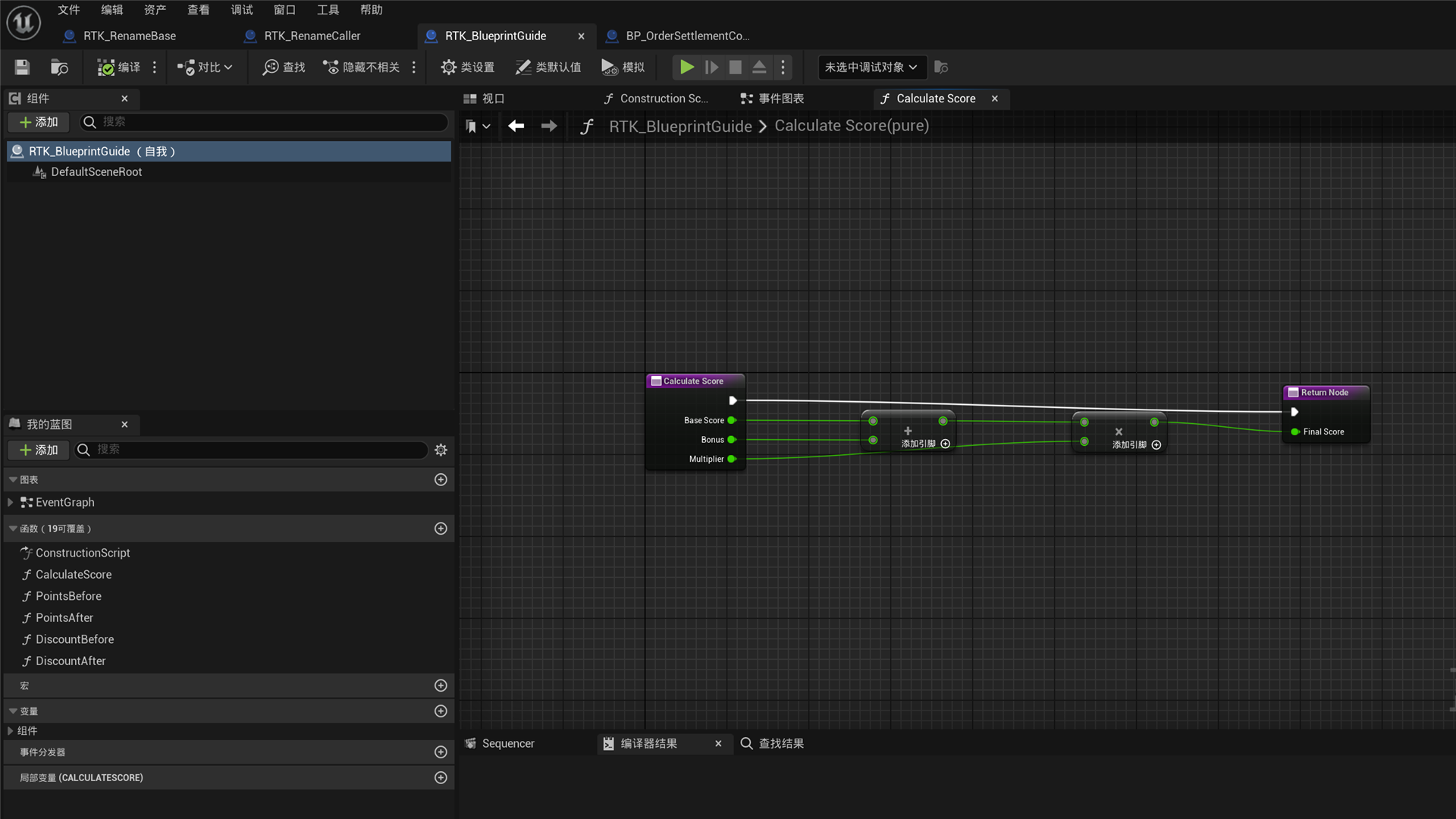
FinalScore = (BaseScore + Bonus) × Multiplier- Use
CreateBlueprintto create an Actor Blueprint. - Use
CreateFunctionto addCalculateScorewith threedoubleinputs and onedoubleoutput. - Use
GetGraphDetailto find the new function’s Entry and Result node identifiers. - Search this function graph for
AddandMultiply, then use the returnedOperator:AddandOperator:Multiplyactions. - Preview an
ApplyGraphPatchcontaining the two nodes and five data connections. - Apply the same patch with native
doublepromotion and automaticBalancedlayout. - Call
SaveAssetif you want to keep the change.
The finished graph adds BaseScore and Bonus, then multiplies the result by Multiplier from left to right.
Editor screenshots and business-rule changes
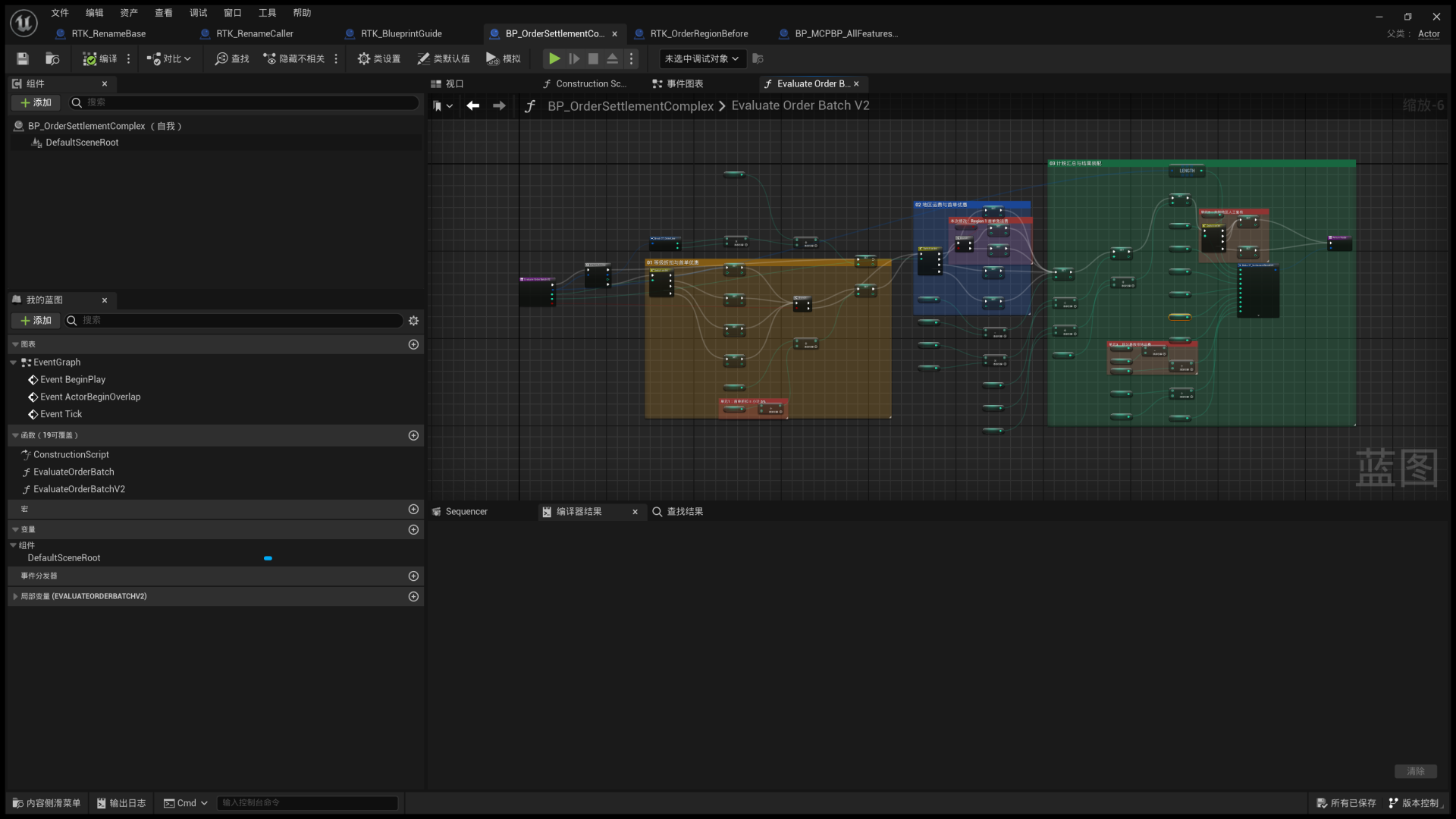
These Blueprint Editor examples show a calculation function, a complete business graph, and visible changes before and after rule edits. They illustrate how nodes, links, and defaults change.
A standard graph example
CalculateScore adds BaseScore and Bonus, then multiplies the result by Multiplier.
A complete business workflow
EvaluateOrderBatchV2 keeps order totals, discounts, shipping, tax, points, risk scoring, and the final result in one connected function graph.
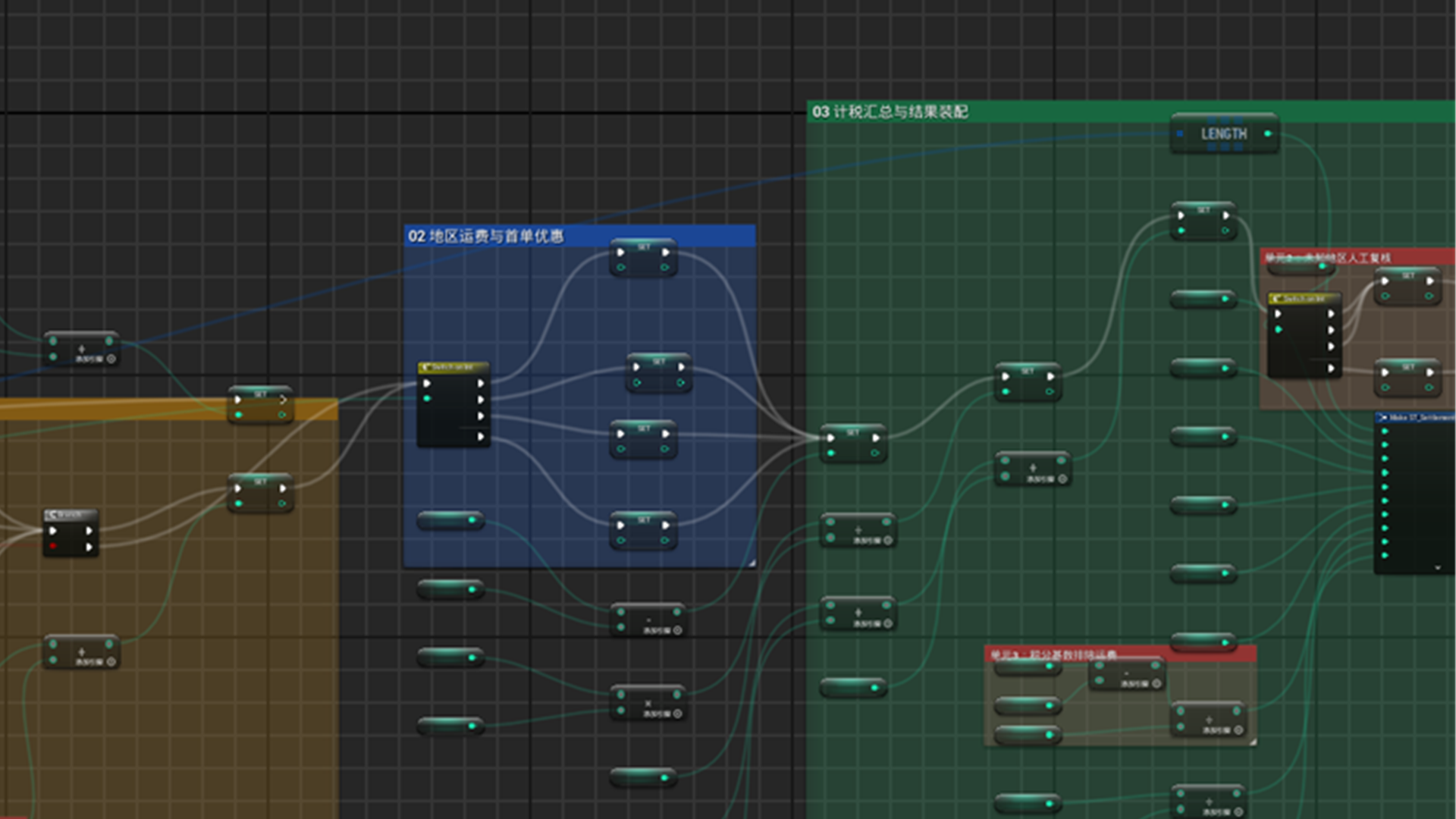
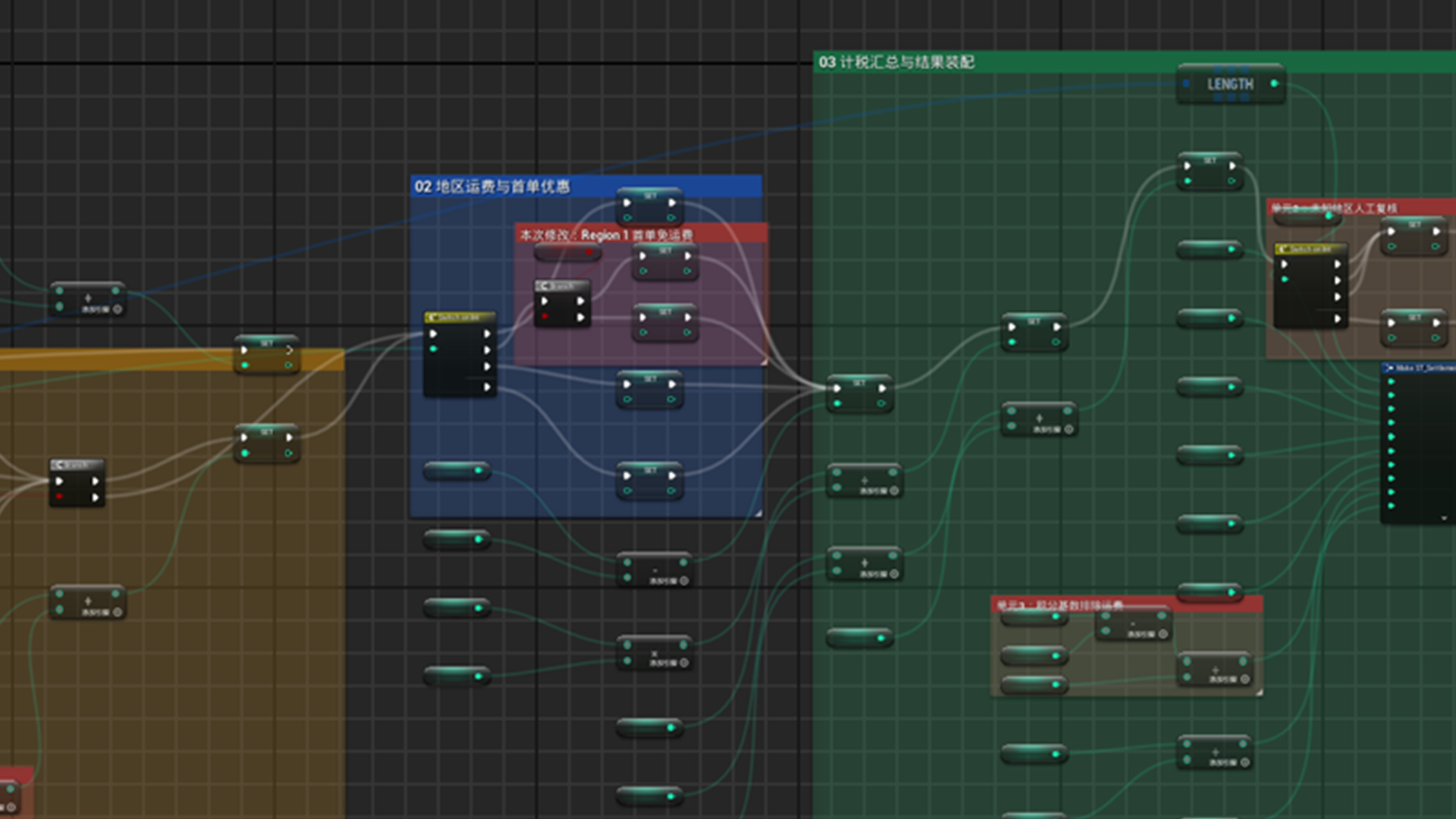
Change 1: free shipping for first orders in Region 1
Before the change, Region 1 always sets ShippingCents = 1000.
After the change, a FirstOrder branch sets shipping to 0 for first orders and keeps 1000 for other orders.
Change 2: exclude shipping from points
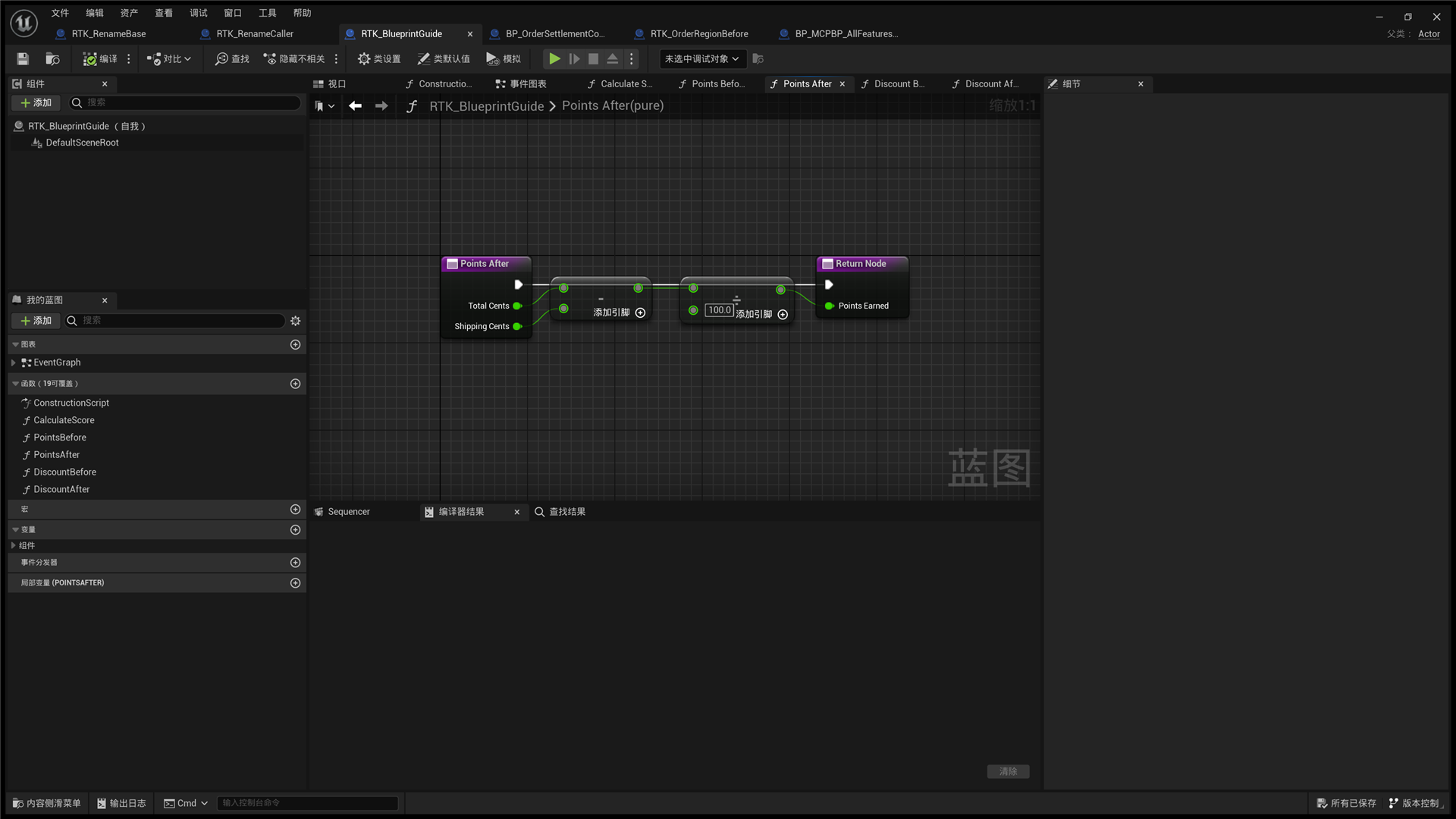
Before the change: PointsEarned = TotalCents / 100.
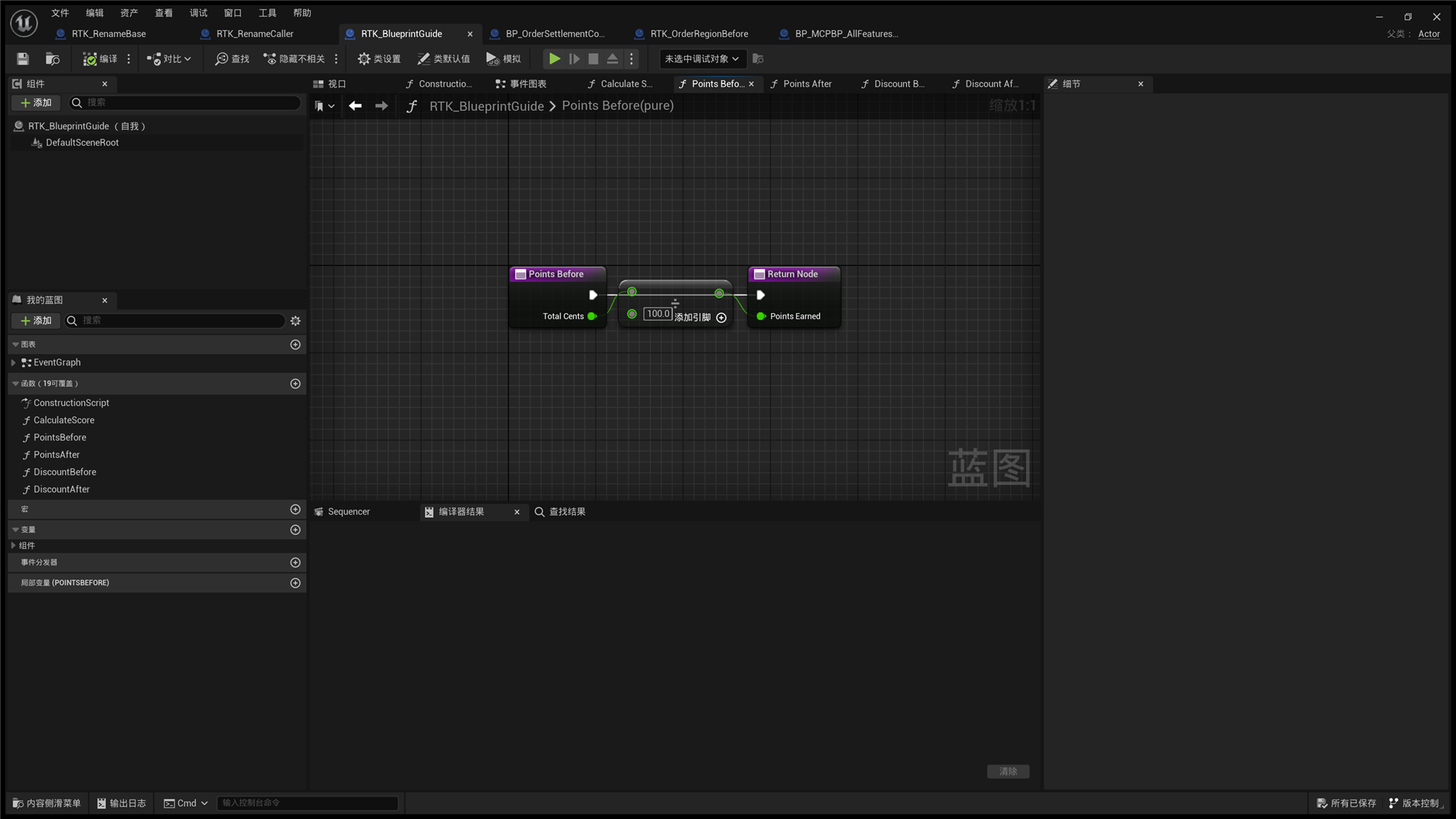
After the change: PointsEarned = (TotalCents - ShippingCents) / 100. A new Subtract node excludes shipping.
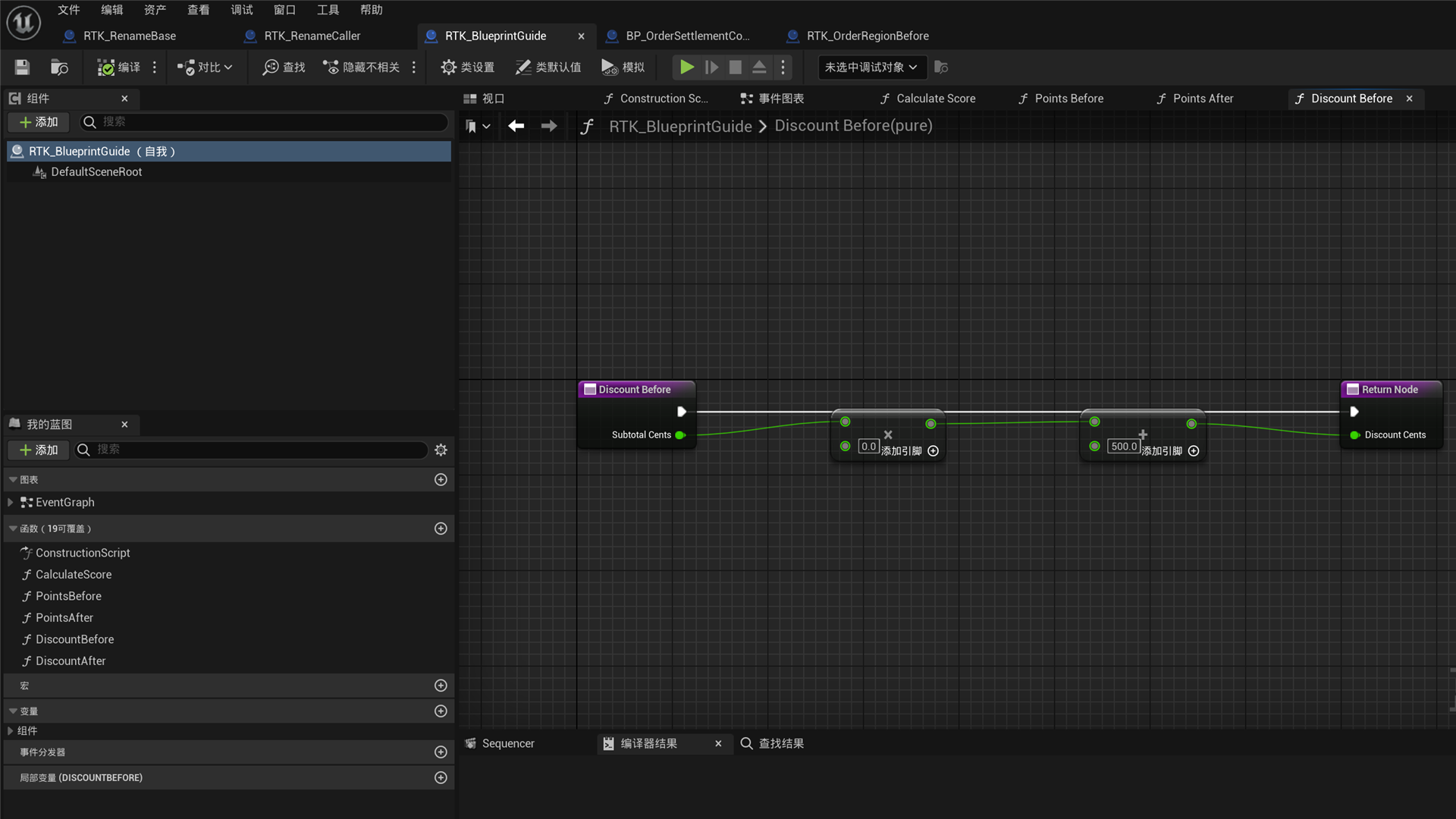
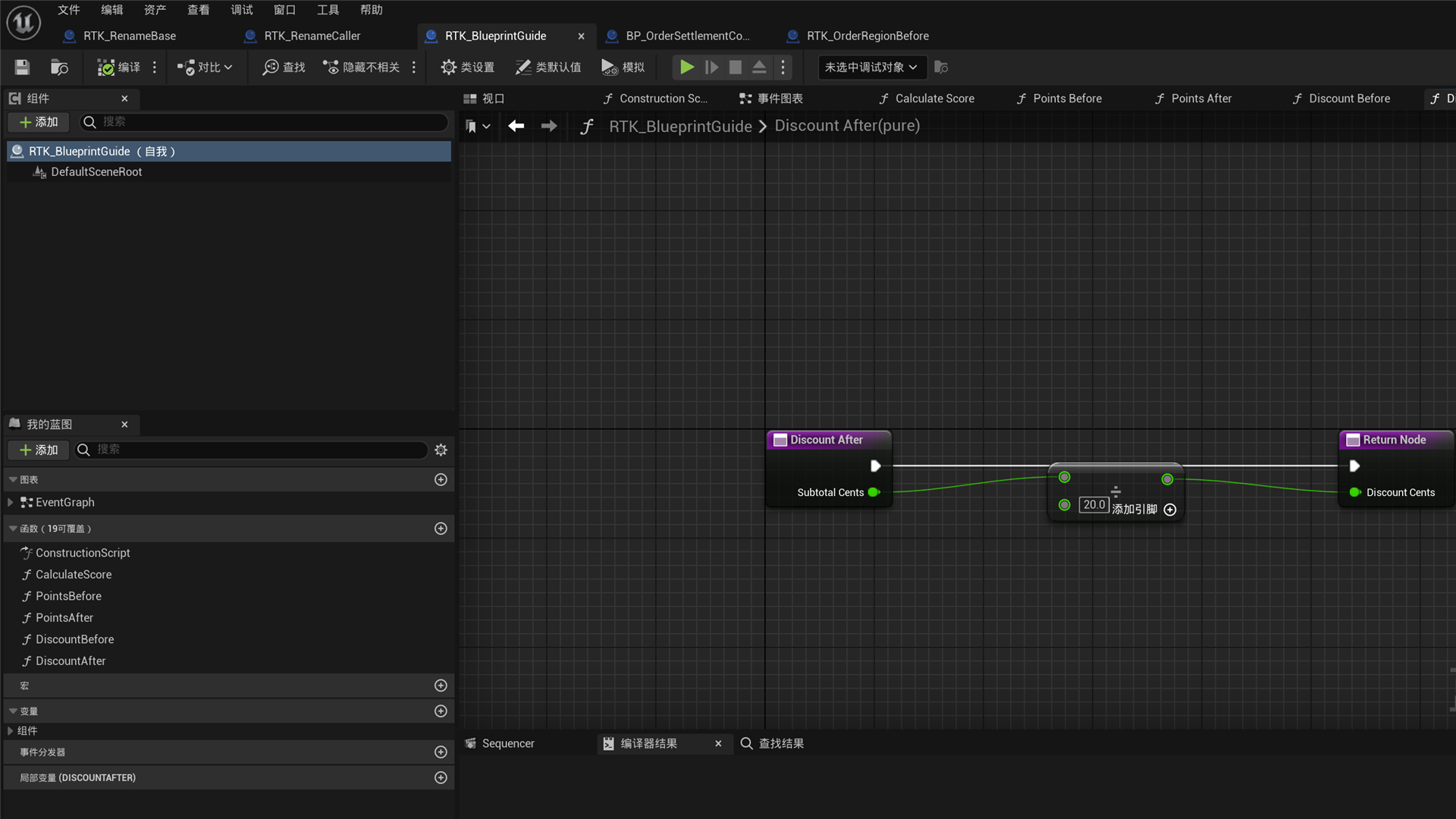
Change 3: replace a fixed first-order discount with 5% of subtotal
Before the change, the graph calculates SubtotalCents × 0 and then adds 500, always returning a fixed discount of 500.
After the change, SubtotalCents / 20 produces a 5% discount.
Before changing logic, use dry-run where supported to understand its impact. Explicitly approve reference updates or potential data loss when the tool requires it. Use SaveAsset to keep changes.
Find assets and graphs
- Use
ListBlueprintsto find assets with pagination. - Use
GetBlueprintOverviewto inspect graphs, variables, functions, components, interfaces, and the parent class. - Use
ListBlueprintMembersto inspect functions, Custom Events, Event Dispatchers, and local variables. - Use
GetGraphDetailto inspect nodes, pins, defaults, links, and layout. - Use
GetCompileErrorsorCompileBlueprintto read editor diagnostics.
Use asset paths returned by the plugin. Page through large graphs to avoid returning too much content at once.
Edit function-local variables
- Find the local with
ListBlueprintMembersand copy its completeTarget.FunctionGraphGuididentifies the function graph andVarGuididentifies the declaration. If supplied,Namemust exactly match its current name. - Supply
BlueprintPath, the copiedTarget, and at least one ofNewName,TypeName,DefaultValue,Category, orTooltip. For example,DefaultValue: ""previews clearing the default;NewName: "TemporaryScore"together withCategory: "Calculation"previews a rename and category change. bDryRundefaults totrue. The preview lists references and potentially removed links.MaxResultsaccepts 1 to 100, defaults to 50, and limits displayed rows only.- Apply the same request with explicit
bDryRun: falseandbApproveReferenceUpdates: true. WheneverTypeNameis supplied, also setbAllowPotentialDataLoss: true. CallSaveAssetto keep the change on disk.
Omitted fields keep their values. An actual type change clears an omitted default; supplying the same type preserves it. Empty Category restores the engine default category, and empty Tooltip removes its metadata. Same-name members and locals in other functions keep their identities. A new name conflicting with a direct child’s member is refused.
Nonempty defaults support numbers, booleans, enums, Name, strings, safe mathematical structs, and Array/Set/Map values whose elements are equally safe. Top-level hard object/class references must already be resident and satisfy path, type, and the actual function entry’s access rules. Private references across packages are refused; top-level soft references follow their type rules. Nonempty Text, nested object/soft references, object-bearing structs, interface/delegate values, and unaudited native structs are refused. An empty default restores the type’s initialized value. Name, category, and tooltip edits do not reimport an unchanged default.
Add graph logic safely
Search using Unreal’s English action names, such as Branch, For Loop, For Each Loop, Switch on Int, Switch on Name, Switch on String, Add, Subtract, Multiply, or Divide.
ApplyGraphPatch supports:
Nodeswith temporary IDs and Action RegistrySpawnerIdvalues.ConnectionsandDisconnections.RemoveNodesidentified by node IDs.MoveNodesidentified by node IDs and graph coordinates.- Optional
PinDefaults,PromotedType, layout scope, and layout style.
The patch uses only its own transaction. On failure, it checks ownership of the Undo record and attempts recovery. Recovery responses from ApplyGraphPatch, ModifyVariable, ModifyLocalVariable, and ModifyFunctionSignature carry RecoveryContractVersion: 2 and remain errors. Check these fields before deciding what to do next:
Field | Meaning |
|---|---|
bUndoSucceeded | This call’s own Undo succeeded. It does not undo transactions added later. |
bContentRestored, bSnapshotRestored | Declarations, graphs, nodes, and pins match their previous contents. bRolledBack also requires this call’s own Undo to succeed. |
RuntimeVerification | Verified means runtime shapes and defaults match; Different means they differ; Unavailable means a complete check was unavailable; NotRequested means no check was requested. bRuntimeRestored is true only for Verified. |
RecoveryAssets | Each Blueprint’s actual before/after Status, status code, and package Dirty state. Restored content may still be Dirty. |
bRollbackStateRestored | Content, required runtime state, and native state all match. The tool does not rewrite Status or clear Dirty to satisfy this field. |
RollbackRecoveryCompileReports | Actual recovery compiler results when needed. Successful compilation still requires content and runtime comparisons. |
DefaultRepairResult, DefaultRepairProperties | Result and property paths for restoring specified member defaults after variable-recovery compilation. Applied still requires the final complete comparison. |
AuthoringDifference, RuntimeDifference, RecoveryError | The location and cause of unrestored content or an unavailable check. |
Stop editing and inspect the current assets if content or runtime differs or recovery cannot be proven. Graphs that are Dirty or already have compiler errors remain editable. A Blueprint without the actual generated class/CDO required for Undo returns RecoveryUnavailable; the tool does not compile it implicitly before the edit.
Members, functions, Structs, and Enums
- Variable tools manage types, defaults, Category, Tooltip, and safe removal.
- Function tools create, rename, make supported signature changes, or safely remove user functions.
- Local-variable operations require function-graph and variable-declaration identifiers.
- Struct/Enum edits use field or entry identifiers and report reference impact.
- Operations that may lose data or change the meaning of serialized Enum values require separate explicit approval.
Function renames and signature edits analyze impact first. Unsafe overrides, Delegate bindings, derived classes, or references cause rejection before the edit.
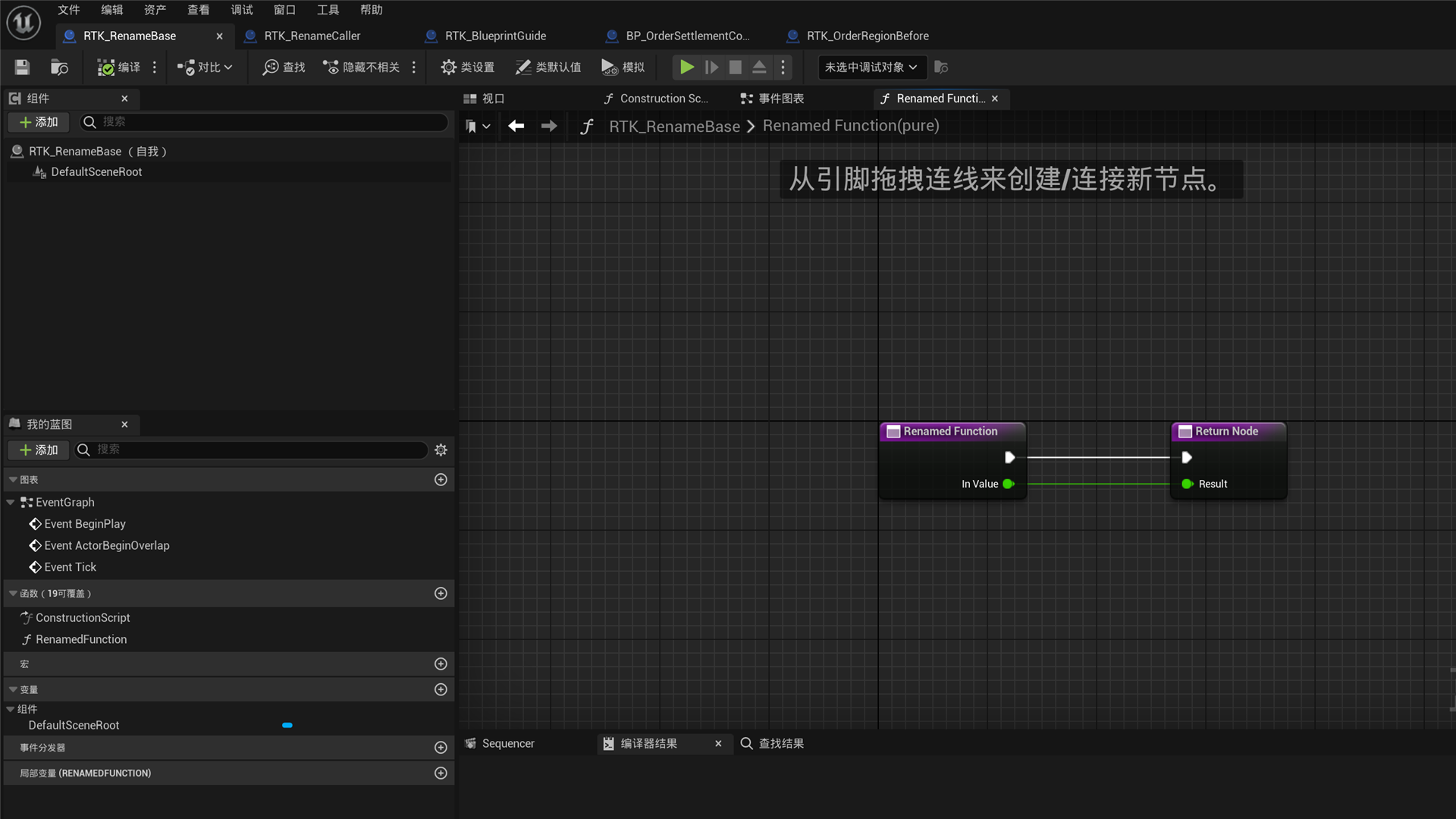
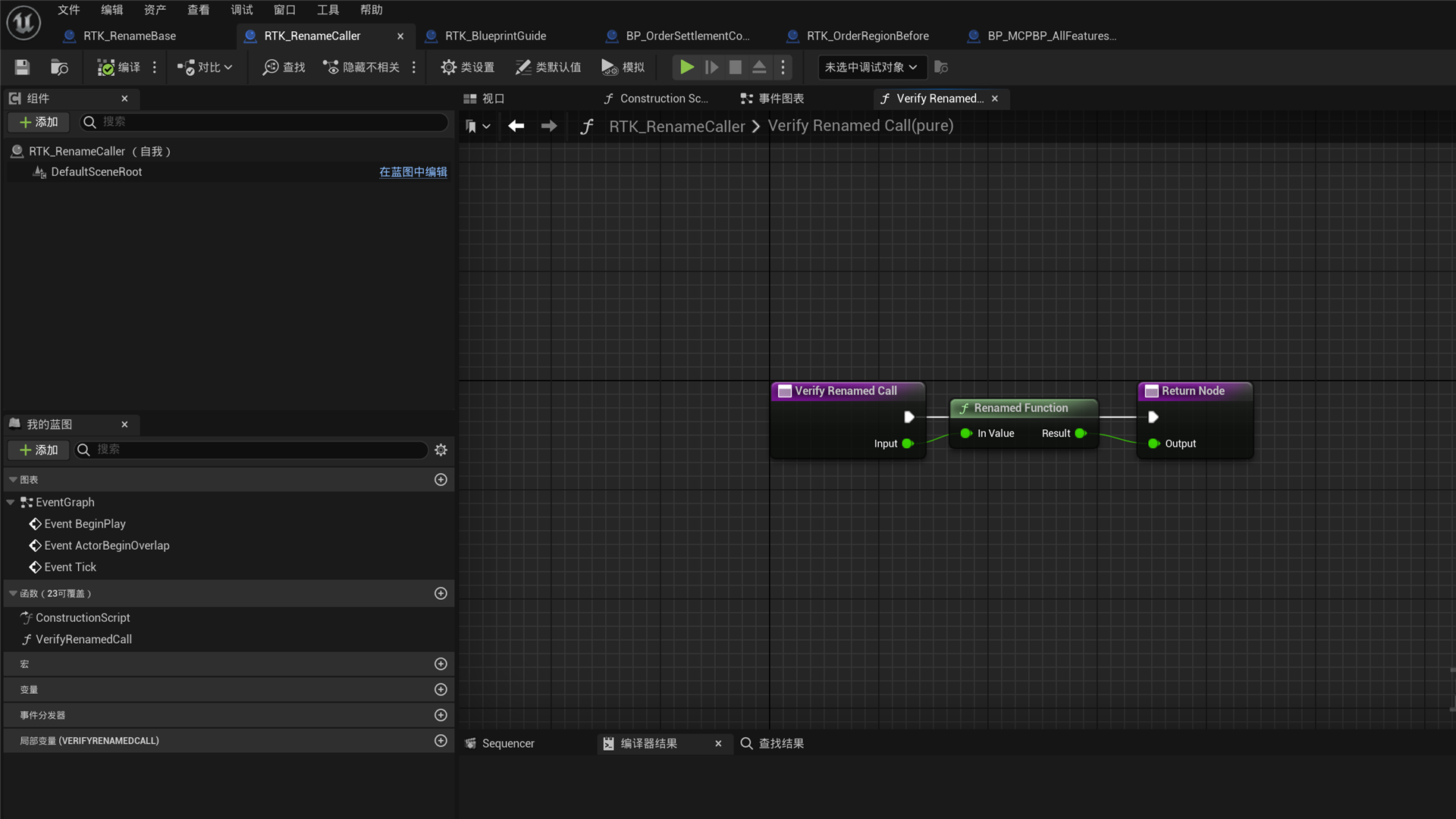
Function rename example
These two images show a function definition and its call site after renaming. Use dry-run before renaming and explicitly approve reference updates when required. Use SaveAsset to keep the change.
Functions, events, and bound events
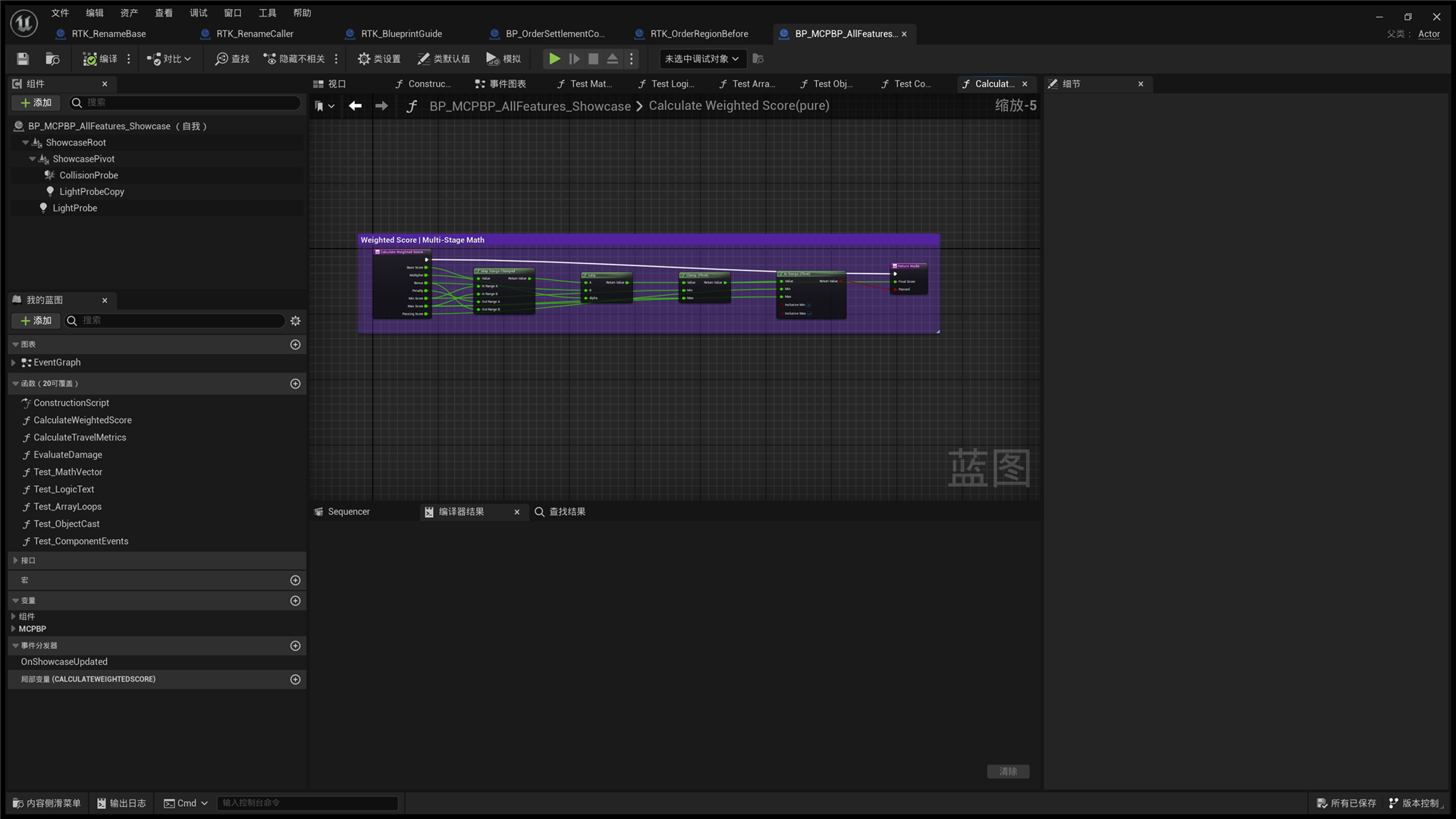
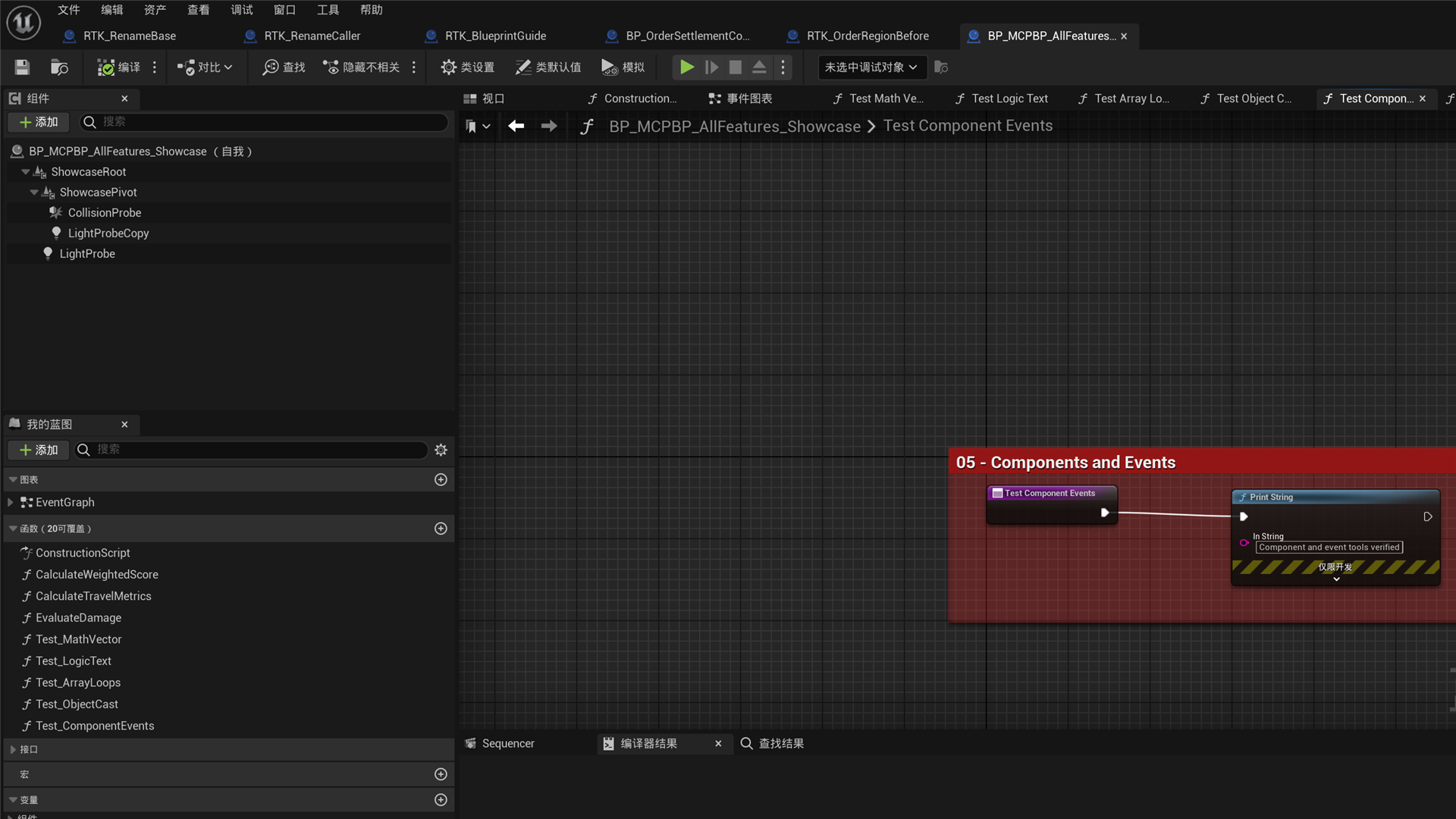
These examples show a function with input and output parameters, a component-event helper function graph, and common structures for Actor lifecycle events, component-bound events, and variable pin counts.
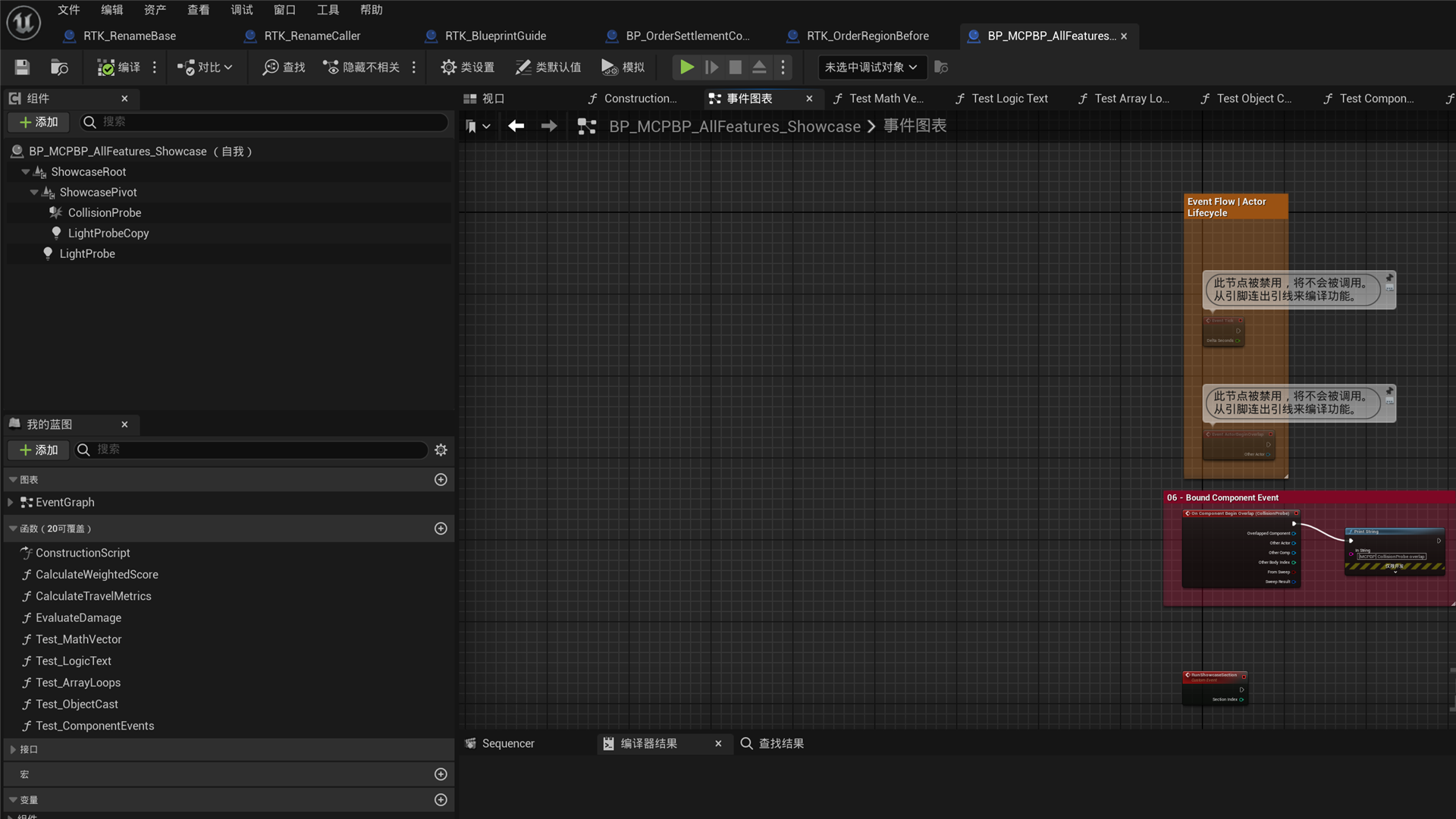
Connect an Event Dispatcher
Declare OnSignal with an input such as Payload:int using AddEventDispatcher. Call SearchGraphNodes with the target BlueprintPath, GraphName, and Query="OnSignal" to obtain the actual actions and pins.
Bindadds a receiving event.Callbroadcasts the inputs to every bound receiver.Unbindremoves a specific receiver.UnbindAllremoves all receivers from that dispatcher.
Create a receiver with a matching input signature using CreateCustomEvent, then create the searched actions with ApplyGraphPatch. Connect the receiver’s @<NodeGuid>.OutputDelegate to the Bind or Unbind Delegate pin. Connect the initiating event’s then to Bind’s execute, and Bind’s then to Call’s execute. Supply Call’s Payload through PinDefaults or a data connection. Read GetGraphDetail to verify the wiring and compile result, then call SaveAsset.
Assign creates a dispatcher node and a matching Custom Event with the delegate pins already connected. It adds a receiver while keeping existing bindings. To wire its event body in the same ApplyGraphPatch, set EventTempId on the Assign node object, for example {"TempId":"assign","SpawnerId":"<Assign ID returned by search>","EventTempId":"receive"}. Use receive.then for the body execution input and receive.Payload for its data input. EventTempId shares one unique namespace with all node TempId values. The result’s NodeGuids includes both aliases, and CreatedNodeCount includes the companion event. Omitting the alias still creates the companion event. Assign requires a graph that supports events; function and macro graphs reject it.
To use an existing function or Custom Event as a receiver, search with Query="CreateDelegate" and create a Create Event node using the returned Native:K2Node_CreateDelegate ID. Set the required DelegateTarget on that node object:
- Function:
{"Kind":"Function","Name":"ExistingHandler","FunctionGraphGuid":"<FunctionGraphGuid from ListBlueprintMembers>"}. - Custom Event:
{"Kind":"CustomEvent","NodeGuid":"<NodeGuid of the existing Custom Event>"}.
The target must already belong to the current Blueprint and have a compatible signature. Connect Create Event’s OutputDelegate to Bind or Unbind’s Delegate; provide any required object connection in the same Patch. The tool selects the target and checks its signature after making the connections. A failure rolls back the entire Patch, including any Assign companion event. Targets use stable GUIDs; an invalid GUID never falls back to a target with the same name.
These five dispatcher actions support scalar dispatchers declared in the target Blueprint itself. Their Delegate:<operation>:self:<declarationGUID> IDs survive compilation and saving. Deleting and recreating the same name produces a new GUID: old IDs are rejected, so search again. Node creation still excludes inherited or cross-Blueprint targets. Editing existing local declarations is covered below.
Edit, rename, and remove signals
Call ListBlueprintMembers with MemberKind: "CustomEvent" or "EventDispatcher" and copy the returned Target. CustomEvents use {"Kind":"CustomEvent","NodeGuid":"<returned NodeGuid>"}; dispatchers use {"Kind":"EventDispatcher","Name":"OnSignal","DeclarationGuid":"<returned declaration GUID>"}. Parameter edits use the current PinId from Inputs. Read it again after editing; names do not replace GUIDs.
ModifySignalSignature performs one operation per request:
Operation | Parameters | Purpose |
|---|---|---|
AddInput | PinName, TypeName, optional DefaultValue | Add an input. |
RenamePin | PinId, PinName | Rename a parameter while preserving compatible links. |
RemovePin | PinId | Remove an unconnected input. |
ChangePinType | PinId, TypeName, optional DefaultValue | Retype an unconnected input. |
SetPinDefault | PinId, explicit string DefaultValue | Set the declaration default. |
MovePin | PinId, zero-based NewIndex | Change declaration order. |
For example, preview a local event default change:
{"BlueprintPath":"/Game/Blueprints/BP_Receiver","Target":{"Kind":"CustomEvent","NodeGuid":"<返回的 NodeGuid>"},"Operation":"SetPinDefault","PinId":"<Inputs 返回的 PinId>","DefaultValue":"23"}Inspect References and AffectedBlueprints, then add bDryRun: false and bApproveReferenceUpdates: true to apply. Existing explicit caller overrides remain intact; connected inputs still take values from their links. Before removing or retyping an input, explicitly disconnect affected declaration, call and companion-event pins, including split child pins. Signature changes incompatible with a selected CreateDelegate handler are refused; handler signatures are never migrated.
CustomEvent hard object, class and interface inputs accept only empty declaration defaults: new Call nodes do not inherit their non-empty values. This restriction covers AddInput, ChangePinType (including an omitted default that would retain an old non-empty value), and SetPinDefault; explicitly pass DefaultValue: "" to clear the default, and use SetPinDefaults on a specific Call node for an object value. Other supported CustomEvent types continue to accept non-empty defaults. EventDispatcher AddInput and ChangePinType accept only omitted or empty defaults; SetPinDefault requires DefaultValue: "". Non-empty strings such as "0" and "false" are also refused. If a type edit would inherit an old non-empty default, explicitly supply an empty string. A readable dispatcher declaration default does not mean Call nodes inherit it. Use the existing SetPinDefaults tool on a specific Call node for other values.
RenameSignal takes the same Target and NewName, with preview as the default. A dispatcher keeps its original DeclarationGuid; use its new Name afterward. A CustomEvent keeps its NodeGuid. Exact loaded calls and bindings are updated while retaining handler identity. Inherited, overridden, interface-implementation and directly signature-driven receiver events must be edited at their source.
Use the same Target with RemoveCustomEvent, preview, then approve application. RemoveEventDispatcher takes DispatcherName and an optional expected DeclarationGuid to guard against a same-name replacement; this tool executes safe deletion directly. Both refuse declarations with real calls or bindings. Explicitly remove those references with ApplyGraphPatch first. Unknown or unloaded references block mutation; external nodes are not deleted in a cascade and execution chains are not rewired. Normal Undo/Redo is supported. Save the declaration and affected assets explicitly with SaveAsset when finished.
Change local function presentation, editor, and declaration properties
ListBlueprintMembers returns function Inputs and Outputs in alphabetical order. Each function pin also includes DeclarationIndex (the zero-based position in its own entry or result terminal declaration array), bIsReference and bIsConst. The index is local to each terminal, not a unique sequence across the whole function. bIsReference and bIsConst are raw declaration flags. When bCompiledFlagsKnown=true, bCompiledReference, bCompiledConst, and bCompiledOutParm describe the current owned compiled function. Unavailable metadata returns only bCompiledFlagsKnown=false, without replacing unknown flags with false. The query never compiles; compile the Blueprint normally before reading when needed. Reference inputs can also carry OutParm while remaining logical inputs. Existing pagination, 16-pin signature limits and default-value truncation remain in effect. CustomEvent and EventDispatcher inputs also return declaration PinId, DeclarationIndex, and a stable Target for the signal lifecycle tools below.
Call ListBlueprintMembers with MemberKind: "Function". Copy the function’s Name and FunctionGraphGuid into a Target with Kind: "Function"; NodeGuid identifies the entry node and cannot replace the graph GUID. Use that target with GetBlueprintDetails to inspect supported values and editing restrictions, then call ModifyFunctionDetails:
{"BlueprintPath":"/Game/Blueprints/BP_Player","Target":{"Kind":"Function","Name":"SendSignal","FunctionGraphGuid":"<ListBlueprintMembers 返回的 FunctionGraphGuid>"},"DisplayName":"Send Signal","Tooltip":"Sends the current payload.","Category":"Signals","Keywords":"payload emit","CompactTitle":"SEND","bCallInEditor":true,"bDeprecated":false,"DeprecationMessage":""}DisplayName changes call-node titles; Tooltip describes the function; Category groups it in menus; Keywords helps action search; CompactTitle selects a compact call-node title. bCallInEditor exposes an editor-callable declaration and does not execute the function. bDeprecated marks usage deprecated, and DeprecationMessage supplies guidance while that flag is enabled. Use SearchGraphNodes with the new title, category, or keywords to find the call action.
Omit a field to preserve it. Empty text clears it; an empty Category resets to Unreal’s default category. Category, keywords, and compact title trim surrounding whitespace. Clearing CompactTitle preserves keywords and restores the ordinary call-node title. Deprecated functions appear in action search only when the Blueprint Editor setting to expose deprecated functions (bExposeDeprecatedFunctions) is enabled. Requests containing only the presentation and editor properties above retain their direct-apply behavior and reject no effective change. Override/interface implementations, RepNotify, construction and other protected functions are read-only.
Declaration fields are JSON booleans bPure, bConst, bExec, and Access: "Public" | "Protected" | "Private". A request containing any declaration field defaults to preview and can also include presentation properties. After reviewing its impact, add bDryRun: false and bApproveReferenceUpdates: true to apply. An identical declaration request returns bNoOp: true without modifying or compiling. For example, preview making a function Pure:
{"BlueprintPath":"/Game/Blueprints/BP_Player","Target":{"Kind":"Function","Name":"CalculateScore","FunctionGraphGuid":"<ListBlueprintMembers 返回的 FunctionGraphGuid>"},"bPure":true}When changing from impure to Pure, Unreal’s native logic bypasses execution pins in supported ordinary call chains while preserving data connections. The reverse change is refused before mutation when connected data outputs have no proven execution position; establish the execution path first. A CreateDelegate target cannot become Pure, and access changes cannot invalidate an existing caller or target delegate owner’s context. Const is checked by the native compiler and cannot be edited on static functions. Exec controls eligibility for native command dispatch; the tool does not execute the function. Call SaveAsset after a successful apply. Use the dedicated tools for parameter signatures and RPC declarations.
Change CustomEvent properties and RPC declarations
Get the event’s NodeGuid from CreateCustomEvent or GetGraphDetail. Use the same Target with GetBlueprintDetails and ModifyCustomEvent. For example, declare a local event as a reliable server RPC:
{"BlueprintPath":"/Game/Blueprints/BP_Player","Target":{"Kind":"CustomEvent","NodeGuid":"<事件的 NodeGuid>"},"Replication":"Server","bReliable":true}Replication accepts None, Server, Client, or Multicast. None disables RPC routing while preserving the stored reliable bit when bReliable is omitted; that bit has no effect outside RPC mode. Explicitly setting or clearing bReliable requires a final RPC mode, which can be supplied in the same request. Details reports the saved value in Current and active routing/reliability in Effective.
bCallInEditor controls the editor-callable declaration; the tool does not execute the event. bDeprecated marks usage deprecated, and DeprecationMessage stores guidance; an empty string clears the message. Booleans must be JSON true/false. Omitted fields stay unchanged, and same-state requests report no change. Only local editable events in a successfully compiled Blueprint are supported; overrides, interface implementations, and dispatcher-bound receivers are refused. Call SaveAsset to persist changes. These settings do not change Actor replication: multiplayer use still requires Actor replication, ownership, and the correct calling endpoint.
Components and class defaults
Read the current component hierarchy before adding, renaming, duplicating, reparenting, setting a root, editing template properties, or removing components. Class-default tools read or edit supported Blueprint defaults; instance values are not presented as class defaults.
Asset lifecycle
Asset tools create, duplicate, rename, reparent, compile, open, close, reload, delete, and save supported Blueprint assets.
- Reloading from disk defaults to dry-run and requires explicit approval before discarding in-memory state.
- Destructive deletion has stricter Undo/Redo and Package safety requirements than ordinary graph edits.
Capture graphs
Call OpenAsset before CaptureGraphScreenshot. Capture the full graph, focus on a node, or reuse a specified viewport. Check that titles, pins, and links are readable before sharing.
The screenshot tool requires an initialized Blueprint graph editor widget. It rejects requests when the graph editor is closed or its widget has zero size.
Settings
Open Project Settings → Plugins → MCP Blueprint:
- Port: defaults to
8766; if occupied, tries up to nine subsequent ports. - Auto Start: starts the server with the editor.
- Auto Compile After Modify: compiles automatically after supported writes.
- Request Timeout Seconds: timeout for ordinary tools.
- Compile Timeout Seconds: separate timeout for compilation tools.
Current limits
- Supports Windows, macOS, and Linux Editor; no Runtime/Shipping module is provided.
- There is currently no generic tool to invoke an arbitrary Blueprint function and return its runtime result.
- Signal lifecycle tools edit only declarations owned by an ordinary Blueprint. Edit inherited, interface, overridden, or signature-driven events at their source. Dispatchers accept only native empty defaults; use
SetPinDefaultsfor a specific call’s values. - Blueprint Actions that cannot be handled safely cause the operation to be rejected.
- Screenshots require an initialized Blueprint Graph Editor widget.
Troubleshooting
- Cannot connect: use the actual endpoint in the toolbar; the configured port may be occupied.
- Missing tool: refresh
tools/listinstead of relying on an old cache. - Write rejected: read every blocker and approval-parameter requirement, then read the target again before retrying.
- Compilation failed: obtain compiler diagnostics and fix the reported Blueprint errors before saving.
- Unexpected graph result: compare
GetGraphDetailbefore and after; use Undo where applicable. - Plugin requests a rebuild: install a package matching the exact engine minor version.
- Plugin missing from the project: check that it is installed under that engine’s
Engine/Plugins/Marketplace. Do not work around this by adding a project dependency. - UE 5.5 reports an outdated project file because the installed MCPBlueprint is absent from the project descriptor: choose Not Now. The engine plugin still loads automatically. Update adds MCPBlueprint to the project’s
.uproject, creating the project-side dependency this installation model explicitly avoids.
Support
For questions or feedback, use the contact page.
Read Blueprint class settings
For an ordinary Blueprint, call GetBlueprintDetails with Target: {"Kind":"ClassSettings"} to read the asset’s raw DisplayName, Description and Category, including empty strings. This target accepts only Kind; do not include member names or GUIDs. These three fields return Current, Editable: true and a Reason. CoverageComplete remains false because only these presentation fields are exposed. The query does not compile, create a CDO or read instance defaults.
Call ModifyClassSettings with BlueprintPath and the strings to change, without a Target. Omitted fields keep their values; empty strings clear them. Spaces and line breaks are preserved. Same-value requests create no transaction; requests without any presentation field are rejected. The tool compiles the edit but does not save the asset. Call SaveAsset when ready.
{"BlueprintPath":"/Game/Blueprints/BP_Receiver","DisplayName":"Signal Receiver","Description":"Receives signal payloads.","Category":"Signals|Local"}To remove an interface directly implemented by the current Blueprint, copy its full class path from GetBlueprintOverview’s Interfaces, then call RemoveInterface:
{"BlueprintPath":"/Game/Blueprints/BP_Receiver","InterfacePath":"/Game/Interfaces/BPI_Signal.BPI_Signal_C"}The tool preserves interface function bodies, converts implemented interface events to local Custom Events with their connections, and compiles the edit. Interface messages no longer dispatch to this Blueprint after removal; the retained functions and events remain callable as local implementations. Edit inherited interfaces in the declaring parent Blueprint. Short names and non-interface class paths are rejected. An interface already absent from the current Blueprint returns no change. Only the preserve-implementations mode is available. The tool does not save; call SaveAsset to persist the edit.
Create and use macros
ModifyMacroDetails edits the native input-tunnel metadata of a local macro in a successfully compiled ordinary Blueprint. Use GetGraphDetail to obtain the macro’s GraphGuid, then read GetBlueprintDetails with Target: {"Kind":"Macro","Name":"Relay","GraphGuid":"<returned GUID>"}. The response exposes raw Current, Editable, Reason and Impact for each supported property.
Pass any changed Category, Tooltip, Keywords or CompactTitle string to ModifyMacroDetails with that same target. Omitted fields retain their values; Category, Keywords and CompactTitle are trimmed. Empty category restores Unreal’s default category; empty tooltip, keywords or compact title clears only that field. Clearing compact title retains independent keywords. The action search reads native category, keywords and tooltip while preserving the name-based SpawnerId; an empty raw tooltip can display Unreal’s macro-instance fallback text. Category changes are refused if a same-name skeleton or inherited function exists. Unknown fields, null values, stale identities and requests with no actual change are rejected. For ordinary Blueprints, the tool preserves existing graph identities, pins and links and compiles the edit. Signature/name changes are outside this tool’s scope. Save assets explicitly.
Native MacroLibraries use the same target and four fields. GetBlueprintDetails reports their raw values and editing capability. A library must have a valid GeneratedClass and an UpToDate, Warning or Dirty status; missing classes, Error/Unknown states and compilation in progress are refused before writing. Explicitly compile a new library if its class is unavailable. Presentation edits preserve the library’s existing status and the content, status and dirty flags of consumers in loaded authored asset graphs, including nested graphs. Unsupported Blueprint subclasses, custom macro-instance classes and unresolved related references are refused. Unloaded consumer packages are not loaded for this operation.
Library presentation edits do not request full Blueprint compilation. Native editor Undo/Redo may regenerate skeletons and leave the library Dirty; you can continue editing presentation fields in that state. bCompilationRequired, AfterStatus and bPackageDirty report the asset’s actual state. If an operation fails, bContentRestored and bRollbackStateRestored distinguish restored content from restored editor state; a successful content rollback can retain Dirty. The response remains an error. Use SaveAsset explicitly to persist the library; consumers are not modified or saved by this metadata operation.
CreateBlueprint accepts optional BlueprintKind: "MacroLibrary"; omission keeps the ordinary Blueprint behavior. Macro libraries currently require a legal native parent, such as /Script/Engine.Actor or /Script/CoreUObject.Object. A Blueprint-generated parent is rejected.
Compile the new asset with CompileBlueprint before CreateMacro. Creation requires a current successful compile and preserves existing graphs and links. Define execution pins explicitly with TypeName: "exec"; omitting Inputs or Outputs creates no implicit execution pins. Data pins use the existing concrete type syntax; wildcard, by-reference and const signatures are unsupported.
{ "BlueprintPath": "/Game/Blueprints/BP_MacroLibrary", "MacroName": "Relay", "Inputs": [{"Name": "Enter", "TypeName": "exec"}, {"Name": "Value", "TypeName": "int"}], "Outputs": [{"Name": "Leave", "TypeName": "exec"}, {"Name": "Result", "TypeName": "int"}]}The response includes GraphGuid, EntryNodeGuid, ExitNodeGuid and actual pin details. Inputs appear as output pins on the entry tunnel; outputs appear as input pins on the exit tunnel. Connect the macro body through ApplyGraphPatch. GetGraphDetail also returns GraphGuid.
Use SearchGraphNodes in the intended consumer graph to obtain the exact macro SpawnerId, then place and connect it with ApplyGraphPatch and compile the consumer. Ordinary Blueprint macros are local; macro-library availability follows its native parent and Unreal’s action filtering. Self-recursion and latent macro use in a function are rejected by the existing graph-context checks. Editing existing macro signatures, renaming or deleting macros is outside this creation tool. Save the library and consumer explicitly with SaveAsset.
Edit, rename, and remove existing macros
Owned ordinary Blueprint macros and native MacroLibrary macros use the same workflow. Compile the declaration and loaded consumers, then query GetBlueprintDetails with Target: {"Kind":"Macro","Name":"Relay","GraphGuid":"<returned GUID>"}. Its Inputs and Outputs include declaration PinId, actual type, default, and zero-based Index. Inputs belong to the entry tunnel; outputs belong to the exit tunnel.
ModifyMacroSignature accepts one Operation per call:
Operation | Additional fields |
|---|---|
AddInput, AddOutput | PinName, TypeName; use exec for execution parameters or a concrete data type. |
RenamePin | Current declaration PinId and new PinName. |
RemovePin | Current declaration PinId. |
ChangePinType | Current declaration PinId and TypeName. |
MovePin | Current declaration PinId and final NewIndex, including execution parameters in that tunnel’s order. |
SetPinDefault | Current data-parameter declaration PinId and explicit string DefaultValue. |
For example, preview a parameter rename:
{"BlueprintPath":"/Game/Blueprints/BP_Macros","Target":{"Kind":"Macro","Name":"Relay","GraphGuid":"<返回的 GUID>"},"Operation":"RenamePin","PinId":"<Inputs 中的 PinId>","PinName":"Amount"}All three tools default to bDryRun: true. Inspect Instances and AffectedBlueprints, then add bDryRun: false and bApproveReferenceUpdates: true to apply. Signature edits accept only the additional fields listed for their operation; setting a default requires an explicit DefaultValue. Removal or type changes refuse connected declaration or instance pins; disconnect them explicitly first. Type changes reset defaults through native rules; read the actual result afterward. Native parameter renaming and reconstruction update loaded instances while preserving unaffected connections and instance default overrides. Unknown or unloaded references block the edit before mutation.
RenameMacro takes the same Target and NewName. Use the new Name with the original GraphGuid afterward; library old-name redirectors may remain. RemoveMacro takes the same Target. Referenced macros refuse deletion and report the Blueprint, graph GUID, and node GUID of each instance. Explicitly remove all local/external instances and compile before previewing and deleting the declaration. Removing instances changes execution semantics; the tool does not rebuild execution chains or cascade deletion to external nodes. Normal Undo/Redo is supported; compile pending assets before the next edit. Save the declaration and affected consumers explicitly when finished.