SimpleAutoEnum User Manual
Complete English product manual for SimpleAutoEnum
Supported Unreal Engine versions: 5.2–5.8
SimpleAutoEnum is a lightweight plugin that automatically binds Unreal Engine enums to configurable string arrays. Define enum values in project settings; the plugin dynamically fills enum entries at runtime.
⚠️ Note: This plugin requires C++ code to define enums and configuration arrays; it is not a Blueprint-only solution.
📝 How to Use
Section titled “📝 How to Use”SIMPLE_BIND_ENUM_TO_CONFIG Macro Parameters:
Section titled “SIMPLE_BIND_ENUM_TO_CONFIG Macro Parameters:”SIMPLE_BIND_ENUM_TO_CONFIG(EnumType, MinValue, MaxValue, SettingsClass, ArrayProperty)- EnumType: Your enum class, such as
EMyWeapons - MinValue: Starting boundary value, such as
None - MaxValue: Ending boundary value, such as
Max - SettingsClass: Settings class derived from
UDeveloperSettings - ArrayProperty: Name of the
TArray<FString>property in the settings class
Complete Setup:
Section titled “Complete Setup:”Step 1: Create a settings class
UCLASS(config = Game, defaultconfig)class UMyGameSettings : public UDeveloperSettings{ GENERATED_BODY()public: UPROPERTY(config, EditAnywhere, Category = "Weapons") TArray<FString> WeaponsList;};Step 2: Define an enum with boundaries
UENUM(BlueprintType)enum class EMyWeapons : uint8{ None UMETA(DisplayName = "None"), Max UMETA(DisplayName = "Max")};Step 3: Bind the enum to configuration
SIMPLE_BIND_ENUM_TO_CONFIG(EMyWeapons, None, Max, UMyGameSettings, WeaponsList);Step 4: Configure in project settings Go to Project Settings > Game > Your Settings and add string values to the array.
🎯 Usage Examples
Section titled “🎯 Usage Examples”Example 1: Standard Usage
Section titled “Example 1: Standard Usage”The most common pattern — a simple enum-to-array binding
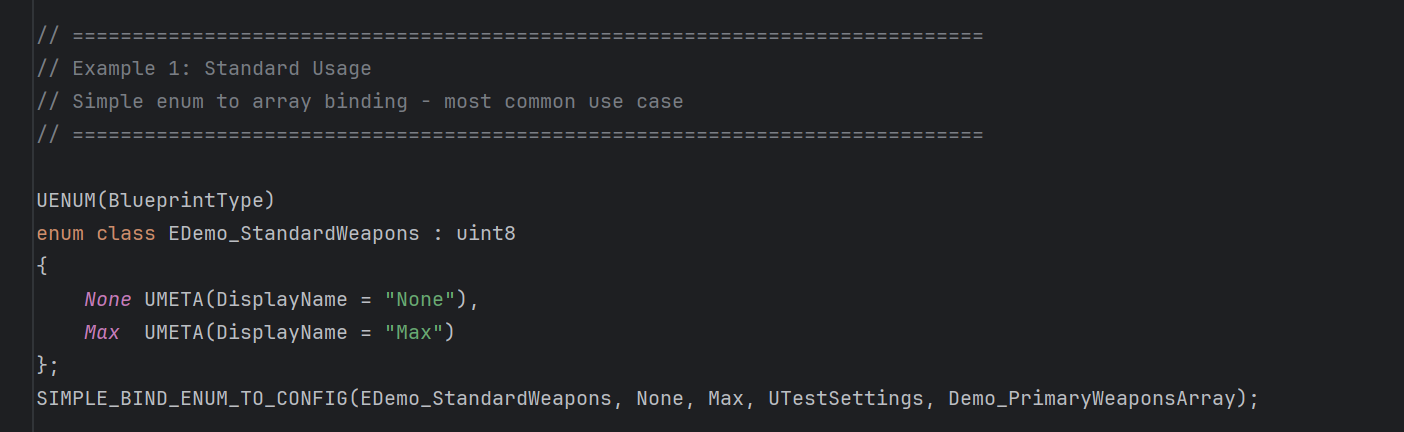
UENUM(BlueprintType)enum class EDemo_StandardWeapons : uint8{ None UMETA(DisplayName = "None"), Max UMETA(DisplayName = "Max")};SIMPLE_BIND_ENUM_TO_CONFIG(EDemo_StandardWeapons, None, Max, USimpleAutoEnumTestSettings, Demo_PrimaryWeaponsArray);Example 2: Range Binding
Section titled “Example 2: Range Binding”Combine multiple arrays into different ranges of one enum
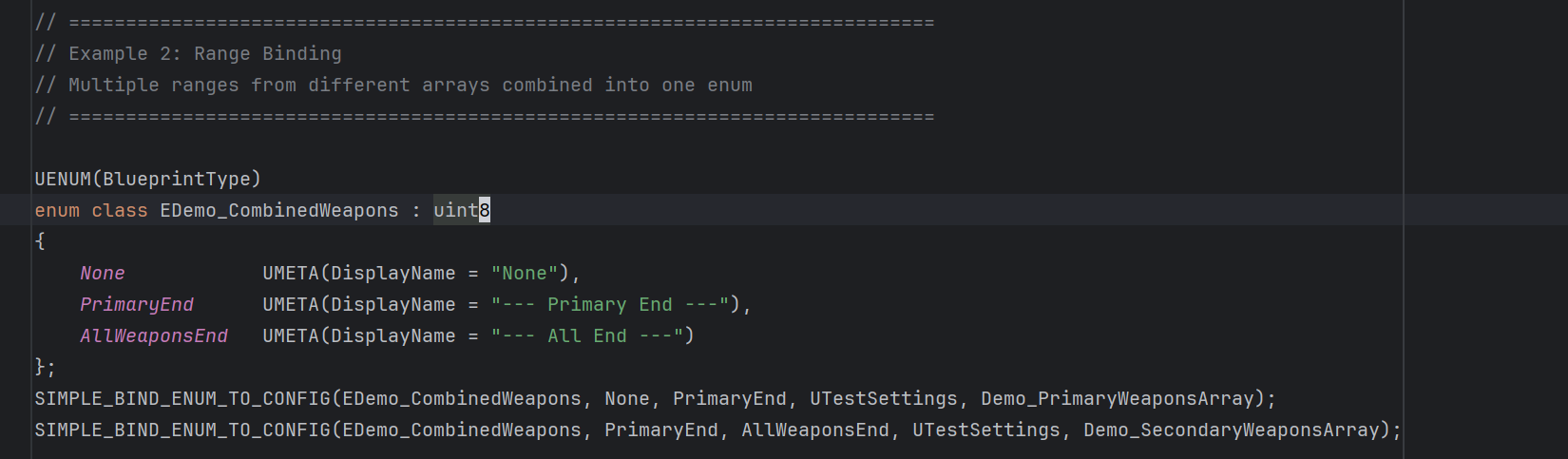
UENUM(BlueprintType)enum class EDemo_CombinedWeapons : uint8{ None UMETA(DisplayName = "None"), PrimaryEnd UMETA(DisplayName = "--- Primary End ---"), AllWeaponsEnd UMETA(DisplayName = "--- All End ---")};// 绑定主武器(None -> PrimaryEnd)SIMPLE_BIND_ENUM_TO_CONFIG(EDemo_CombinedWeapons, None, PrimaryEnd, USimpleAutoEnumTestSettings, Demo_PrimaryWeaponsArray);// 绑定副武器(PrimaryEnd -> AllWeaponsEnd)SIMPLE_BIND_ENUM_TO_CONFIG(EDemo_CombinedWeapons, PrimaryEnd, AllWeaponsEnd, USimpleAutoEnumTestSettings, Demo_SecondaryWeaponsArray);Example 3: Shared Array
Section titled “Example 3: Shared Array”Multiple enums use the same configuration array
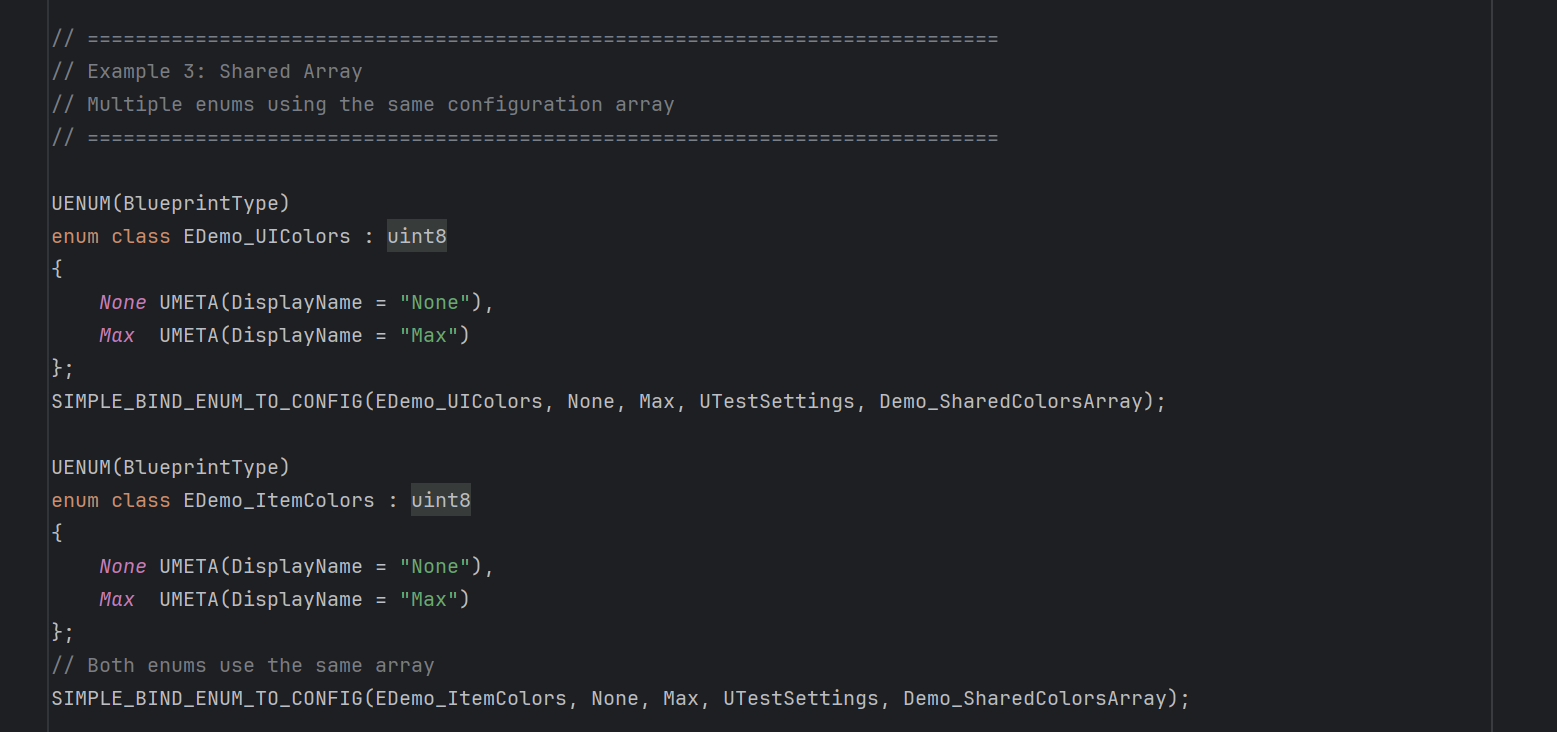
UENUM(BlueprintType)enum class EDemo_UIColors : uint8{    None UMETA(DisplayName = "None"),    Max  UMETA(DisplayName = "Max")};SIMPLE_BIND_ENUM_TO_CONFIG(EDemo_UIColors, None, Max, USimpleAutoEnumTestSettings, Demo_SharedColorsArray);
UENUM(BlueprintType)enum class EDemo_ItemColors : uint8{    None UMETA(DisplayName = "None"),    Max  UMETA(DisplayName = "Max")};// 两个枚举使用相同的配置数组SIMPLE_BIND_ENUM_TO_CONFIG(EDemo_ItemColors, None, Max, USimpleAutoEnumTestSettings, Demo_SharedColorsArray);
⚙️ Configuration and Runtime Results
Section titled “⚙️ Configuration and Runtime Results”Project settings configuration:
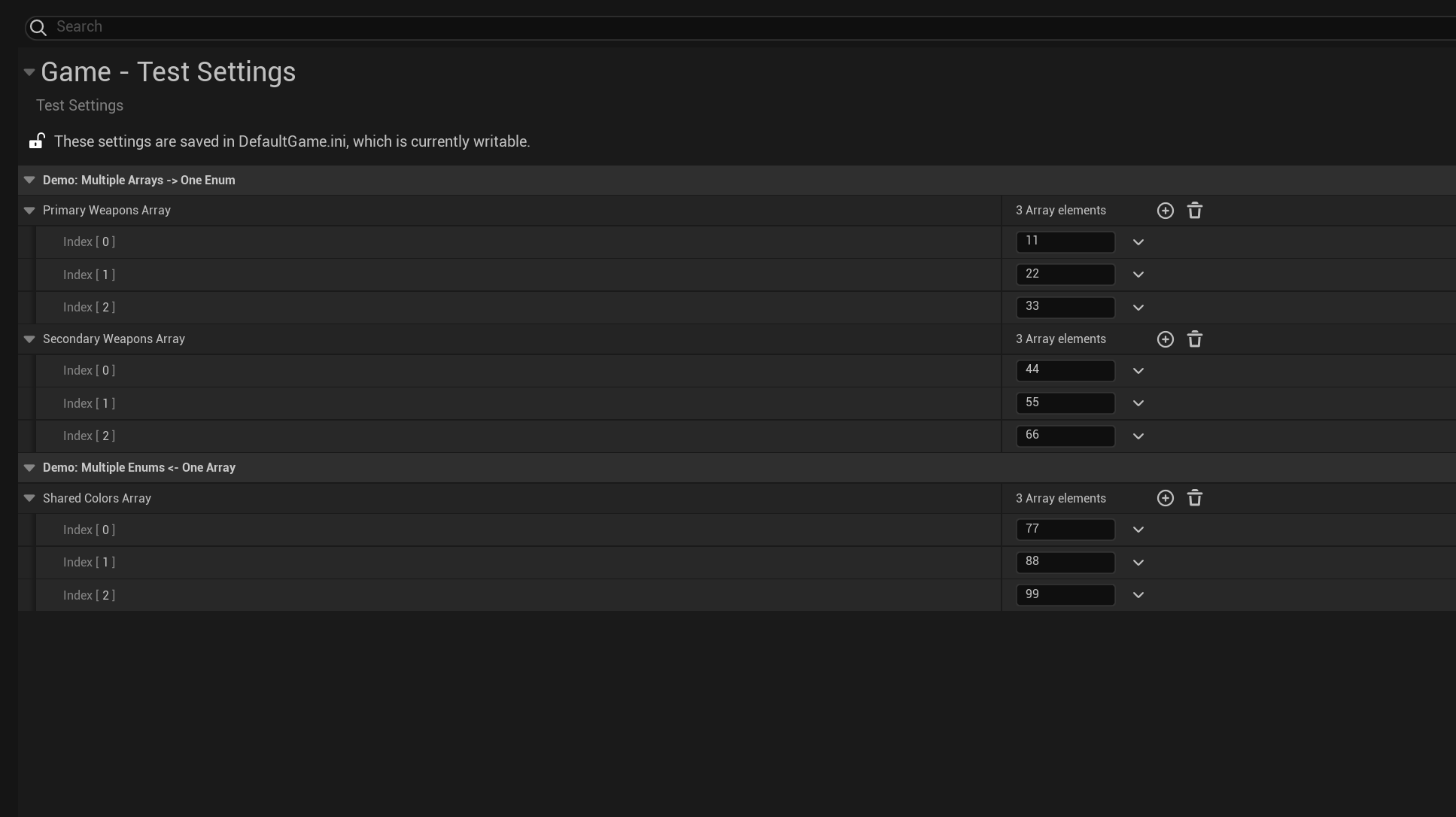
Final runtime result:
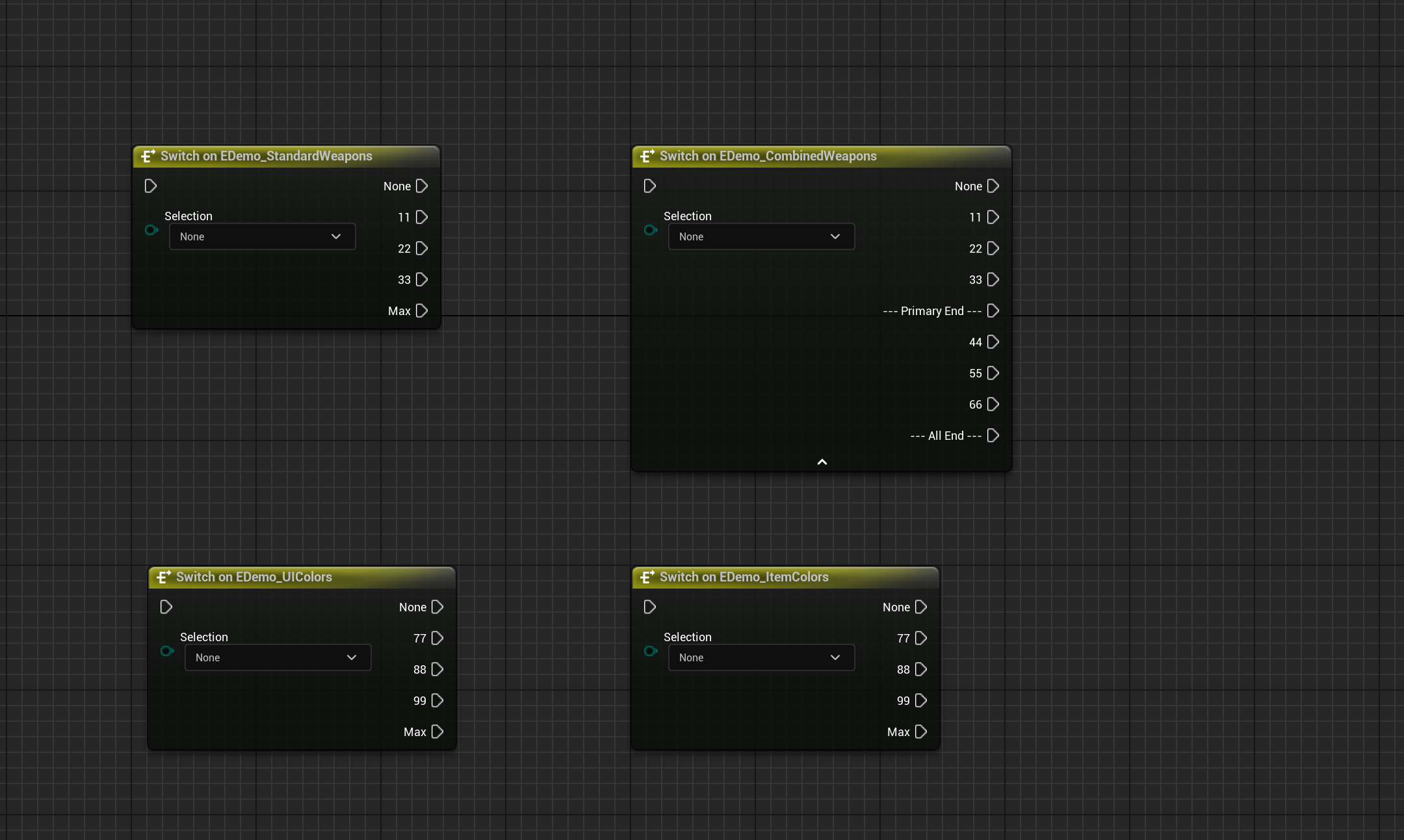
The plugin generates enum values dynamically from configuration, enabling:
- Adding enum values without modifying code
- Consistent naming across systems
- Shared configuration across multiple enums
⚠️ Important Notes and Limitations
Section titled “⚠️ Important Notes and Limitations”Blueprint Functions
Section titled “Blueprint Functions”- Issue: Blueprint functions store enum values as
FString, so enum name or position changes may not update automatically - Solution: Right-click the Blueprint function and choose Refresh to synchronize current enum values
DataAssets
Section titled “DataAssets”- Behavior: DataAssets use enum indices and synchronize automatically when names change
- Warning: Reordering enum values shifts DataAsset values; for example, swapping positions 1 and 2 causes a DataAsset storing value 1 to refer to position 2
- Recommendation: Avoid reordering existing enum entries in production; append new values only
Version History
Section titled “Version History”Open Edit → Project Settings, go to SimpleAutoEnum settings, and set Language to English or Chinese. English is the default. User-facing interfaces, prompts, notifications, and functional logs update immediately without restarting the editor; public API names and module startup/shutdown logs always remain in English.
Support
Section titled “Support”For usage questions or collaboration inquiries, visit the contact page.
- Contact: Contact and Collaboration
Supplementary Usage Instructions
Section titled “Supplementary Usage Instructions”SimpleAutoEnum User Guide
Section titled “SimpleAutoEnum User Guide”Define enum boundaries and a UDeveloperSettings class first, then associate configuration arrays using binding macros. The original examples cover one-to-one binding, multiple ranges, and shared arrays across enums.
Binding and Data Processing
Section titled “Binding and Data Processing”1. Bind with One Macro Line
Section titled “1. Bind with a Single-line Macro”// 传统方式:3个地方写代码// 配置类 -> 手动调用初始化 -> 手动监听变化
// SimpleAutoEnum:一行搞定SIMPLE_BIND_ENUM_TO_CONFIG(EAIType, None, MAX, UMySettings, AITypeList)How it works:
- Macro expansion creates a static initializer that registers automatically at engine startup
- No manual subsystem code is needed
- Anonymous namespaces prevent symbol conflicts
2. Comprehensive Data Validation
Section titled “2. Comprehensive Data Validation”// 自动去重["Soldier", "Archer", "Soldier"] → ["Soldier", "Archer"]
// 过滤空值和空格["", " ", "Mage "] → ["Mage"]
// 保护None/MAX["None", "Soldier", "MAX"] → ["Soldier"] // None和MAX不会被覆盖3. Flexible Boundary Definitions
Section titled “3. Flexible Boundary Definitions”// 标准模式UENUM(BlueprintType)enum class EWeaponType : uint8{ None, MAX};SIMPLE_BIND_ENUM_TO_CONFIG(EWeaponType, None, MAX, UMySettings, WeaponList)
// 自定义边界UENUM(BlueprintType)enum class EQuestState : uint8{ Begin, End};SIMPLE_BIND_ENUM_TO_CONFIG(EQuestState, Begin, End, UMySettings, QuestList)4. Complete Logging System
Section titled “4. Complete Logging System”LogSimpleAutoEnum: Log: Registered pending enum binding: EAIType -> UMySettings::AITypeListLogSimpleAutoEnum: Log: Processing 3 pending enum bindings from static initializationLogSimpleAutoEnum: Log: Processed enum binding: EAIType -> UMySettings::AITypeListLogSimpleAutoEnum: Warning: Duplicate value found: "Soldier"These logs help diagnose problems.
Usage Examples
Section titled “Usage Examples”The plugin supports three common usage patterns for different scenarios.
Example 1: Standard Usage — One-to-One Binding
Section titled “Example 1: Standard Usage — One-to-One Binding”The most common pattern binds one enum to one configuration array.
// 1. 定义枚举框架UENUM(BlueprintType)enum class EWeaponType : uint8{    None,    MAX};
// 2. 创建配置类UCLASS(Config=Game, DefaultConfig, meta=(DisplayName="Game Settings"))class UMyGameSettings : public UDeveloperSettings{    GENERATED_BODY()public:    UPROPERTY(Config, EditAnywhere, Category="Weapons")    TArray<FString> WeaponsList;};
// 3. 绑定枚举SIMPLE_BIND_ENUM_TO_CONFIG(EWeaponType, None, MAX, UMyGameSettings, WeaponsList)
Configuration:
WeaponsList: ["剑", "斧", "弓", "法杖"]Result:
EWeaponType::None, 剑, 斧, 弓, 法杖, EWeaponType::MAXExample 2: Range Binding — Combining Multiple Arrays
Section titled “Example 2: Range Binding — Combining Multiple Arrays”Bind multiple configuration arrays to different ranges of one enum for category management.
// 定义带有多个边界的枚举UENUM(BlueprintType)enum class ECombinedWeapons : uint8{    None            UMETA(DisplayName = "None"),    PrimaryEnd      UMETA(DisplayName = "--- Primary End ---"),    AllWeaponsEnd   UMETA(DisplayName = "--- All End ---")};
// 绑定主武器到第一个范围SIMPLE_BIND_ENUM_TO_CONFIG(ECombinedWeapons, None, PrimaryEnd, UMyGameSettings, PrimaryWeaponsList)// 绑定副武器到第二个范围SIMPLE_BIND_ENUM_TO_CONFIG(ECombinedWeapons, PrimaryEnd, AllWeaponsEnd, UMyGameSettings, SecondaryWeaponsList)
Configuration:
PrimaryWeaponsList: ["长剑", "战斧"]SecondaryWeaponsList: ["匕首", "手枪"]Result:
None, 长剑, 战斧, PrimaryEnd, 匕首, 手枪, AllWeaponsEndUse cases:
- Weapon systems (primary/secondary/special weapons)
- Skill categories (active/passive/ultimate skills)
- Item categories (consumables/equipment/materials)
Example 3: Shared Array — Multiple Enums
Section titled “Example 3: Shared Array — Multiple Enums”Multiple enums use the same configuration array to maintain consistent categories.
// 品质等级枚举(用于UI显示)UENUM(BlueprintType)enum class EUIQuality : uint8{    None,    Max};SIMPLE_BIND_ENUM_TO_CONFIG(EUIQuality, None, Max, UMyGameSettings, QualityLevelsArray)
// 物品品质枚举(用于道具系统)UENUM(BlueprintType)enum class EItemQuality : uint8{    Begin,    End};// 使用同一个配置数组,保证UI和物品系统的品质分类一致SIMPLE_BIND_ENUM_TO_CONFIG(EItemQuality, Begin, End, UMyGameSettings, QualityLevelsArray)
Configuration:
QualityLevelsArray: ["普通", "优秀", "稀有", "史诗", "传说"]Result:
// EUIQuality枚举:None, 普通, 优秀, 稀有, 史诗, 传说, Max
// EItemQuality枚举:Begin, 普通, 优秀, 稀有, 史诗, 传说, End
// 两个枚举的索引值完全对应// EUIQuality::普通 (索引1) 和 EItemQuality::普通 (索引1)// EUIQuality::传说 (索引5) 和 EItemQuality::传说 (索引5)
Use cases:
- Color tiers (consistent UI/item/effect colors)
- Rarity tiers (consistent equipment/item/monster grading)
- Difficulty tiers (consistent level/quest/Boss difficulty)
Usage Notes
Section titled “Usage Notes”Check enum boundaries, configuration-array ordering, empty strings, and duplicates. When multiple enums share an array, preserve the relationship between each enum’s boundaries and the array indices.