SimpleAssetCleaner User Manual
Complete English product manual for SimpleAssetCleaner
SimpleAssetCleaner automatically identifies and removes unreferenced assets in Unreal Engine projects to keep repositories tidy.
Important: This plugin can delete assets from version control. Read carefully before use.
Compatibility: Unreal Engine 5.2–5.8
Cleanup Scope
Section titled “Cleanup Scope”Project Content Only
Section titled “Project Content Only”- Only assets in the project’s
/Content/folder (/Game/path)
Untouched Content
Section titled “Untouched Content”- Plugin assets such as
/PluginName/Content/ - Engine assets
- Code files (C++ headers/source files)
- References outside
/Content/
How It Works
Section titled “How It Works”The plugin uses reference-chain analysis:
- Root assets - Always considered “in use,” such as maps, Blueprints, and DataAssets
- Reference chains - Assets directly or indirectly referenced by roots are considered “in use”
- Unreferenced assets - Assets unreachable from every root are cleaned up
Automatic Cleanup on Submission (Recommended)
Section titled “Automatic Cleanup on Submission (Recommended)”- Triggered when opening the version control submission dialog
- Checks only newly added files
- Reverts unreferenced files from version control
- Local copies are safe - Files are not deleted from disk
Automatically Add Untracked Dependencies on Submission
Section titled “Automatically Add Untracked Dependencies on Submission”When submitting a changelist, the plugin automatically checks dependencies of assets being submitted. If dependent files are not yet under version control, a dialog lists them. Select the dependencies to add using checkboxes; confirming automatically adds them to version control.
- Trigger: Automatically when submitting a changelist
- Detection: Files depended on by pending assets that are not yet under version control
- Operation: A dialog lists untracked dependencies; select and confirm to add them
- Toggle: Enable or disable this through “Enable Auto Add Dependencies” in settings
Context Menu
Section titled “Context Menu”Right-click folders or assets in the Content Browser and choose the Simple Asset Cleaner submenu for these features:
Clean Unreferenced Assets
Section titled “Clean Unreferenced Assets”Scans assets in the selection and displays unreferenced assets with checkboxes. Cleanup runs after the user selects and confirms them.
- Supports selecting one or multiple files or folders
- Newly added files: reverted, with local copies retained
- Tracked files: deleted from both server and local disk
Add Untracked Dependencies
Section titled “Add Untracked Dependencies”Checks dependencies of selected assets, finds files outside version control, and lists them for user confirmation before adding them.
- Supports selecting one or multiple files or folders
The context menu acts precisely on the selection, making it suitable for everyday cleanup and dependency checks on particular directories or assets.
Configuration
Section titled “Configuration”Location: Editor > Project Settings > General > Simple Asset Cleaner
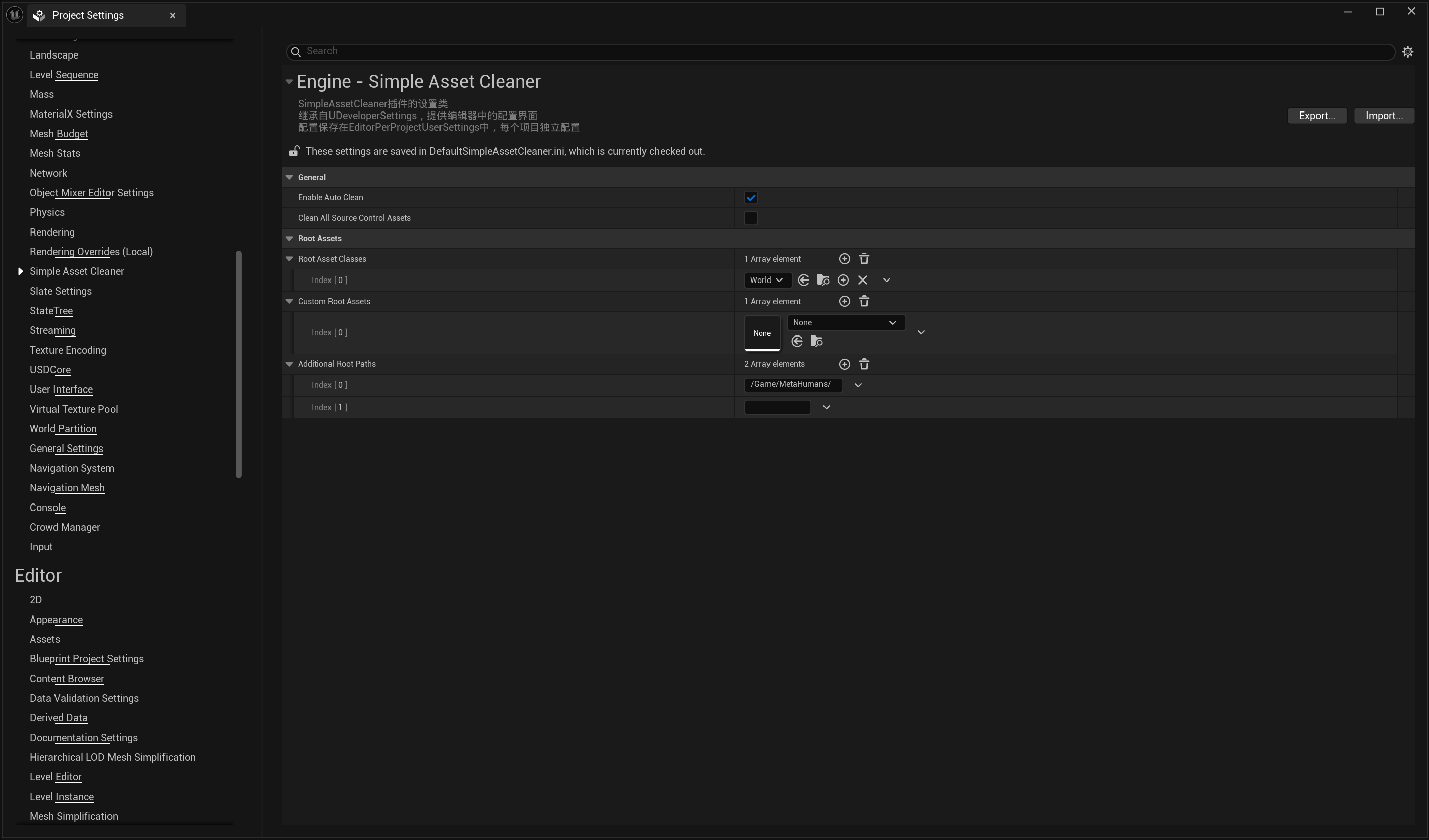
Version Control Provider (Important!)
Section titled “Version Control Provider (Important!)”The plugin automatically wraps your version control provider in a proxy to monitor submissions.
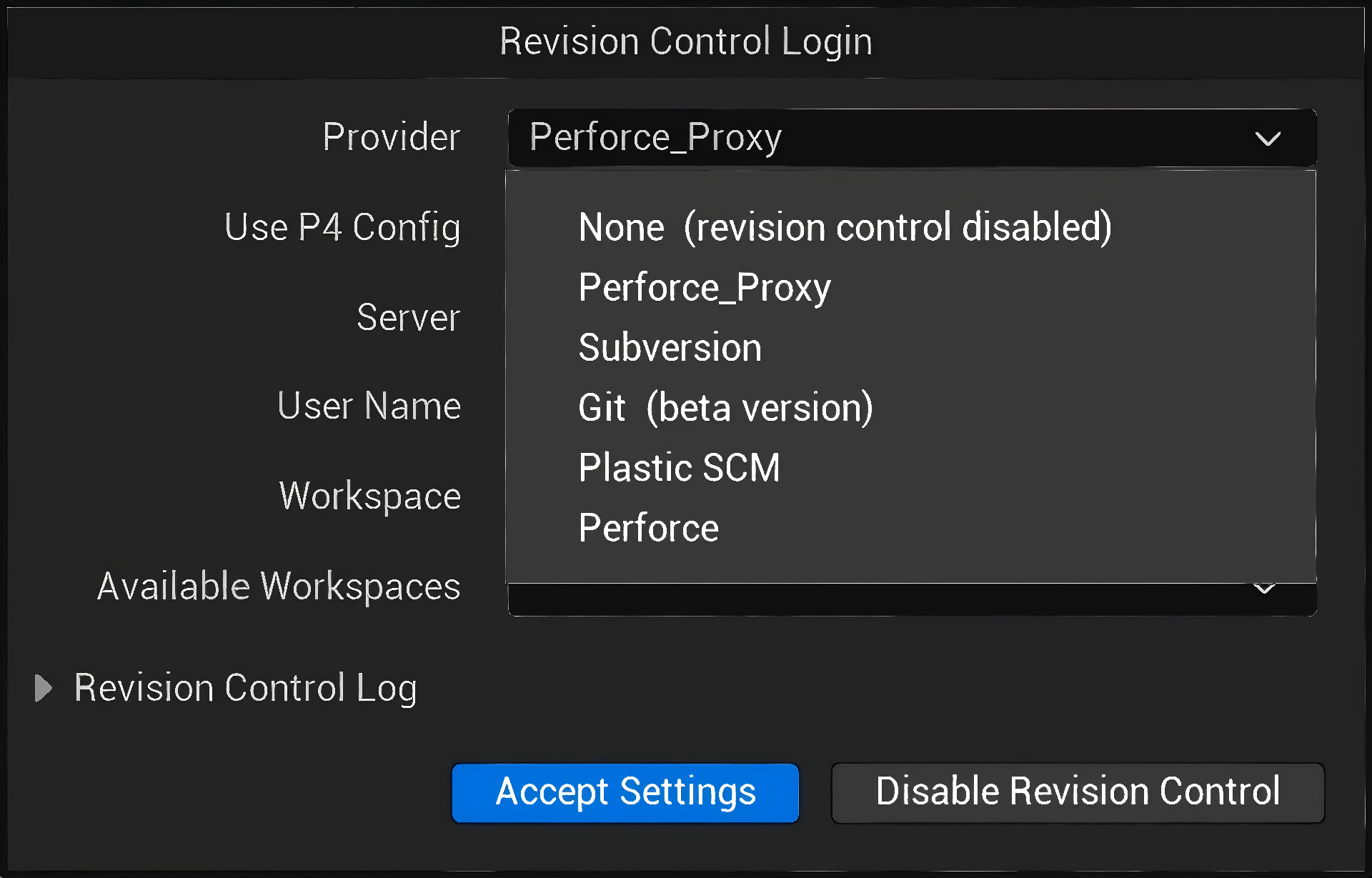
Do not select a proxy provider manually!
- Always select your actual version control provider, such as Perforce, Git, or SVN
- The plugin wraps it automatically in the background
- Selecting a proxy directly may cause problems
Correct settings:
- Use:
Perforce,Git,Subversion, etc. - Avoid:
Perforce_Proxy,Git_Proxy, or any provider ending in_Proxy
General Settings
Section titled “General Settings”Enable Auto Clean
Section titled “Enable Auto Clean”- Default: Enabled
- Function: Check references before submission
- Behavior: Revert unreferenced newly added files, preserving local files
- Recommendation: Keep enabled for everyday use
Enable Auto Add Dependencies
Section titled “Enable Auto Add Dependencies”- Default: Enabled
- Function: Automatically detect untracked dependency files during submission
- Behavior: A dialog lists untracked dependencies; selected files are added after confirmation
- Recommendation: Keep enabled to prevent missing dependencies from breaking other team members’ builds
Language
Section titled “Language”- Default: English
- Options: Chinese / English
- Function: Switch the language of all UI text and logs
- Behavior: Takes effect immediately without restarting the editor
Enable Verbose Logging
Section titled “Enable Verbose Logging”- Default: Disabled
- Function: Detailed logs for debugging
- Recommendation: Enable only when troubleshooting
Root Asset Configuration
Section titled “Root Asset Configuration”Root Asset Classes
Section titled “Root Asset Classes”- Default:
UWorld(map files) - Function: Assets of these types, including parent/derived classes, are treated as roots
- Example:
UWorld- Maps (.umap) and derived typesUDataAsset- DataAssets and derived types
- Note: Parent classes and all derived classes are automatically included
Custom Root Assets
Section titled “Custom Root Assets”- Function: Manually designate individual assets as roots
- Example:
/Game/Core/GameMode.GameMode - Purpose: Critical assets not covered by Root Asset Classes
Additional Root Paths
Section titled “Additional Root Paths”- Function: All assets under these paths are treated as roots
- Example:
/Game/Essential/,/Game/Core/ - Purpose: Protect entire system folders from cleanup
Important Notes
Section titled “Important Notes”Operation Comparison
Section titled “Operation Comparison”| Asset status | Automatic cleanup on submission | Context-menu “Clean Unreferenced Assets” |
|---|---|---|
| Newly added | Revert, retain local copy | Revert, retain local copy |
| Tracked | No action | Delete (server + local) |
Automatic Dependency Addition
Section titled “Automatic Dependency Addition”| Dependency status | Action |
|---|---|
| Already under version control | No action required |
| Not under version control | Listed in a confirmation dialog for the user to select files to add |
Support
Section titled “Support”When reporting issues, provide:
- Unreal Engine version
- Version control system (Perforce/Git/SVN)
- Plugin settings screenshot
- Log output with verbose logging enabled
Compatibility: Unreal Engine 5.2–5.8 | Tested on Windows; theoretically supports all platforms
Remember: Start conservatively. Assets can always be deleted, but restoration requires version control history!
Contact
Section titled “Contact”For usage questions or collaboration inquiries, visit the contact page.
- Contact: Contact and Collaboration
Supplementary Usage Instructions
Section titled “Supplementary Usage Instructions”SimpleAssetCleaner User Guide
Section titled “SimpleAssetCleaner User Guide”Identifies candidate unreferenced assets using roots and reference relationships, with entry points for submission handling and full cleanup.
Installation and Configuration
Section titled “Installation and Configuration”Step 1: Install the Plugin
Section titled “Step 1: Install the Plugin”-
Copy the plugin folder into your project’s
PluginsdirectoryYourProject/└── Plugins/└── SimpleAssetCleaner/ -
Open the project and search for
SimpleAssetCleanerunderEdit > Plugins -
Enable it and restart the editor
Step 2: Basic Configuration
Section titled “Step 2: Basic Configuration”Open project settings: Editor > Project Settings > General > Simple Asset Cleaner
Automatic cleanup toggle:
Configure the root assets and protected paths to retain before checking Enable Auto Clean.
With default configuration, the plugin:
- Uses all maps as root assets
- Automatically checks and cleans on submission
- Protects plugin and engine assets outside the project
Advanced configuration (recommended for teams):
1. Configure root asset types
Add to Root Asset Classes:
UWorld- Maps (included by default)UBlueprint- Blueprint classes, if Blueprints are core assetsUDataAsset- DataAssets, if the project has substantial configuration data
2. Add protected paths
Add to Additional Root Paths:
/Game/Core/- Core systems directory/Game/Config/- Configuration directory/Game/Managers/- Manager directory
3. Optionally enable verbose logging
On first use, enable Enable Verbose Logging to observe the plugin. Once familiar, disable it to reduce log output.
Step 3: Start Using It
Section titled “Step 3: Start Using It”Daily work:
Check candidate unreferenced assets according to configuration during submission and review the results.
Deep cleanup:
To clean the entire project, click Clean All Source Control Assets in settings.
Features and Parameters
Section titled “Features and Parameters”Submission Handling
Section titled “Submission Handling”With automatic cleanup enabled, the tool processes files during submission using reference-analysis results.
Workflow:
- Work normally, creating or modifying assets
- Add assets to version control (Add to Source Control)
- Open the submission dialog to prepare a submission
- The plugin automatically detects in the background which assets are unreferenced
- Unreferenced assets are automatically removed from the submission list (reverted)
- The submission dialog shows only files that actually need to be submitted
Typical scenario:
An artist tests 10 materials, but only 2 are ultimately used in the scene. During submission, the plugin identifies and reverts the 8 unreferenced materials, leaving a clean submission list.
Full Cleanup
Section titled “Full Cleanup”Besides daily automatic cleanup, SimpleAssetCleaner offers full cleanup for periodic maintenance or major version changes.
Use cases:
- Cleanup before a major project version change
- Taking over a legacy project and removing accumulated unused content
- Regular maintenance to keep the repository healthy
Procedure:
- Open
Editor > Project Settings > General > Simple Asset Cleaner - Click
Clean All Source Control Assets - Wait for scanning to finish; a progress bar is shown
- Review logs to see which assets were cleaned
Safety measures:
| Asset status | Action |
|---|---|
| Newly added, unsubmitted, unreferenced asset | Revert from version control, retaining the local file |
| Submitted, unreferenced asset | Delete from version control and local disk |
Important reminder:
Full cleanup deletes submitted unreferenced files. Before using it:
- Ensure complete version control history is available for recovery
- Try it on a test branch first
- Communicate with team members in advance
Root Asset Configuration
Section titled “Root Asset Configuration”SimpleAssetCleaner uses “root assets” to determine whether assets are in use.
What is a root asset?
Root assets are the most central assets in your project, such as:
- Map files (.umap)
- Main Blueprint classes, such as GameMode and PlayerController
- Configuration data tables
Starting from these roots, the plugin tracks all directly or indirectly referenced assets. Assets on these reference chains are retained; others are considered unreferenced.
Three configuration methods:
1. Root Asset Classes
Specify which asset types are roots. UWorld (maps) is included by default.
Common configurations:
UWorld- All maps (included by default)UBlueprint- All Blueprint classesUDataAsset- All DataAssetsUDataTable- All data tables
2. Custom Root Assets
Manually designate particular assets as roots, useful for important assets of less common types.
For example:
/Game/Core/MainGameMode- Main game mode/Game/Config/GlobalSettings- Global configuration
3. Additional Root Paths
Protect all assets in an entire directory. These assets and everything they reference are retained.
For example:
/Game/Core/- Core systems directory/Game/Config/- Configuration directory/Game/Essential/- Essential assets directory
How it works:
Map A (root asset)  ├─ References material M1  │   └─ References texture T1 ✅ Retain  └─ References Blueprint BP1      └─ References material M2 ✅ Retain
Material M3 ❌ Not referenced by any root → Clean up
Logging Options
Section titled “Logging Options”The plugin provides optional verbose logging for debugging and monitoring.
Enable it:
Check Enable Verbose Logging in project settings
Logs include:
- Files scanned
- Unreferenced assets detected
- Cleanup operations performed
- Reference-chain tracing for debugging
Enable verbose logging on first use or when problems arise to understand the plugin’s operation.
Scope and Notes
Section titled “Scope and Notes”5.1 Configuration Recommendations
Section titled “5.1 Configuration Recommendations”✅ Recommended practices:
- Automatic cleanup configuration - Review settings periodically as project assets change
- Define roots and protection scope first - Cover maps, Blueprints, configuration assets, and directories that must be retained
- Add asset types gradually - Determine which types are core assets, such as Blueprints and data tables
- Protect critical directories - Prevent accidental deletion of core systems
- Enable verbose logging on first use - Observe how the plugin works
⚠️ Notes:
- Try it on a test branch first - Check that cleanup matches expectations
- Ensure version control recovery before full cleanup - Keep at least one recoverable commit
- Use consistent team configuration - Put configuration files under version control so all members use the same rules
- Review configuration periodically - Core asset types may change as the project evolves
5.2 Source Control Providers
Section titled “5.2 Source Control Providers”SimpleAssetCleaner supports all version control systems supported by Unreal Engine:
- ✅ Perforce
- ✅ Git
- ✅ SVN
- ✅ Plastic SCM
- ✅ Other systems integrated through the UE API
Configuration points:
Choose your actual provider, such as Perforce, Git, or Subversion, under Editor > Preferences > Source Control.
⚠️ Important: Do not choose options ending in _Proxy, such as Perforce_Proxy. These are internal plugin implementations and are handled automatically.
5.3 Cleanup Results
Section titled “5.3 Cleanup Results”| Asset status | Automatic cleanup (submission) | Manual full cleanup |
|---|---|---|
| Newly added unreferenced asset | Revert (retain local copy) | Revert (retain local copy) |
| Submitted unreferenced asset | No action | Delete (server + local) |
| Referenced asset | Submit normally | Retain |
| Plugin and engine assets | No action | No action |
5.4 Protected Assets
Section titled “5.4 Protected Assets”SimpleAssetCleaner analyzes and cleans only assets in the project Content directory (/Game/ path).
Assets outside cleanup scope:
- ❌ Plugin assets, such as
/YourPlugin/Content/ - ❌ Engine assets (
/Engine/path) - ❌ C++ code files (.h, .cpp)
- ❌ External references (files outside Content)
Assets retained through root configuration:
- ✅ Assets of configured root types
- ✅ Assets listed as custom roots
- ✅ All assets under root paths
- ✅ Assets directly or indirectly referenced by any of the above