SimpleTCPServer User Guide
Complete product user guide for SimpleTCPServer
SimpleTCPServer is a lightweight TCP server plugin designed for Unreal Engine.
It supports multi-channel listening, dynamic configuration updates, and offers a fully Blueprint-exposed API for managing client connections at runtime.
Compatibility
Section titled “Compatibility”- Unreal Engine 5.2–5.8
- Version 1.1.0 (Version 2)
🔧 Plugin Initialization
Section titled “🔧 Plugin Initialization”Once enabled, the plugin activates automatically.
It registers as a GameInstanceSubsystem, and its lifecycle persists across level transitions.
⚙️ Static Channel Configuration (Optional)
Section titled “⚙️ Static Channel Configuration (Optional)”You can define server listening channels via Project Settings → SimpleTCPServer Settings.
Using this method is recommended for centralized management and ease of debugging.
🔹 Channel Config Fields
Section titled “🔹 Channel Config Fields”| Field Name | Example | Description |
|---|---|---|
| Channel Name | MainServer | The name used in Blueprints to refer to channel |
| Bind Address (IP:Port) | 0.0.0.0:8888 | Address to bind the listening socket |
| Max Connections | 32 | Max number of concurrent client connections |
| Max Receive Bytes | 1024 | Max buffer size for each message |
🧠 Blueprint Node Interface
Section titled “🧠 Blueprint Node Interface”📥 Receiving
Section titled “📥 Receiving”| Node Function | Description |
|---|---|
BindMessageHandle | Bind message receive delegate |
UnbindMessageHandle | Unbind a specific delegate |
UnbindAllMessageHandle | Unbind all delegates |
🔌 Connection Status Callback
Section titled “🔌 Connection Status Callback”| Node Function | Description |
|---|---|
BindConnectHandle | Bind delegate for client connect/disconnect |
UnbindConnectHandle | Unbind a specific connection delegate |
UnbindAllConnectHandle | Unbind all connection delegates |
📤 Sending
Section titled “📤 Sending”| Node Function | Description |
|---|---|
SendMessage | Send byte array to a specific SessionChannel |
BroadcastMessage | Send byte array to all connections on a channel |
⚙️ Channel & Connection Management
Section titled “⚙️ Channel & Connection Management”| Node Function | Description |
|---|---|
StartServer | Start listening on a server channel |
StopServer | Stop listening and disconnect all clients on the channel |
IsServerRunning | Check if a server channel is running |
GetAllSessions | Get all current SessionChannels on a listening channel |
IsSessionConnected | Check if a session is still connected |
UpdateTCPServerConfig | Update channel config (hot reload supported) |
GetTCPServerConfig | Get current config of a channel |
🔁 Socket Lifecycle
Section titled “🔁 Socket Lifecycle”| Type | Created When | Destroyed When |
|---|---|---|
| Listening Socket | When calling StartServer | When calling StopServer |
| Session Socket | When a client is accepted | When client disconnects or socket is destroyed |
🧪 Blueprint Example (Images)
Section titled “🧪 Blueprint Examples (Images)”All Node Overview
Section titled “All Node Overview”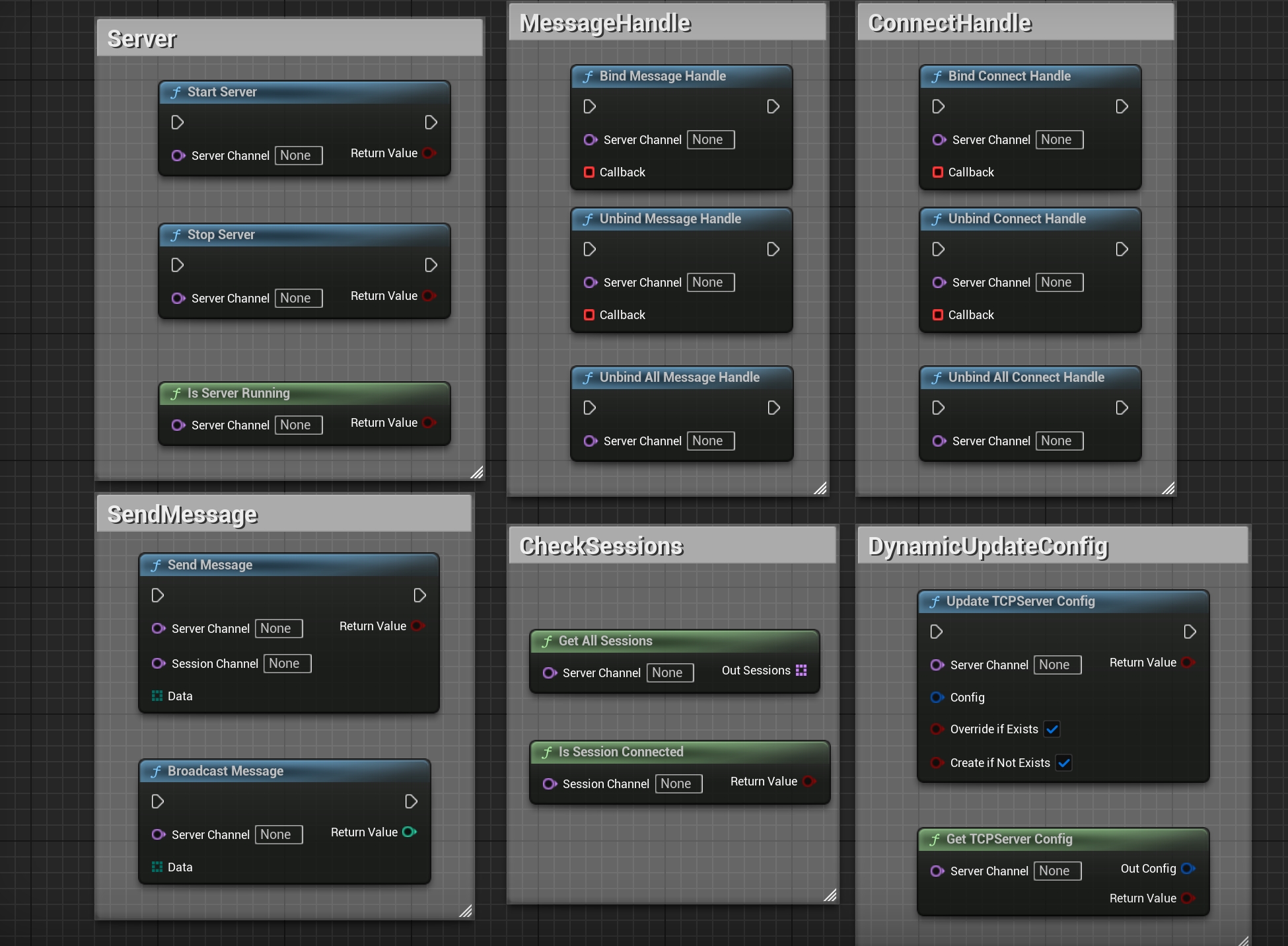
✅ Notes & Tips
Section titled “✅ Notes & Tips”- Only IPv4 is supported — domain name, IPv6, and encryption are not supported
- All sockets are internally managed, no manual cleanup required
- Plugin persists across level transitions, bound to GameInstance lifecycle
- Each connected client is assigned a unique
SessionChannelin format"IP:Port"
🔧 Recommended Companion Plugins
Section titled “🔧 Recommended Companion Plugins”-
🔌 SimpleTCPClient Plugin
Lightweight plugin designed for client-side usage, ideal for connecting to a SimpleTCPServer instance. -
🧩 SimpleByteConversion Plugin Enables conversion between native Unreal types (e.g., FString, float, int) and
TArray<uint8>, ideal for building structured protocols.
Native TCP server implementation
2.3 Basic TCP server implementation
Listen on a port:
bool StartTCPServer(int32 Port){    ISocketSubsystem* SocketSubsystem = ISocketSubsystem::Get(PLATFORM_SOCKETSUBSYSTEM);
    // 创建监听Socket    FSocket* ListenSocket = SocketSubsystem->CreateSocket(NAME_Stream, TEXT("TCP Server"), false);
    // 绑定端口    TSharedRef<FInternetAddr> Addr = SocketSubsystem->CreateInternetAddr();    Addr->SetPort(Port);    Addr->SetAnyAddress();
    if (!ListenSocket->Bind(*Addr))    {        UE_LOG(LogTemp, Error, TEXT("绑定端口失败: %d"), Port);        return false;    }
    // 开始监听(最大8个待连接队列)    if (!ListenSocket->Listen(8))    {        UE_LOG(LogTemp, Error, TEXT("监听失败"));        return false;    }
    UE_LOG(LogTemp, Log, TEXT("TCP服务器启动,端口: %d"), Port);    return true;}
Accept a client connection:
void AcceptClients(FSocket* ListenSocket){    ISocketSubsystem* SocketSubsystem = ISocketSubsystem::Get(PLATFORM_SOCKETSUBSYSTEM);    TSharedRef<FInternetAddr> ClientAddr = SocketSubsystem->CreateInternetAddr();    FSocket* ClientSocket = ListenSocket->Accept(*ClientAddr, TEXT("TCP Client"));
    if (ClientSocket)    {        FString ClientIP = ClientAddr->ToString(false);        int32 ClientPort = ClientAddr->GetPort();
        UE_LOG(LogTemp, Log, TEXT("客户端连接: %s:%d"), *ClientIP, ClientPort);
        // 存储客户端Socket用于后续通讯    }}
Listener and session lifetimes
These native examples demonstrate Bind, Listen, and Accept; they are not SimpleTCPServer Blueprint interfaces. Retain ownership of both listening and accepted sockets, and release them on failure, shutdown, or disconnection. The local pointers in these functions do not form a complete server lifecycle.
Listen(8) sets the queue for connections waiting to be accepted. It is not the plugin’s total client limit. IP:Port identifies a network endpoint, not a persistent user identity or authentication. Client data still needs stream framing, partial read/write handling, timeouts, and permission checks. Multiple-client handling should also avoid blocking the game thread.
See the TCP client and network communication guide for protocol choices and shared thread, reconnection, and byte-conversion guidance.
The native communication examples were published on Cnblogs on 2025-10-25.
Version History
Section titled “Version History”Open Edit → Project Settings, select the SimpleTCPServer settings page, and set Language to English or Chinese. English is the default. Available user-facing UI, tooltips, notifications, and functional logs update immediately without restarting the editor. Public API names and module startup/shutdown logs remain in English.
Support
Section titled “Support”For usage questions or collaboration, please visit the contact page.
- Contact: Contact and collaboration