SimpleTCPClient User Guide
Complete product user guide for SimpleTCPClient
SimpleTCPClient is a lightweight TCP client plugin designed for Unreal Engine.
It supports runtime dynamic configuration of client channels, and all functionality is exposed to Blueprint for easy integration.
Choosing a protocol and finding the right tutorial
UDP is often used for frequent sensor, simulator, and LAN data. TCP provides an ordered byte stream between clients and servers. WebSocket suits existing web services, browser control panels, and real-time messages across languages. Choose based on tolerance for packet loss, latency, message format, and deployment conditions; a protocol name alone does not establish reliability or cost.
- SimpleUDP tutorial: UDP send/receive channels, address filtering, and native socket examples.
- TCP client and network communication guide: outgoing TCP connections, reconnection, and shared architecture.
- SimpleTCPServer tutorial: listening, accepting clients, and managing sessions.
- SimpleWebSocket tutorial: named connections, message delegates, and WebSockets module examples.
- SimpleByteConversion tutorial: conversion between application types and byte arrays.
The original technical record also mentions the Send Http Request Blueprint node and third-party libraries for MQTT or gRPC where needed. Availability of a particular HTTP node depends on the modules or plugins enabled in the project; check your project. Those protocol implementations are outside this guide.
Compatibility
Section titled “Compatibility”- Unreal Engine 5.2–5.8
- Version 1.1.0 (Version 2)
🔧 Plugin Initialization
Section titled “🔧 Plugin Initialization”The plugin is automatically activated after being enabled.
It registers internally as a GameInstanceSubsystem, requiring no manual startup or shutdown code.
⚙️ Static Channel Configuration (Optional)
Section titled “⚙️ Static Channel Configuration (Optional)”You can predefine client channels via Project Settings → SimpleTCPClient Settings.
It is recommended to configure channels here for easier management.
🔹 Client Channel Config Fields
Section titled “🔹 Client Channel Config Fields”| Field | Example | Description |
|---|---|---|
| Channel Name | DefaultClient | Name used in Blueprint to reference channel |
| Remote Address (IP:Port) | 127.0.0.1:8888 | The target address to connect |
| Auto Connect | True | Whether to auto-connect on startup |
| Auto Reconnect Interval | 1.0 (seconds) | Interval between reconnection attempts |
| Max Receive Bytes | 1024 | Max size per receive |
🧠 Blueprint Node Interface
Section titled “🧠 Blueprint Node Interface”📥 Receiving
Section titled “📥 Receiving”| Node Function | Description |
|---|---|
BindMessageHandle | Bind a message receive delegate |
UnbindMessageHandle | Unbind a specific delegate |
UnbindAllMessageHandle | Unbind all delegates and close socket |
📤 Sending
Section titled “📤 Sending”| Node Function | Description |
|---|---|
SendMessage | Send a byte array through a specific channel |
⚙️ Runtime Channel Management
Section titled “⚙️ Runtime Channel Management”| Node Function | Description |
|---|---|
StartConnection | Manually start a connection (for non-auto channels) |
StopConnection | Stop and destroy the socket |
IsConnected | Check whether a channel is currently connected |
UpdateTCPClientConfig | Create or update channel config (auto reconnects) |
GetTCPClientConfig | Get the current configuration of a channel |
🔁 Socket Lifecycle
Section titled “🔁 Socket Lifecycle”| Type | Created When | Destroyed When |
|---|---|---|
| Client Socket | When calling StartConnection or auto | When calling StopConnection or shutdown |
🧪 Blueprint Examples (Images)
Section titled “🧪 Blueprint Examples (Images)”All Blueprint Nodes
Section titled “All Blueprint Nodes”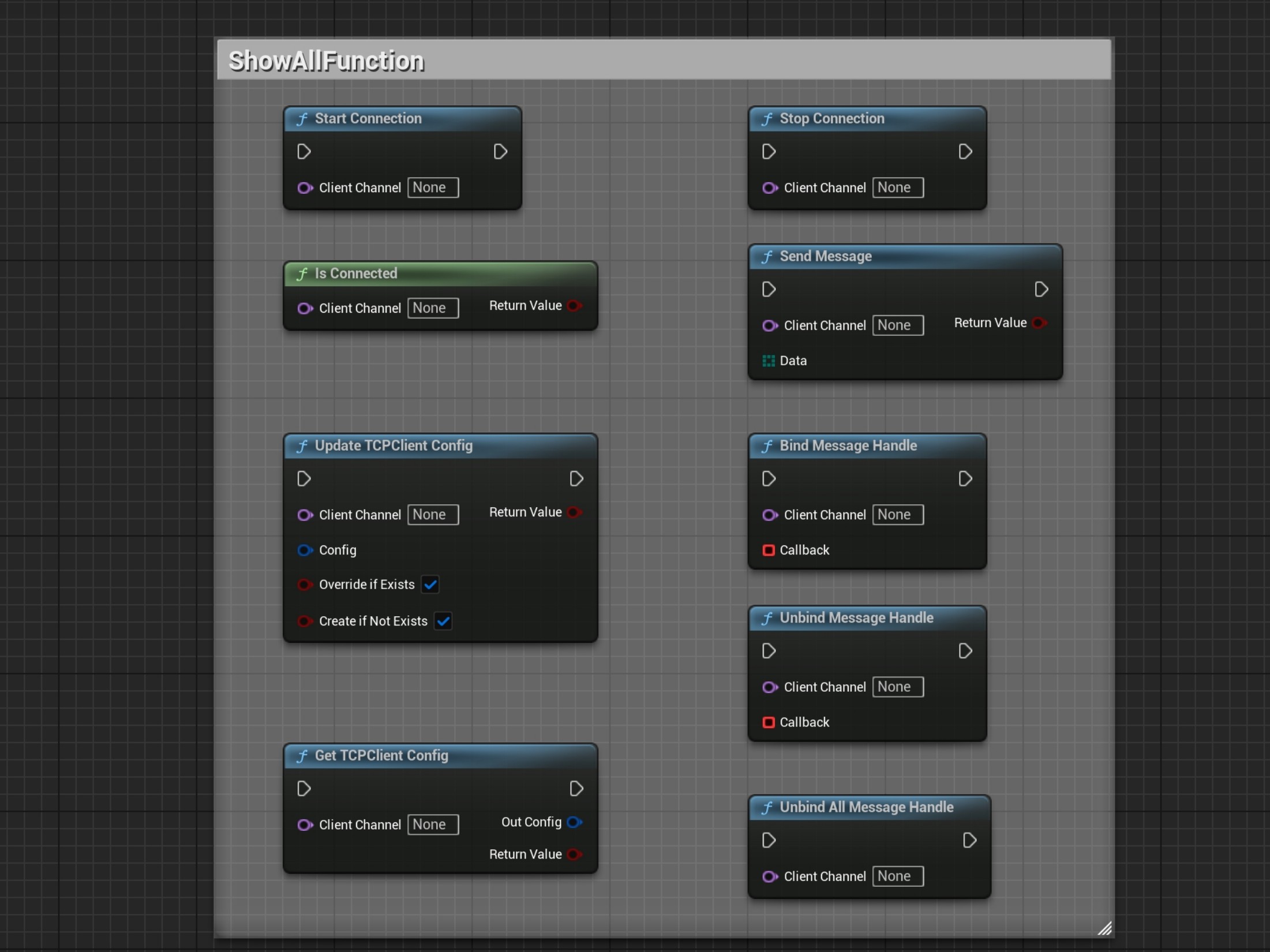
Manual Start/Stop Connection
Section titled “Manual Start/Stop Connection”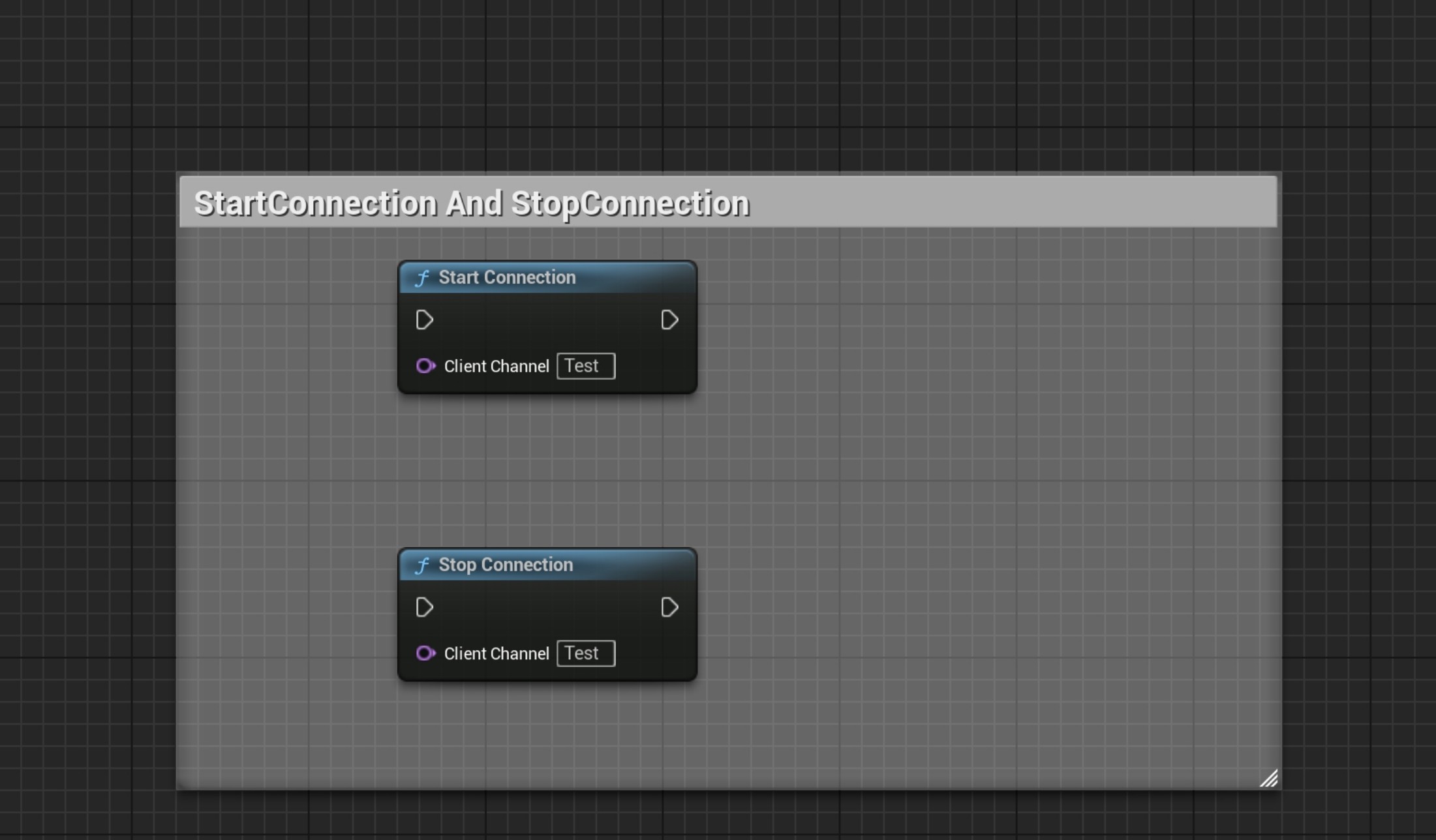
Note: If the channel is set to auto-connect and has a reconnect interval configured, manual startup is not required.
Bind & Unbind Message Handler
Section titled “Bind & Unbind Message Handler”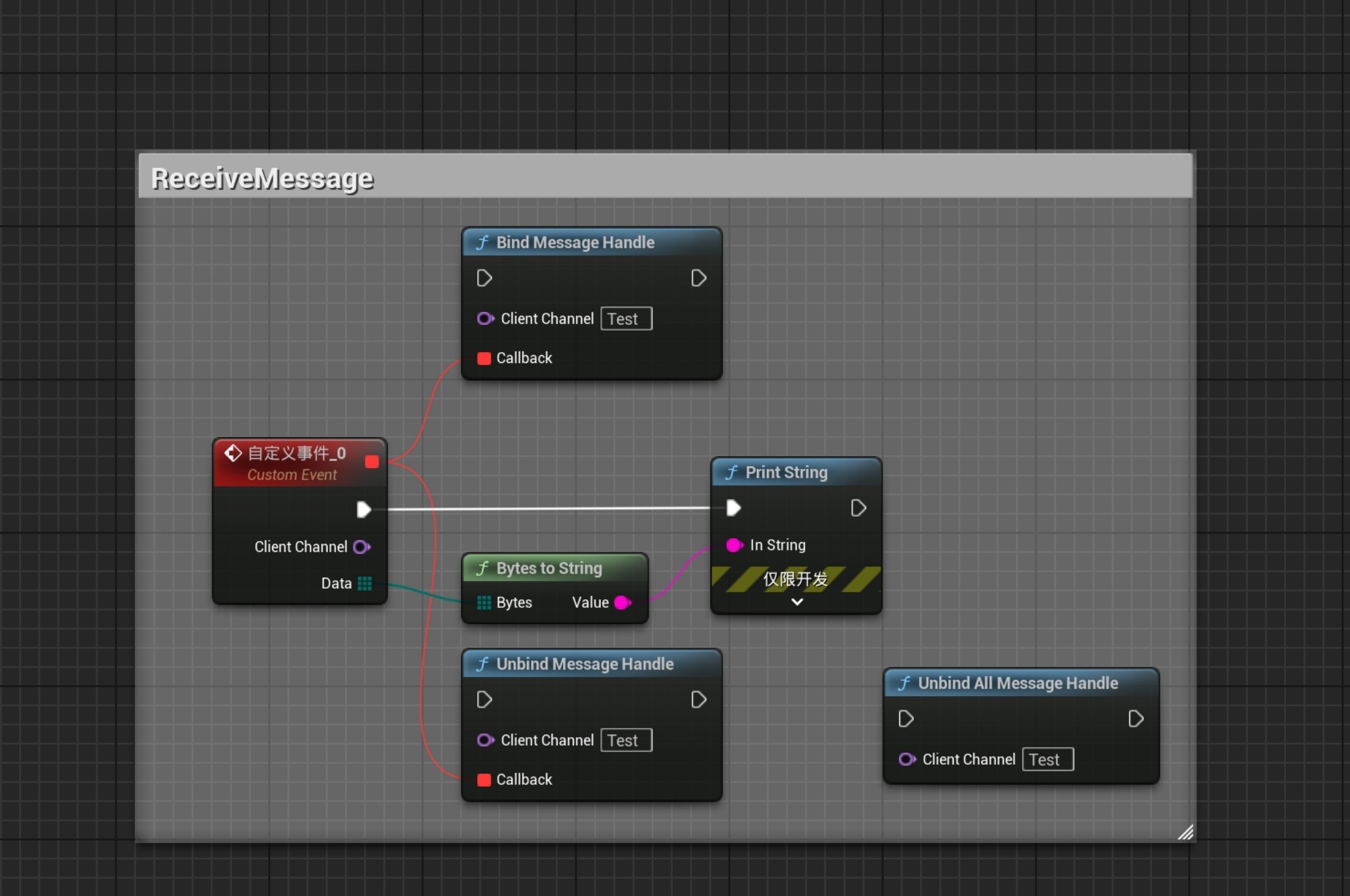
Dynamically Update Client Channel Config
Section titled “Dynamically Update Client Channel Config”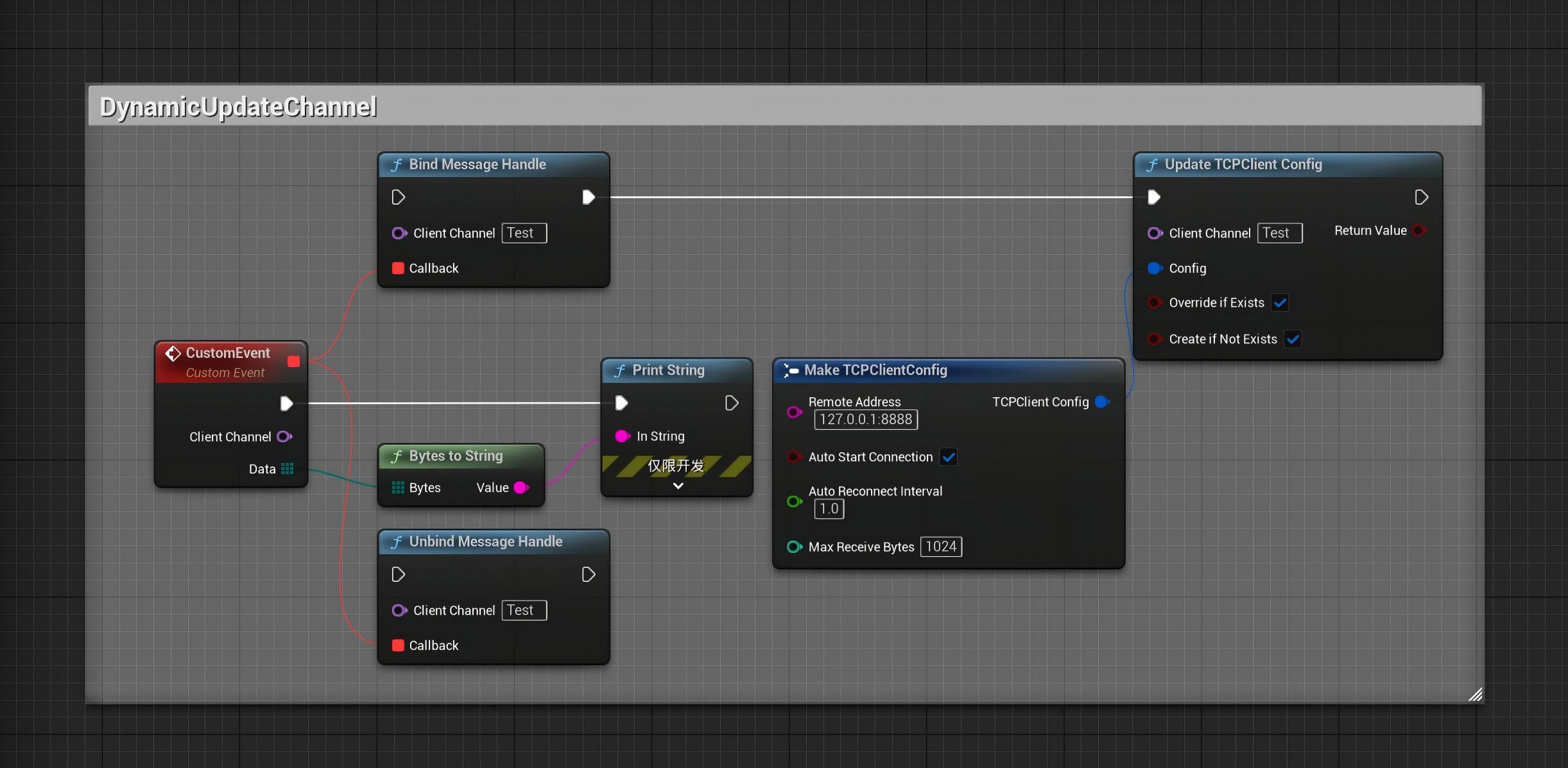
Note: The message delegate remains valid across socket reconnections. The update order does not matter — once config is updated, callbacks will still be triggered.
Send Message (String or Structured Data)
Section titled “Send Message (String or Structured Data)”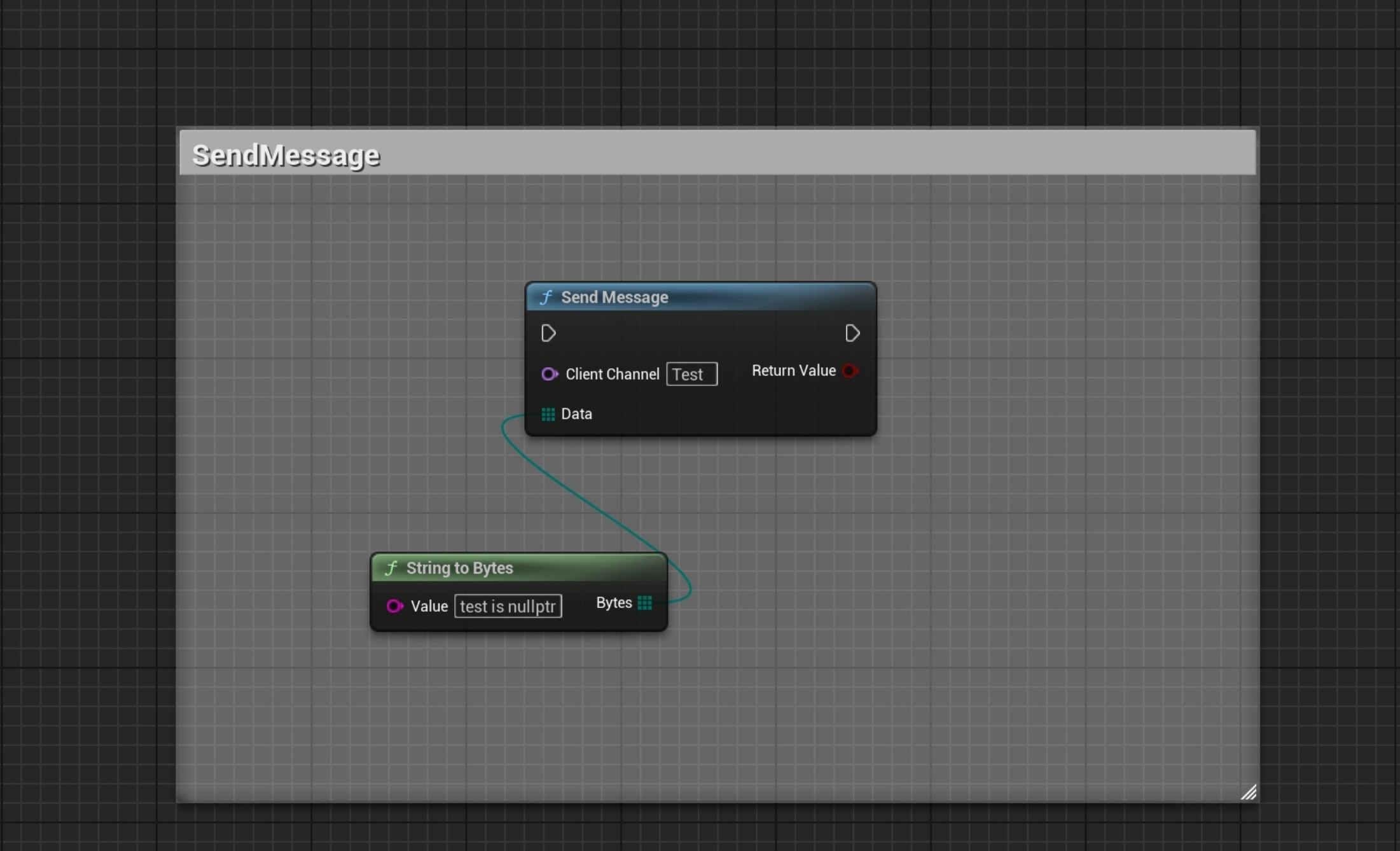
✅ Tips & Notes
Section titled “✅ Tips & Notes”- Only IPv4 is supported — no domain name, IPv6, or encryption
- All sockets are fully managed internally, no manual cleanup needed
- The plugin lives within the
GameInstancelifecycle, and is not affected by level transitions
🔧 Recommended Companion Plugin
Section titled “🔧 Recommended Companion Plugins”Use with SimpleByteConversion to easily convert common Unreal types (FString, float, int, etc.) to/from TArray<uint8> and build structured protocols.
Native TCP client implementation
2.1 Use cases
- Connecting to external servers, including Python/C# tools
- Sending commands that require reliable transport
- File transfer and resource downloads
- Bidirectional communication
2.2 Basic TCP client implementation
Connect to a server:
bool ConnectToTCPServer(const FString& IP, int32 Port){    ISocketSubsystem* SocketSubsystem = ISocketSubsystem::Get(PLATFORM_SOCKETSUBSYSTEM);
    // 创建TCP Socket    FSocket* ClientSocket = SocketSubsystem->CreateSocket(NAME_Stream, TEXT("TCP Client"), false);
    // 设置目标地址    TSharedRef<FInternetAddr> Addr = SocketSubsystem->CreateInternetAddr();    bool bIsValid;    Addr->SetIp(*IP, bIsValid);    Addr->SetPort(Port);
    if (!bIsValid)    {        UE_LOG(LogTemp, Error, TEXT("无效的IP地址: %s"), *IP);        return false;    }
    // 连接    if (ClientSocket->Connect(*Addr))    {        UE_LOG(LogTemp, Log, TEXT("TCP连接成功: %s:%d"), *IP, Port);        return true;    }    else    {        UE_LOG(LogTemp, Error, TEXT("TCP连接失败"));        return false;    }}
Send and receive data:
// 发送bool SendTCPData(FSocket* Socket, const TArray<uint8>& Data){    int32 BytesSent = 0;    return Socket->Send(Data.GetData(), Data.Num(), BytesSent);}
// 接收bool ReceiveTCPData(FSocket* Socket, TArray<uint8>& OutData){    uint32 PendingDataSize = 0;    if (Socket->HasPendingData(PendingDataSize))    {        OutData.SetNumUninitialized(PendingDataSize);        int32 BytesRead = 0;
        if (Socket->Recv(OutData.GetData(), OutData.Num(), BytesRead))        {            OutData.SetNum(BytesRead);            return true;        }    }    return false;}
Connection ownership and byte stream handling
These FSocket functions are native implementation examples, not SimpleTCPClient nodes. The connection function only returns a Boolean and does not give the caller a way to own and release the socket. Release resources for invalid addresses, failed connections, and shutdown. A synchronous Connect can wait, so keep it out of game-thread flows that need to remain responsive.
A successful Send does not mean one call sent every byte; continue according to the actual number sent. Recv returns part of a byte stream, which may not be one complete application message. Handle buffer limits, zero-byte reads, disconnections, and errors. Reliable TCP transport does not guarantee that an application command executes or that a disconnected session recovers automatically. Define message framing, acknowledgments, and recovery rules in the application protocol.
Channels, threads, reconnection, and message formats
The native socket examples cover basic sending and receiving. A project also needs to organize connections, application logic, and lifetimes:
- Use multiple channels for different ports and application functions.
- Process communication asynchronously to avoid blocking the game thread.
- Add reconnection attempts when a TCP client disconnects.
- Manage separate client sessions on a TCP server.
- Filter IP addresses with allowlists or blocklists, including CIDR where supported.
- Expose operations through Blueprint nodes where needed.
- Serialize structures to byte arrays and back; see the SimpleByteConversion tutorial.
SimpleTCPClient provides client channels, asynchronous handling, and reconnection controls. Use the corresponding guides for server sessions, UDP address filters, and named WebSocket connections. The two ends must agree whether to resend messages, log in again, or synchronize application state after the transport reconnects.
Start with the protocol, then socket creation and data transfer, followed by asynchronous handling, multiple channels, and Blueprint integration. C++ users can also use these examples to practice their own communication implementation. They do not include a complete production communication layer.
The native communication examples were published on Cnblogs on 2025-10-25.
Version History
Section titled “Version History”Open Edit → Project Settings, select the SimpleTCPClient settings page, and set Language to English or Chinese. English is the default. Available user-facing UI, tooltips, notifications, and functional logs update immediately without restarting the editor. Public API names and module startup/shutdown logs remain in English.
Support
Section titled “Support”For usage questions or collaboration, please visit the contact page.
- Contact: Contact and collaboration