SimpleUDP User Guide
Complete product user guide for SimpleUDP
SimpleUDP is a lightweight UDP communication plugin for Unreal Engine.
It supports runtime dynamic configuration of send/receive channels, and all functionality is exposed to Blueprint for easy integration.
Compatibility
Section titled “Compatibility”- Unreal Engine 5.2–5.8
- Version 1.1.0 (Version 2)
🔧 Plugin Initialization
Section titled “🔧 Plugin Initialization”The plugin takes effect immediately after enabling.
It registers internally as a GameInstanceSubsystem — no manual startup or shutdown code required.
⚙️ Static Channel Configuration (Optional)
Section titled “⚙️ Static Channel Configuration (Optional)”You can pre-configure channels via Project Settings → SimpleUDP Settings.
Note: While runtime channel modification is supported, it’s recommended to configure channels here whenever possible for better manageability.
🔹 Receive Channels
Section titled “🔹 Receive Channels”| Field | Example | Description |
|---|---|---|
| Channel Name | DefaultRecv | Channel name used in Blueprint |
| Bind Address | 0.0.0.0:9000 | Local IP and port to listen on |
| Max Receive Bytes | 1024 | Max packet size per receive |
| Filter Mode | None / Whitelist / Blacklist | IP filtering mode |
| Whitelist / Blacklist | ["192.168.1.0/24"] | Supports CIDR format |
Important:
Max Receive Bytesdefaults to1024bytes. If a single UDP datagram in your protocol may exceed 1024 bytes, increase this value in the receive channel configuration before receiving; otherwise, the datagram may not be received completely.
🔹 Send Channels
Section titled “🔹 Send Channels”| Field | Example | Description |
|---|---|---|
| Channel Name | DefaultSend | Channel name |
| Target Addresses | ["255.255.255.255:9000"] | List of destination IP:Port |
| Fixed Port 🔧 | 0 (default) | Local bind port for sending socket (0 = auto) |
| Max Send Bytes | 1024 | Max size per packet |
Important:
Max Send Bytesdefaults to1024bytes. If a single UDP datagram in your protocol may exceed 1024 bytes, increase this value in the send channel configuration before sending; otherwise, only data up to the configured limit will be sent.
🧠 Blueprint Node Interface
Section titled “🧠 Blueprint Node Interface”📥 Receiving
Section titled “📥 Receiving”| Node | Description |
|---|---|
BindUDPMessageHandler | Bind a message receive callback |
UnBindUDPMessageHandler | Unbind a specific handler |
UnBindAllUDPMessageHandler | Unbind all handlers and close socket |
📤 Sending
Section titled “📤 Sending”| Node | Description |
|---|---|
SendUDPMessage | Send a byte array through the channel (socket auto-created) |
⚙️ Runtime Configuration
Section titled “⚙️ Runtime Configuration”| Node | Description |
|---|---|
UpdateReceiveChannelConfig | Create/update a receive channel (rebinding if needed) |
UpdateSendChannelConfig | Create/update a send channel, supports FixedPort ✅ |
GetReceiveChannelConfig | Get one receive channel config |
GetSendChannelConfig | Get one send channel config |
GetAllReceiveChannelConfig | Get all receive channel configs |
GetAllSendChannelConfig | Get all send channel configs |
🛠️ Utility Nodes
Section titled “🛠️ Utility Nodes”| Node | Description |
|---|---|
ParseEndpoint | Parse "127.0.0.1:9000" to IP and port |
IsIPInCIDR | Check if an IP is in a CIDR block |
🔁 Socket Lifecycle
Section titled “🔁 Socket Lifecycle”| Type | Created When | Destroyed When |
|---|---|---|
| Receiver | First call to BindUDPMessageHandler | All handlers removed → auto close socket |
| Sender | First call to SendUDPMessage or config | Plugin shutdown or channel deleted |
🧪 Blueprint Examples (Images)
Section titled “🧪 Blueprint Examples (Images)”All Blueprint Functions
Section titled “All Blueprint Functions”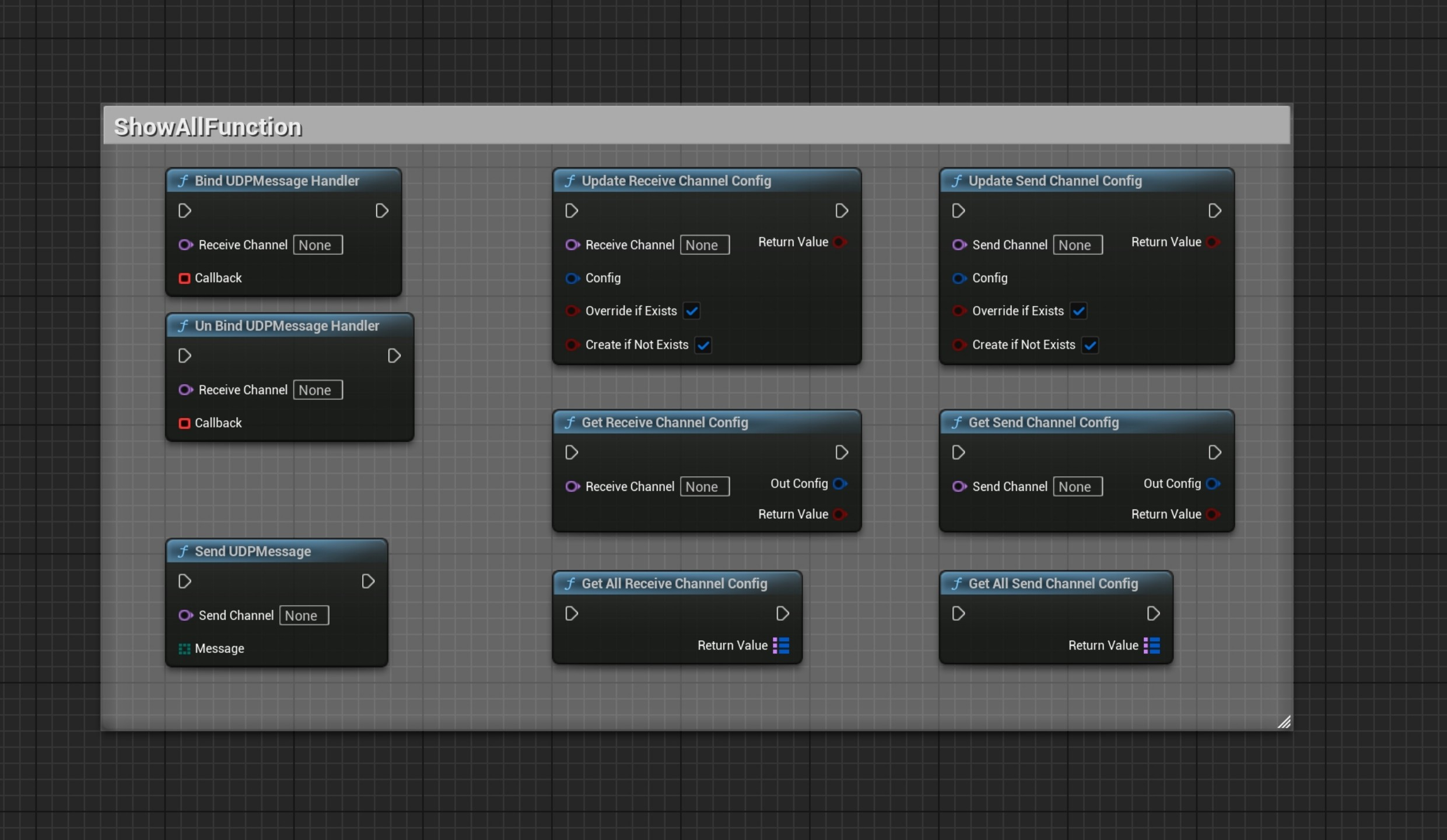
Bind & Unbind Example
Section titled “Bind & Unbind Example”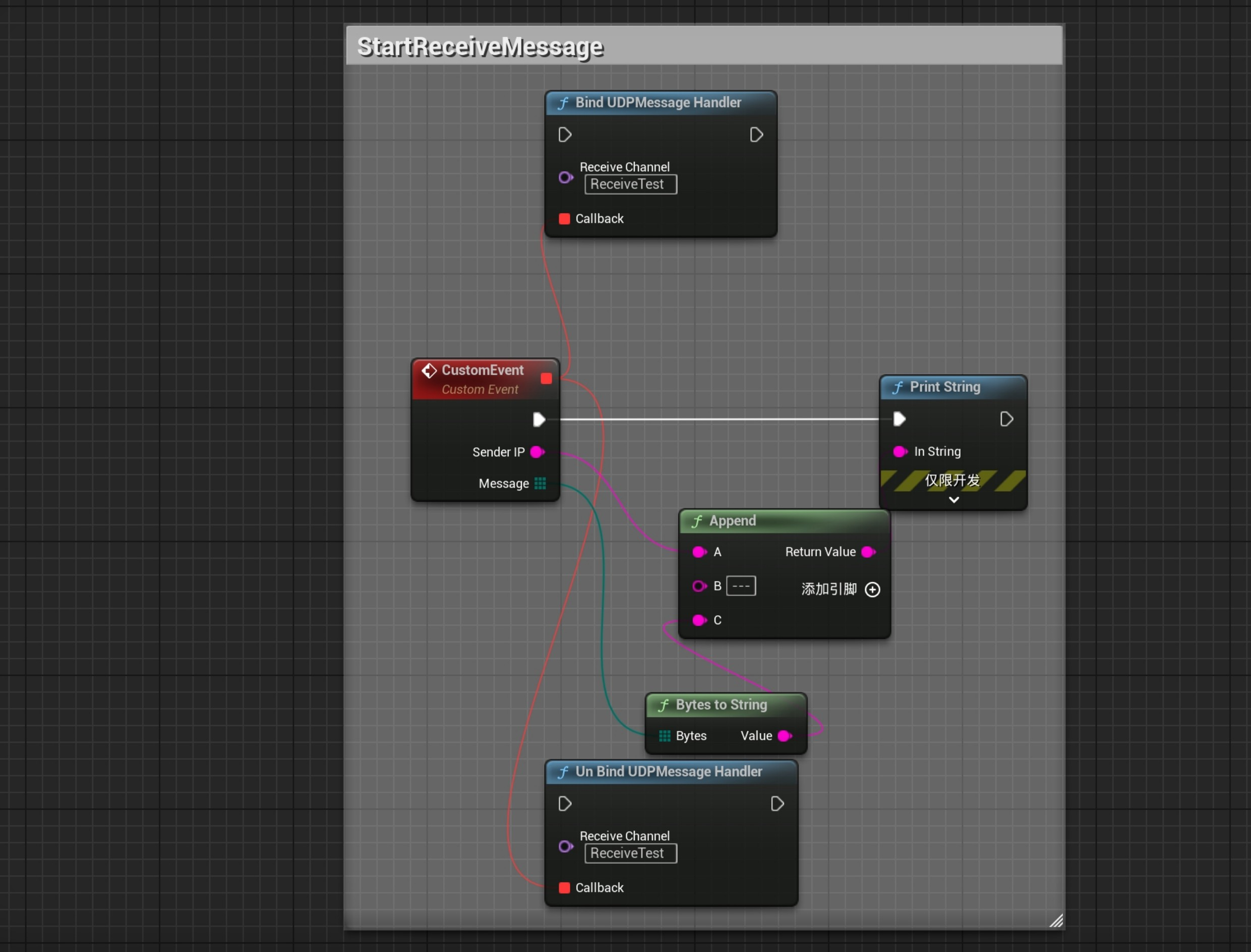
Socket is created automatically after the first bind, and destroyed when no more handlers remain.
Unbind All (Force Close Socket)
Section titled “Unbind All (Force Close Socket)”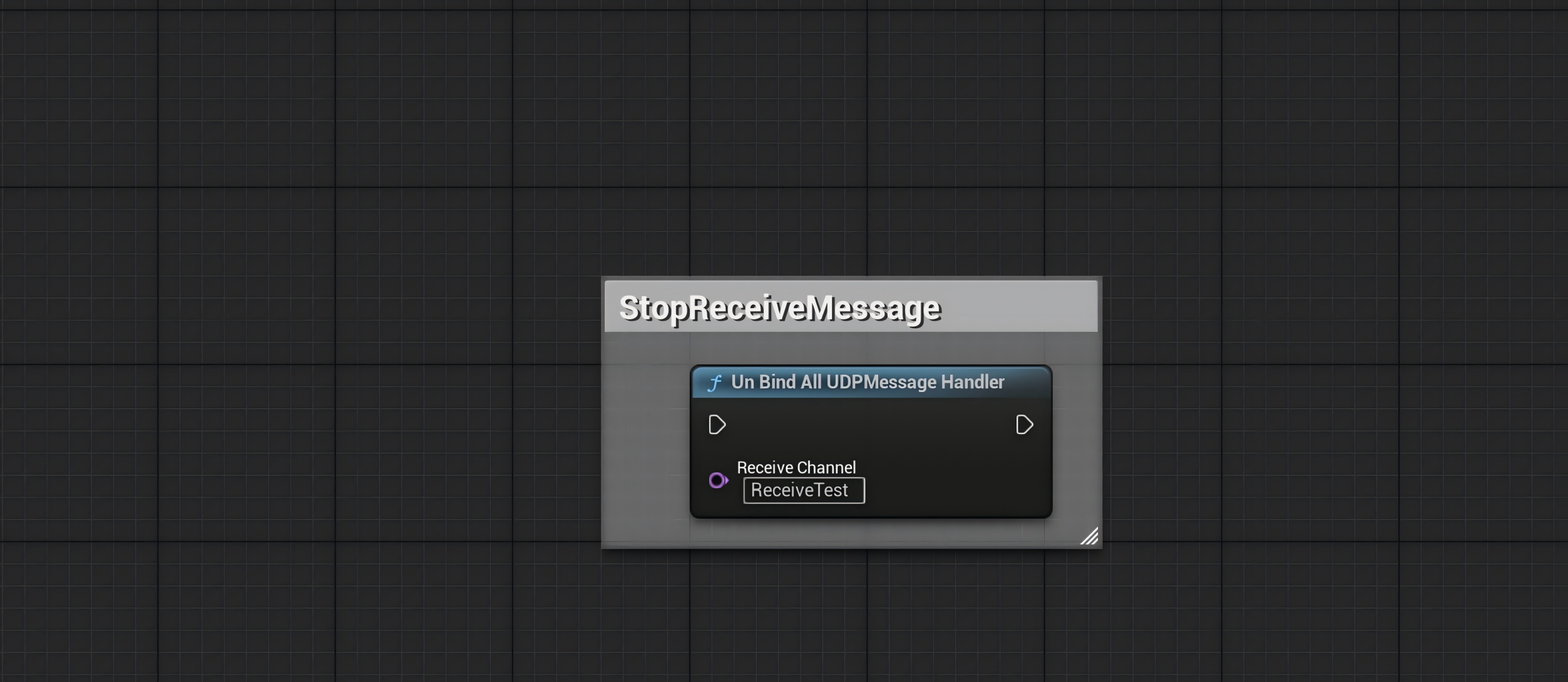
Use this node to unbind everything from a channel and close the socket manually.
Dynamically Update Receive Channel
Section titled “Dynamically Update Receive Channel”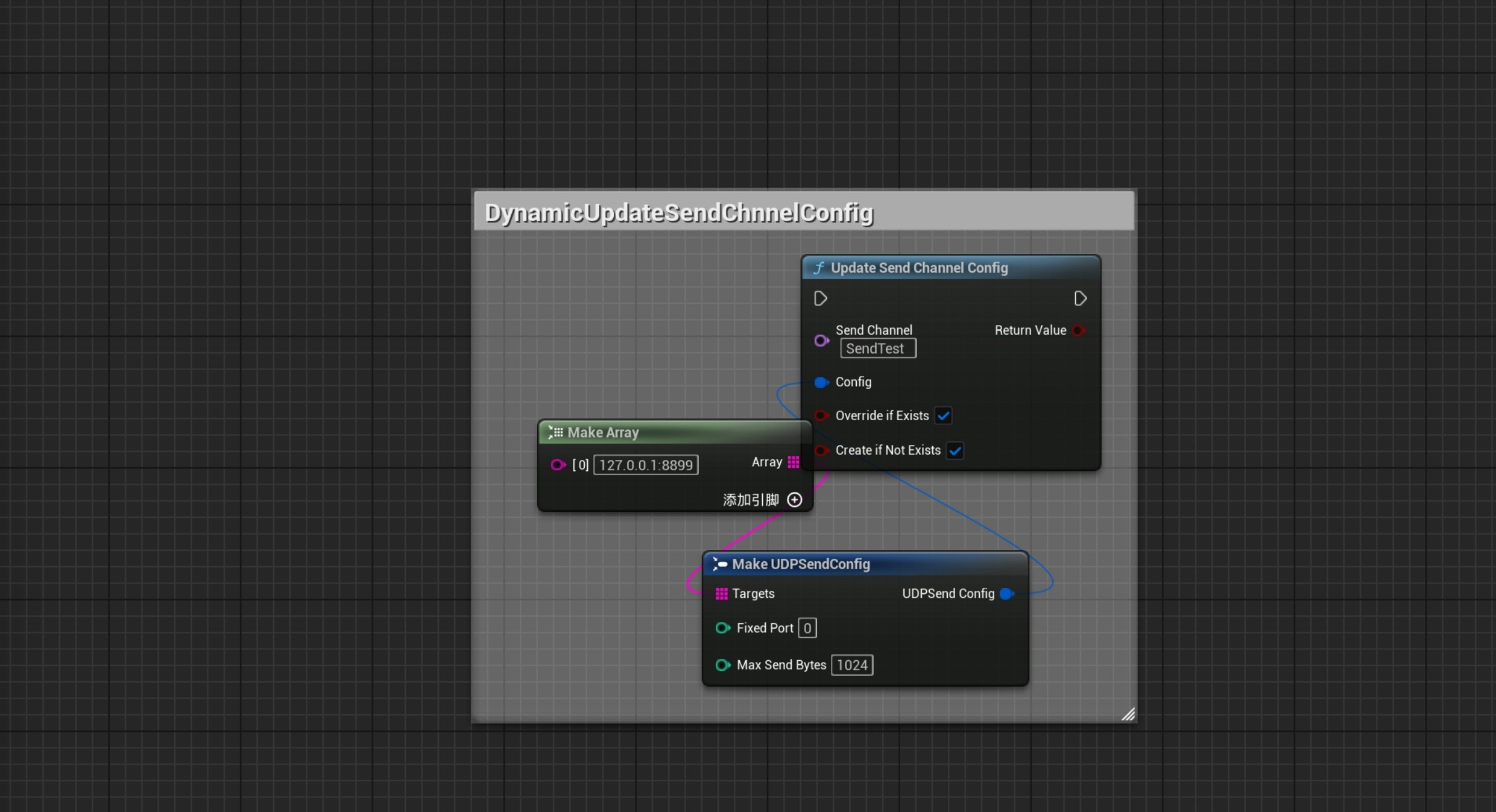
Socket is auto-rebuilt if needed. Function order doesn’t matter.
The two booleans control whether to override existing channels or add new ones.
Dynamically Update Send Channel
Section titled “Dynamically Update Send Channel”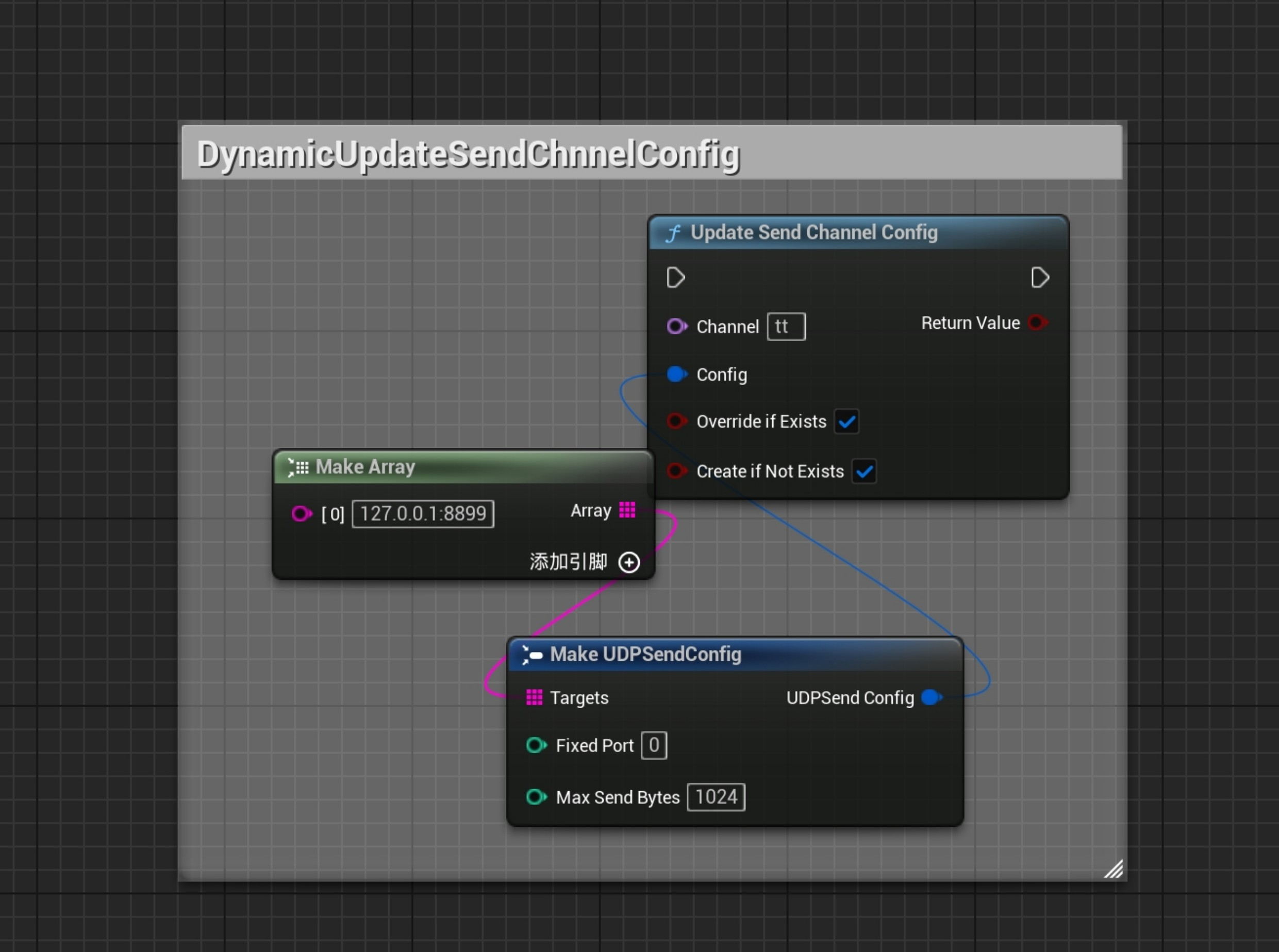
Send sockets only rebuild if FixedPort is different.
The two booleans behave the same as receive config.
Send String Message
Section titled “Send String Message”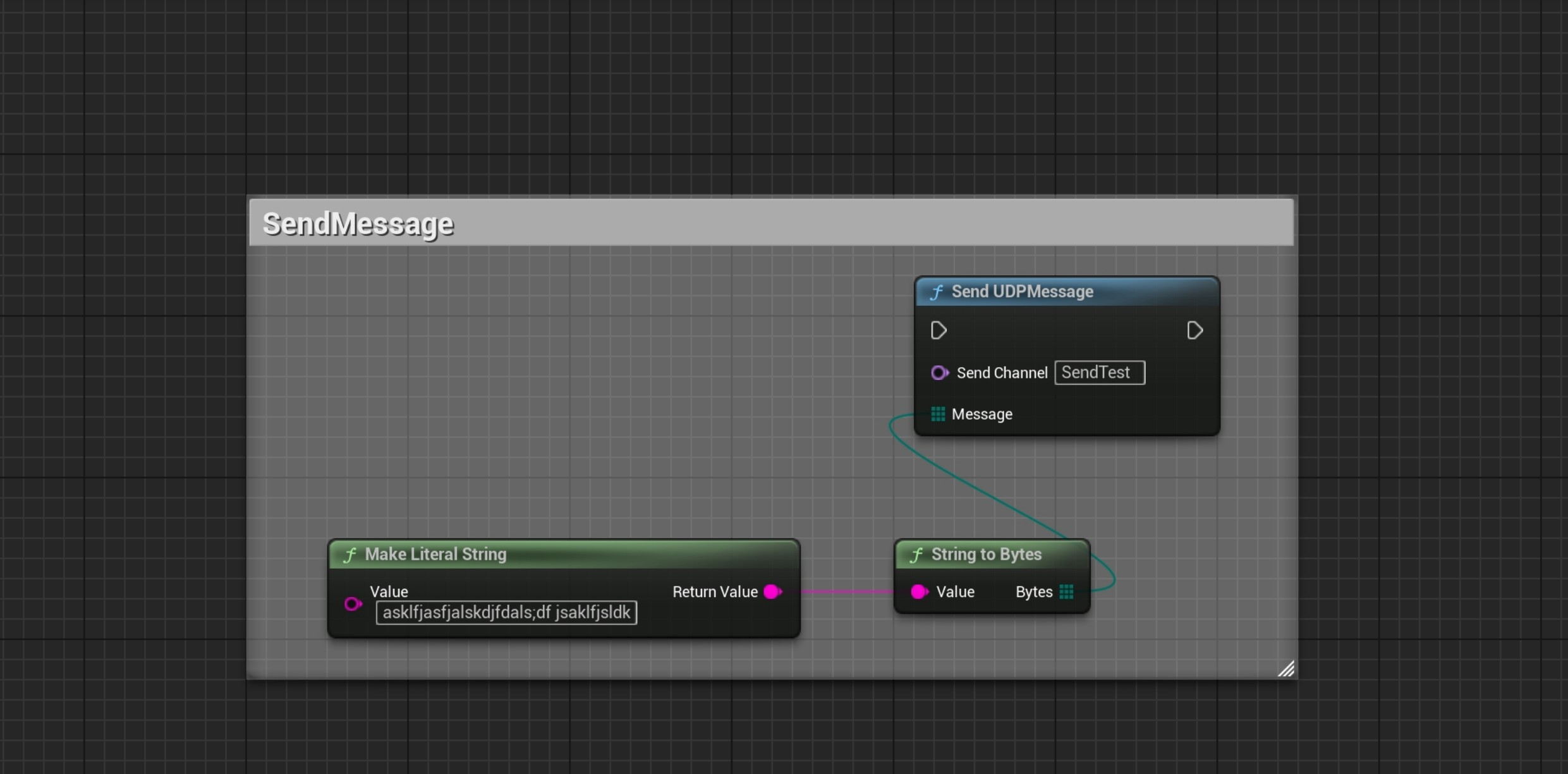
✅ Tips & Notes
Section titled “✅ Tips & Notes”- Only IPv4 is supported (no IPv6 or domain resolution)
- Valid port range:
0~65535, where0means auto-assign - Do not bind the same port in different channels unless the socket is released
- IP filters support CIDR format (e.g.
192.168.1.0/24)
🔧 Recommended Companion
Section titled “🔧 Recommended Companion”Use with SimpleByteConversion plugin to easily serialize/deserialize between data ↔ TArray<uint8>.
Native UDP sockets and use cases
1.1 Use cases
- Collecting sensor data, such as LiDAR, camera, and GPS data
- Connecting simulators such as CarSim and PreScan
- LAN broadcast or multicast
- Real-time control commands
1.2 Basic implementation
Create a UDP socket and bind a port:
#include "Sockets.h"#include "SocketSubsystem.h"
// 获取Socket子系统ISocketSubsystem* SocketSubsystem = ISocketSubsystem::Get(PLATFORM_SOCKETSUBSYSTEM);
// 创建UDP SocketFSocket* RecvSocket = SocketSubsystem->CreateSocket(NAME_DGram, TEXT("UDP Receiver"), false);
// 创建地址并绑定TSharedRef<FInternetAddr> Addr = SocketSubsystem->CreateInternetAddr();Addr->SetPort(8888);Addr->SetAnyAddress();
if (RecvSocket->Bind(*Addr)){    UE_LOG(LogTemp, Log, TEXT("UDP Socket绑定成功,端口: 8888"));}
// 设置非阻塞模式RecvSocket->SetNonBlocking(true);
Receive UDP data:
void ReceiveUDPData(FSocket* RecvSocket){    ISocketSubsystem* SocketSubsystem = ISocketSubsystem::Get(PLATFORM_SOCKETSUBSYSTEM);
    TArray<uint8> RecvData;    RecvData.SetNumUninitialized(65507); // UDP最大包大小
    int32 BytesRead = 0;    TSharedRef<FInternetAddr> SenderAddr = SocketSubsystem->CreateInternetAddr();
    if (RecvSocket->RecvFrom(RecvData.GetData(), RecvData.Num(), BytesRead, *SenderAddr))    {        RecvData.SetNum(BytesRead);
        FString SenderIP = SenderAddr->ToString(false);        int32 SenderPort = SenderAddr->GetPort();
        UE_LOG(LogTemp, Log, TEXT("收到来自 %s:%d 的数据,大小: %d"),            *SenderIP, SenderPort, BytesRead);
        // 处理接收到的数据        ProcessReceivedData(RecvData);    }}
Send UDP data:
void SendUDPData(const FString& TargetIP, int32 TargetPort, const TArray<uint8>& Data){    ISocketSubsystem* SocketSubsystem = ISocketSubsystem::Get(PLATFORM_SOCKETSUBSYSTEM);    FSocket* SendSocket = SocketSubsystem->CreateSocket(NAME_DGram, TEXT("UDP Sender"), false);
    TSharedRef<FInternetAddr> RemoteAddr = SocketSubsystem->CreateInternetAddr();    bool bIsValid;    RemoteAddr->SetIp(*TargetIP, bIsValid);    RemoteAddr->SetPort(TargetPort);
    if (bIsValid)    {        int32 BytesSent = 0;        SendSocket->SendTo(Data.GetData(), Data.Num(), BytesSent, *RemoteAddr);
        UE_LOG(LogTemp, Log, TEXT("发送 %d 字节到 %s:%d"), BytesSent, *TargetIP, TargetPort);    }
    SendSocket->Close();    ISocketSubsystem::Get()->DestroySocket(SendSocket);}
Native examples and plugin channels
These three FSocket examples demonstrate binding, receiving, and sending. They are not SimpleUDP Blueprint APIs. Implement ProcessReceivedData in your project. Check object validity and the return values from creation, binding, data transfer, and closing. The receiver also needs an explicit exit and cleanup path. A nonblocking native socket does not by itself provide a background receive thread.
The example’s 65507 illustrates the usual IPv4 UDP datagram payload limit. It is not a recommended packet size. The usable size also depends on path MTU, fragmentation, and plugin channel buffers. Broadcast and multicast are protocol use cases; listing them does not mean the plugin has configured the routes, socket options, or subscriptions they require. UDP does not guarantee delivery or ordering, so application logic must handle packet loss and message identity.
See the TCP client and network communication guide for protocol choices, threading, and data conversion.
The native communication examples were published on Cnblogs on 2025-10-25.
Version History
Section titled “Version History”Open Edit → Project Settings, select the SimpleUDP settings page, and set Language to English or Chinese. English is the default. Available user-facing UI, tooltips, notifications, and functional logs update immediately without restarting the editor. Public API names and module startup/shutdown logs remain in English.
Support
Section titled “Support”For usage questions or collaboration, please visit the contact page.
- Contact: Contact and collaboration