SimpleWebSocket User Guide
Complete product user guide for SimpleWebSocket
This guide walks you through how to configure and use the SimpleWebSocket plugin to communicate via WebSocket in your Unreal Engine project.
Compatibility
Section titled “Compatibility”- Unreal Engine 5.2–5.8
- Version 1.1.0 (Version 2)
🛠️ Plugin Settings
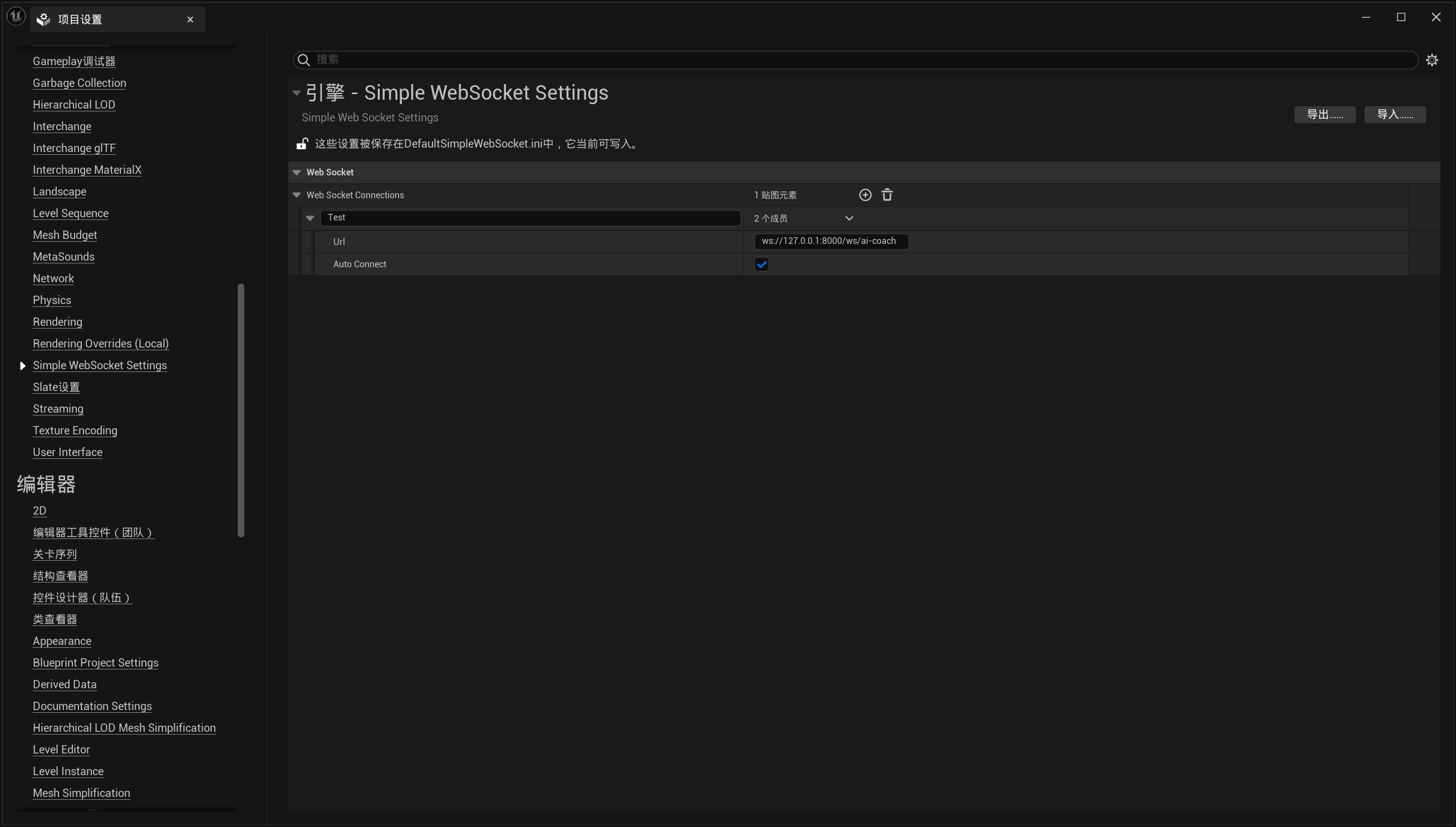
Section titled “🛠️ Plugin Settings”After enabling the plugin, go to the project settings panel under Simple WebSocket Settings.
Steps:
Section titled “Steps:”- Open Unreal Engine Editor
- Go to
Edit > Project Settings - Scroll down and find
Simple WebSocket Settings - Add a new WebSocket connection entry (e.g., named
Test) - Enter the WebSocket address (recommended format:
ws://127.0.0.1:xxxx, do not use localhost) - Enable Auto Connect (optional; if enabled, the connection will be established automatically at runtime)
📷 Example screenshot:
🎮 Blueprint Usage Example
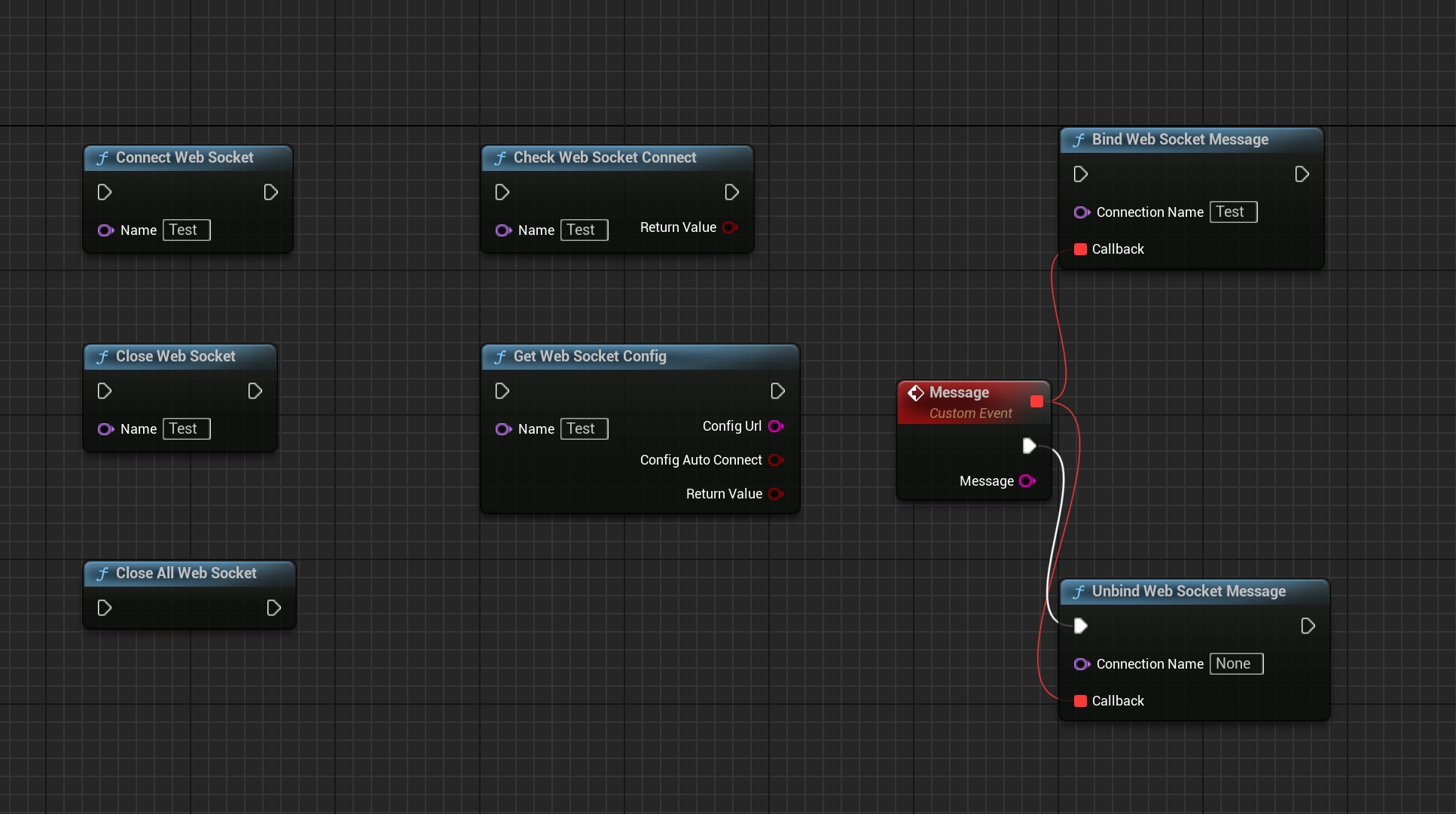
Section titled “🎮 Blueprint Usage Example”You can use GameInstance-level Blueprint functions to connect, send, receive, and close WebSocket connections. All functions are static and can be called from any Blueprint.
Available Nodes:
Section titled “Available Nodes:”Connect Web Socket: Connect to a WebSocket by nameSend WebSocket Message: Send a text messageBind Web Socket Message: Bind a Blueprint event to receive messages (supports multiple callbacks)Close Web Socket: Close a specific connectionClose All Web Socket: Close all connectionsCheck Web Socket Connect: Check if a connection is establishedGet Web Socket Config: Retrieve config for a named connectionUnbind Web Socket Message: Unbind a message event
📷 Example Blueprint graph:
✅ Notes
Section titled “✅ Notes”- The plugin only supports the
ws://protocol. Securewss://is not supported. - Fully tested in packaged builds — works as expected in production.
- Avoid using
localhostin WebSocket URLs. Always use127.0.0.1instead to prevent connection issues. - Each connection name can have multiple bound callbacks, allowing modular event handling.
Native examples with the UE WebSockets module
3.1 Use cases
- Web frontend control panels
- Real-time push messages from cloud services
- Communication with browsers or mobile clients
- A shared protocol across languages and platforms
3.2 UE’s built-in WebSockets module
UE provides the WebSockets module. Add these dependencies to .Build.cs:
PublicDependencyModuleNames.AddRange(new string[] { "Core", "WebSockets", "Http"});3.3 Basic implementation
Connect a WebSocket:
#include "IWebSocket.h"#include "WebSocketsModule.h"
void ConnectWebSocket(const FString& URL){    // 创建WebSocket实例    TSharedPtr<IWebSocket> WebSocket = FWebSocketsModule::Get().CreateWebSocket(URL);
    // 绑定连接成功事件    WebSocket->OnConnected().AddLambda([]()    {        UE_LOG(LogTemp, Log, TEXT("WebSocket连接成功"));    });
    // 绑定消息接收事件    WebSocket->OnMessage().AddLambda([](const FString& Message)    {        UE_LOG(LogTemp, Log, TEXT("收到消息: %s"), *Message);    });
    // 绑定连接关闭事件    WebSocket->OnClosed().AddLambda([](int32 StatusCode, const FString& Reason, bool bWasClean)    {        UE_LOG(LogTemp, Warning, TEXT("WebSocket关闭: %s"), *Reason);    });
    // 发起连接    WebSocket->Connect();}
Send a message:
void SendWebSocketMessage(TSharedPtr<IWebSocket> WebSocket, const FString& Message){ if (WebSocket.IsValid() && WebSocket->IsConnected()) { WebSocket->Send(Message); }}Connection notes:
- Use
127.0.0.1instead oflocalhostwhen troubleshooting name resolution in packaged builds. - The SimpleWebSocket plugin in this guide supports only
ws://. Check the engine, backend, and certificate configuration for native UE WebSockets module support forwss://. - Example connection URL:
ws://127.0.0.1:8080.
Module capabilities and plugin support
These three blocks show .Build.cs dependencies, connection creation, event binding, and text messages. They are not SimpleWebSocket node declarations. The project must retain the native IWebSocket object until the connection ends. The local TSharedPtr does not show where to keep it, and the example does not cover complete connection-error handling, delegate unbinding, or reconnection.
The original technical record described the ws:// limitation as a general limitation of UE’s WebSockets module. That scope was too broad: this guide documents the limitation for SimpleWebSocket, which does not establish that every UE version and underlying backend lacks wss:// support. For a custom native connection, check the engine version, backend, and certificate configuration.
127.0.0.1 is the local loopback address, suitable for a service on the same machine. Use the actual destination address for a service on another host. Avoiding localhost is a troubleshooting recommendation here; it does not mean remote services should use loopback.
See the TCP client and network communication guide for other protocols and shared architecture.
The native communication examples were published on Cnblogs on 2025-10-25.
Version History
Section titled “Version History”Open Edit → Project Settings, select the SimpleWebSocket settings page, and set Language to English or Chinese. English is the default. Available user-facing UI, tooltips, notifications, and functional logs update immediately without restarting the editor. Public API names and module startup/shutdown logs remain in English.
Support
Section titled “Support”For usage questions or collaboration, please visit the contact page.
- Contact: Contact and collaboration