Overview
UEPackageManager is a Windows Unreal Engine project packaging tool. Package projects quickly without opening the UE editor, using a graphical interface or the command line.
It calls Unreal Automation Tool for Build, Cook, Stage, Pak, Archive, and related steps, then deploys additional files into successful packages according to rules. Project detection, isolated configuration, and output cleanup support controlled repeated packaging.
Background and goals
UE delivery often separates packaging commands from additional file preparation. Engines, output directories, build types, and accompanying data may vary by project, and reusing a previous project’s settings can produce incorrect results.
The work consolidates these choices into one workflow. Its GUI serves the current project, while the command line supports automation with an explicitly specified project.
Core capabilities
Project detection and configuration isolation
The tool automatically detects the current UE project and associated engine, and saves packaging options per project to avoid mixing configurations from different projects.
UE packaging and result inspection
The tool organizes project packaging through UAT, supports multiple build types, and provides process logs. Both the GUI and CLI can start packaging; actual build results still come from UAT.
Additional deployment after success
Rules can copy files or folders into the package and filter out content that should not be delivered.
This stage only runs after UE packaging succeeds, preventing extra content from being placed into failed outputs. Targets are restricted to the package root, so rules cannot write to arbitrary external paths.
Old package cleanup controls
Users may choose to clean an old package detected at the current output location before packaging, but actual cleanup still requires confirmation. Changing output paths does not retroactively clean the old location, protecting other directories. Cleanup and additional deployment both operate on the current packaging target.
Use cases
It suits teams repeatedly generating Win64 project packages with accompanying data, configuration, or helper tools.
The GUI helps inspect the current project and options. The CLI can integrate the same workflow into scripts, but parameters, output directories, and logs still require review.
Scope and limitations
Current scope is Win64 project packaging on Windows, using a Launcher engine or a manually specified source engine.
Full Debug builds, standalone plugin packaging, automatic editor closure, and project version control operations are outside the tool’s responsibilities. Projects must still confirm additional file content, licensing, and deployment locations.
Screenshots
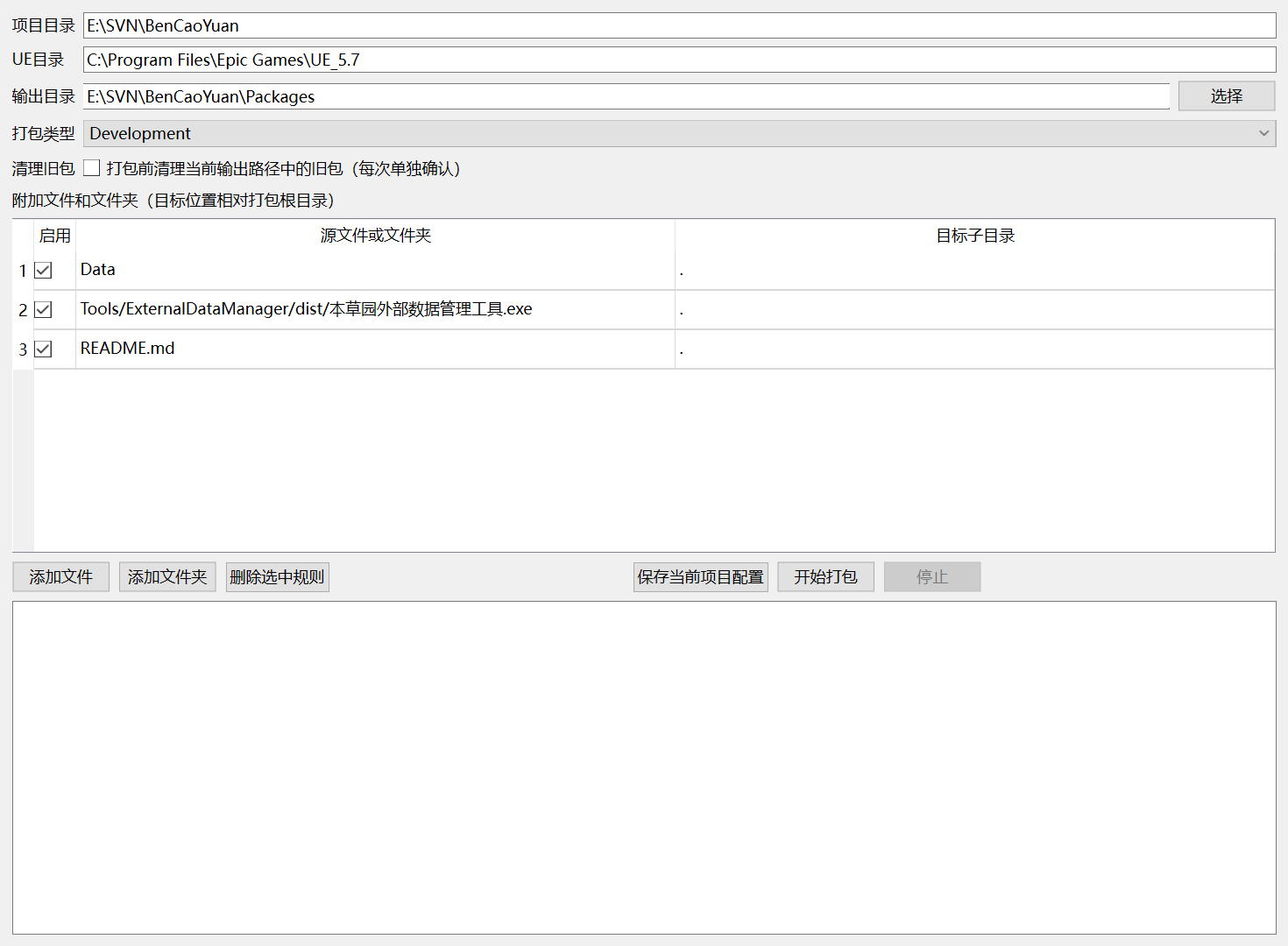
UEPackageManager graphical interface: configuring the project, packaging parameters, and additional file copy rules.
For operation steps and parameter details, see the user guide.